Pre-Litigation Case Management: Where Call Automation Fits
- Pre-litigation case management covers everything between signing a personal injury client and settling or filing suit: onboarding, treatment, records, the demand, negotiation and disbursement.
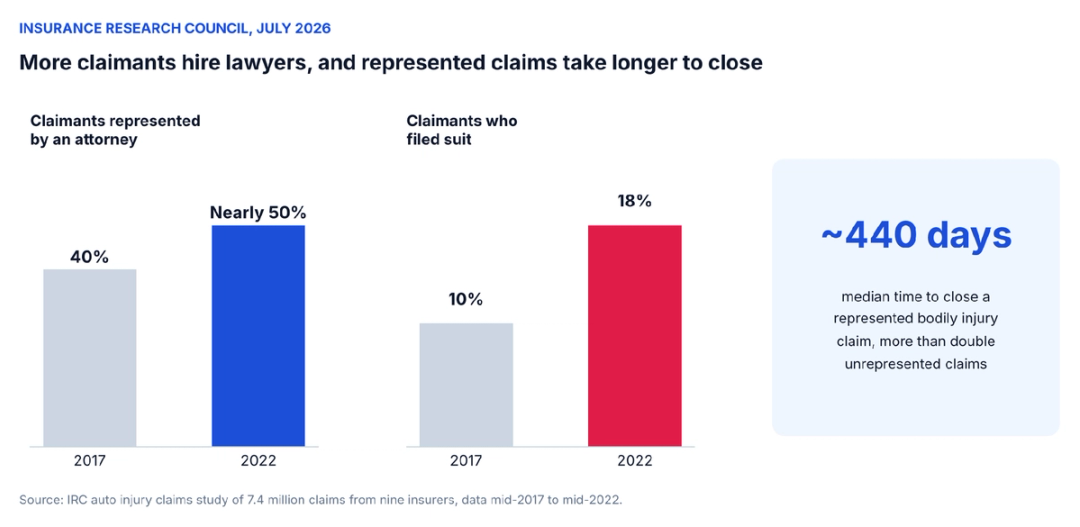
- Represented auto injury claimants waited a median of nearly 440 days for claim closure in an Insurance Research Council study, and every stage of that wait produces phone calls.
- Onboarding calls, treatment check-ins, provider follow-up and routine status questions are the strongest candidates for call automation.
- Settlement offers, case value questions, complaints about the representation and distressed callers should always reach a person.
- Start automation with the stage that produces the most calls at your firm, and measure records turnaround, client contact and case manager time before and after.
The Insurance Research Council's latest auto injury study, released in July 2026, found that claimants represented by attorneys waited a median of nearly 440 days for their bodily injury claims to close. That is more than a year of a case sitting in pre-litigation, and for the client, more than a year of wondering what is happening with it.
Very little of that time is spent in court. The same study found litigation rates rising to 18% of claimants by 2022, which still leaves the large majority of represented claims resolving without a lawsuit, inside the stretch of work law firms call pre-litigation.
The legal work in that stretch is real: building the damages picture, writing the demand and negotiating with an adjuster who would rather pay less. Around it sits a much larger volume of coordination, and the bulk of it happens by phone.
As per our estimate, a typical PI case generates about 150 calls over its life. Clients call to ask about bills, appointments and timing, providers call about records and balances, adjusters call about claims, and the case manager makes dozens of outbound calls to keep everything moving.
Pre-litigation case management is the discipline of keeping all of that on track, and the phone is where it most often slips. Call automation can take a large share of those calls off the case manager's desk, though not all of them, because a call that moves a case forward and a call that only reports on it sound the same when the phone rings.
What pre-litigation case management covers
Pre-litigation is the phase between the signed retainer and either a settlement or the decision to file suit. For a personal injury firm, it is where cases are built and where the majority of them end.
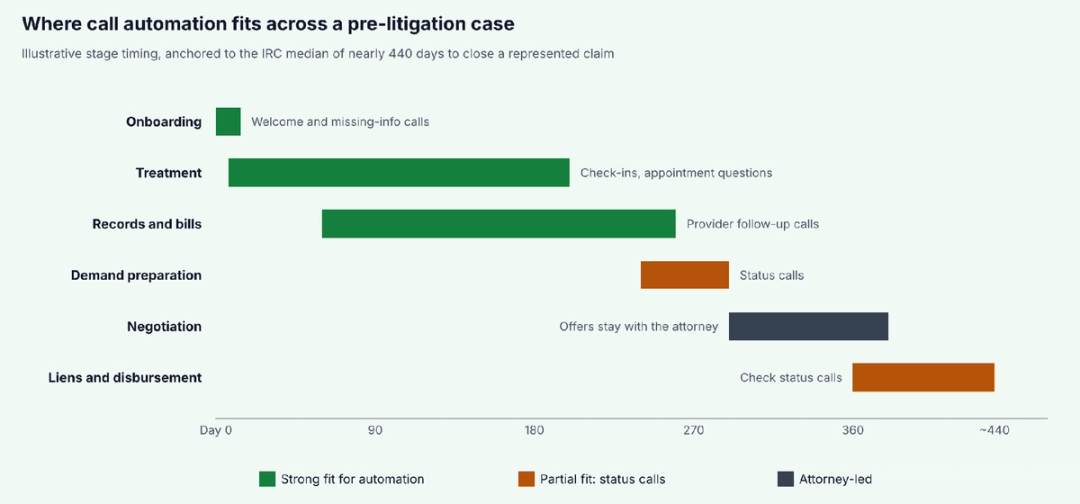
Case managers carry most of the day-to-day work, with attorneys stepping in for strategy, the demand and negotiations. The stages overlap in practice, but each has its own goals and its own mix of calls.
| Pre-litigation stage | What the team is working on | Calls that pile up |
|---|---|---|
| Onboarding | Opening the file, collecting insurance, crash and provider details, sending notices | Welcome calls, missing-information calls, client questions about next steps |
| Treatment | Tracking care and keeping the client engaged until treatment ends | Client check-ins, appointment questions, calls about bills and collections |
| Records and bills | Requesting and chasing medical records and itemized bills | Provider follow-up calls, client questions about missing records |
| Demand preparation | Building the damages summary and drafting the demand | Client status calls asking when the demand will go out |
| Negotiation | Responding to offers and counteroffers with the adjuster | Adjuster calls, offer discussions with the client |
| Liens and disbursement | Resolving liens, finalizing the settlement statement and paying out | Lienholder calls, client calls about the check |
The calls behind each stage of pre-litigation
Each stage produces a different call pattern, and the right role for automation shifts with it.
Onboarding sets the pace for the whole case
The first days after signing decide how quickly a case starts moving. The firm needs the client's insurance information, the other driver's carrier, the police report number, photos, provider names and dates, and it needs them before evidence and memories fade.
This information arrives by phone, in pieces. A client remembers the urgent care name on Tuesday and finds the claim number on Thursday, and each piece becomes a call someone has to take or make.
Speed in this stage pays off later. Insurance notices sent in the first week, a police report requested before it is hard to find and a complete provider list from day one all shorten the records stage that follows, which is why onboarding deserves more attention than its short length suggests.
These calls are structured and repetitive, which makes them good candidates for automation. An agent can welcome the client, collect the missing items against a checklist, explain what happens next and write each answer to the case file.
Treatment is the longest stage and the loneliest for clients
Treatment can last months. The client is attending physical therapy, seeing specialists, receiving bills and sometimes getting collection notices, while from their point of view nothing seems to be happening with the case.
Regular contact matters here for two reasons. Clients who hear from the firm are less likely to call anxiously, and a check-in can catch problems early, such as a missed appointment, a new provider the firm doesn't know about or a bill sent to collections.
Missed appointments matter beyond the client's health. Adjusters frequently point to gaps in treatment to argue that an injury was minor or resolved, so a check-in that catches a skipped therapy session early can protect the value of the claim.
Scheduled check-in calls are a natural fit for automation. Our piece on automating outbound calls explains why outbound contact is where firms recover the most time, since those calls are the first to slip when a case manager is busy.
Records and bills decide when the demand can go out
A demand can't go out until the records and bills are in, and collecting them is a long run of follow-up calls to provider offices, records departments and outside copy vendors.
Timelines vary by request type. When a patient requests their own records under the HIPAA right of access, 45 C.F.R. 164.524 generally gives the provider 30 days to act, with one possible extension, and requests that sit unchased can drift well past that. Copy fees, vendor backlogs and requests sent to the wrong department add further delays that only steady follow-up uncovers.
Provider follow-up is one of the most automatable call types in pre-litigation, because the calls follow a pattern: confirm the request was received, ask about status, note the expected date and call back. Our comparison of AI systems for medical provider calls covers how those calls work in practice.
Demand preparation is quiet work with noisy phones
Drafting the demand is focused attorney and paralegal work, and it is when clients call most often to ask when it will be done. Answering those calls from the case file, with an honest status and a realistic timeframe, protects the drafting time without leaving clients in the dark. Clients also have information to add at this stage, such as lost wages, a new out-of-pocket expense or a change in how the injury affects daily life, and a quick check-in call before the demand goes out can capture details that raise its value.
Negotiation belongs to the attorney
Once a demand is out, the adjuster's response starts a negotiation that only the attorney should conduct. Offers, counteroffers and the strategy behind them are legal work, and the decision to accept belongs to the client.
The ethics rules are specific on this point. Comment 2 to Model Rule 1.4 says a lawyer who receives an offer of settlement must promptly inform the client of its substance, and Model Rule 1.2(a) reserves the decision whether to settle for the client.
Automation still has a role at the edges. It can take an adjuster's call, capture the claim details and route it to the assigned attorney, and it can answer a client's "has there been an offer?" call by connecting them to the attorney or scheduling a callback, without discussing the offer itself.
Liens and disbursement test the client's patience
After a settlement, the client wants to know when the money arrives, and the answer depends on liens. Health insurers, hospitals and government programs may all claim part of the recovery, and the Centers for Medicare and Medicaid Services says conditional payments Medicare made must be repaid when a beneficiary receives a settlement.
The firm's duties continue through this stage. Minnesota's Rule 1.15(c), which tracks the Model Rule, requires a lawyer to promptly notify the client when funds arrive and promptly deliver the funds the client is entitled to receive.
Status calls spike here, and nearly all of them ask the same question. An agent that can give an accurate, approved status from the case file, such as "we are waiting on the final lien amount from the hospital," saves the case manager a dozen identical calls a week.
When pre-litigation ends in a lawsuit
Some cases don't settle. The deadline that governs this decision is the statute of limitations, which varies by state and claim type; California, for example, gives most personal injury plaintiffs two years under Code of Civil Procedure section 335.1.
When the adjuster won't move or that deadline is approaching, the attorney files suit and the case moves to litigation, where court deadlines, discovery and depositions change the call pattern again. Calls about court dates and depositions need careful human handling, though routine scheduling confirmations can still be automated. Tracking the limitations date for every pre-litigation file, and flagging cases that are getting close, is one of the most important safeguards a case management system provides.
Calls that should never be automated
Call automation works in pre-litigation case management because the bulk of the calls are routine. A few categories are not, and these should always reach a person, whatever the time of day:
- Settlement offers and case value: Any discussion of what a case is worth or whether to accept an offer belongs to the attorney and the client.
- Complaints about the representation: A client who is unhappy with the firm or wants to change lawyers needs a person who can listen and respond.
- Distressed callers: A client in crisis, facing eviction or describing a medical emergency needs a human voice, and in an emergency, an immediate instruction to call 911.
- New injuries or major treatment changes: A new surgery, a new diagnosis or a second accident can change the case and should reach the case manager the same day.
- Questions requiring legal advice: Anything that calls for interpreting the law or the client's options goes to an attorney.
These rules should be written down before automation goes live, with clear triggers for a warm transfer or a same-day callback. An agent that recognizes these situations and hands them off cleanly is doing its job, and one that tries to handle them is a risk.
How call automation changes a case manager's week
The payoff from automating calls in pre-litigation case management shows up in how case managers spend their time. As per our estimate, case managers spend 50+ hours a week on routine calls, and a case manager with 100 cases fields about 15,000 calls a year.
Take away the onboarding follow-ups, treatment check-ins, provider chases and routine status calls, and a large share of that volume goes with them. What remains are the calls that need judgment: the client with a new complication, the provider disputing a bill, the adjuster with a question that touches strategy.
The time that comes back goes into the work that moves cases toward settlement, such as reviewing records, organizing damages and preparing demands. Our guide to reducing case manager workload covers the other changes that help, from caseload limits to better templates.
Clients notice the difference too. A client who gets a check-in every few weeks and a clear answer when they call is less likely to feel forgotten during a 440-day wait, which our guide to improving client communication treats as the biggest driver of client satisfaction.
Keeping control when calls are automated
Automation in pre-litigation case management only works if the firm stays in charge of what the agent says. That starts with deciding which case data the agent can read and which status messages it may share, so a client hears "your records request to the orthopedic clinic is pending" and never a guess about their settlement.
Every call should end as a note in the case file. When the case manager opens the file, they should see what the client asked, what the agent said and anything that needs follow-up, without listening to a recording.
Review matters most in the first month. Read a sample of calls from each stage every week, check the transfers and callbacks, and adjust the rules where the agent's handling doesn't match what an experienced case manager would have done.
Tone deserves the same review as accuracy. Clients in pre-litigation are often months into a stressful process, and an agent that sounds rushed or scripted can undo the reassurance a status update was meant to give, so listen for how calls sound as well as what they say.
See HelloCounsel handle pre-litigation calls
We'll show you HelloCounsel collecting onboarding details from a new client, following up with a provider on a records request and answering a client's status question from your case file. Book a pre-litigation call demo
What the agent needs from your case management system
An agent can only answer a pre-litigation call well if it can see the case. Before launch, decide which fields it may read and keep those fields current, because an accurate answer depends on accurate data. At a minimum, the agent needs:
- The case stage and the assigned case manager and attorney
- The date and summary of the last client contact
- Open records requests, with provider names and dates requested
- Upcoming appointments and deadlines the client is allowed to know about
- Approved status messages for each stage, written by the firm
With those fields in place, the agent can tell a client that their records request to the imaging center went out on a specific date and is being followed up, rather than offering a vague "it's in progress." It can also route calls to the right person, since it knows who owns each case instead of guessing from a ring group.
The same fields make pre-litigation case management easier to supervise. A manager can see which cases haven't had client contact in 30 days, which records requests are overdue and which stages are generating the most calls, and adjust staffing before cases stall.
Stale data is the main risk. If a records request was received last week but the file still shows it as pending, the agent will tell the client the wrong thing, so the firm needs a habit of updating key fields as work happens, or an integration that updates them automatically.
How HelloCounsel supports pre-litigation case management
HelloCounsel builds AI voice agents for plaintiff personal injury firms, with products that map to the stages of pre-litigation rather than a single generic phone line.
New cases start with Case Opening, which handles the welcome call and collects what a new file needs.
| HelloCounsel product | Stage it supports | What it handles |
|---|---|---|
| Case Opening | Onboarding | Welcome calls and collection of the details a new file needs, with 24 hours to get every case moving |
| Client Communication | Treatment through disbursement | Scheduled check-in calls, with 2x more frequent check-ins at firms using HelloCounsel |
| Medical Records | Records and bills | Provider follow-up calls on records requests, with 15 days cut from records turnaround |
| Receptionist | Every stage | Inbound calls answered in under two rings, callers matched to the case file and status questions answered from case data |
Across every stage of pre-litigation case management, the same rules apply when a call needs a person: the AI receptionist checks live availability and makes a warm transfer or schedules a callback, and every call is written to the case file as a note in systems such as Filevine, Litify, SmartAdvocate, CASEpeer and MyCase. Calls are handled in English and Spanish, including callers who switch languages mid-call.
Across 30,000+ calls, firms using HelloCounsel have seen a 48% improvement in call reception. Pricing is custom, based on call and case volume rather than seats, so you pay for tasks completed, and most firms go live in under two weeks.
Start with the stage that makes the most noise
Every firm's pre-litigation calls cluster differently. A high-volume auto practice may drown in onboarding calls, while a firm with complex injuries may lose the most time chasing records, and a firm that recently settled a batch of cases may be buried in disbursement status calls.
Count before choosing. For one month, have case managers tally calls by stage and type, then pick the stage with the most routine volume as the first place to automate, and measure records turnaround, days between client contacts and case manager hours on the phone before and after.
Starting with one stage keeps the rollout manageable and makes the results easy to see. Once that stage runs smoothly, the next one is a smaller step, and pre-litigation case management becomes less about keeping up with the phone and more about moving cases toward settlement.
Choose your first pre-litigation stage to automate with HelloCounsel's founders Talk with HelloCounsel's founders about where your case managers spend their phone time and which pre-litigation stage would benefit most from automation first. Book a call with HelloCounsel's founders about pre-litigation calls
Frequently asked questions
1. What is pre-litigation case management?
It is the work of moving a personal injury case from the signed retainer to a settlement or a decision to file suit, including onboarding, tracking treatment, collecting records and bills, preparing the demand, negotiating with the insurer and resolving liens.
2. How long does the pre-litigation phase take?
It varies with treatment length and case complexity. An Insurance Research Council study found represented auto injury claimants waited a median of nearly 440 days for bodily injury claims to close, so many cases spend more than a year in pre-litigation.
3. Which pre-litigation calls can be automated?
Onboarding follow-ups, scheduled client check-ins, provider calls about records requests, routine status questions and appointment confirmations are strong candidates. Each needs approved wording, a note written to the case file and a clear path to a person when the call changes.
4. Which calls should stay with attorneys or case managers?
Settlement offers, questions about case value, complaints about the representation, distressed callers, new injuries and anything requiring legal advice should reach a person. Write these triggers down before launch so the agent knows when to transfer or schedule a callback.
5. Does call automation replace case managers?
It takes the routine call volume off their desks so they can focus on records review, damages and demands. Judgment calls, sensitive conversations and client relationships stay with the case manager, who gets more time for the work that moves cases forward.
6. Where should a firm start with pre-litigation call automation?
Tally calls by stage and type for a month, then automate the stage with the most routine volume first. Measure records turnaround, days between client contacts and case manager phone hours before and after to confirm the change is working.
Share this article