Contact Center as a Service for Law Firms and Who Owns What After You Sign
- Contact center as a service for law firms is a subscription to a vendor-run phone platform covering routing, menus, recording, reporting, and integrations, usually billed per user each month.
- The vendor runs the platform, its uptime, carrier connections, and infrastructure security, while your firm still owns the routing rules, user access, recording settings, integrations, and the duty to protect client information.
- CCaaS delivers calls to the people answering but doesn't answer them, so staffing, case context, and after-call notes remain the firm's job unless AI voice agents take part of that work.
- Before signing, check the term and auto-renewal, minimum seat commitments, renewal price increases, the uptime commitment and service credits, and how call data is exported when you leave.
- Write an ownership map listing who runs each layer, from platform to routing to answering, before you sign, so gaps show up in the contract review rather than after go-live.
Contact center as a service, usually shortened to CCaaS, is a name that describes a billing arrangement as much as a product. The vendor runs the software and servers, and the firm pays a monthly fee for each person who uses them, much like the case management system or the document platform it already rents.
The phrase "as a service" can suggest that the vendor takes the contact center off the firm's hands. It takes the platform off the firm's hands, which is a narrower thing. The routing rules, the phone menu clients hear, the recording notice, the people who pick up and the note that should land in the case file afterward all stay with the firm.
That gap matters more at a plaintiff firm than at most businesses that buy CCaaS. The calls carry medical details and accident facts; the context needed to answer them sits in the case management system rather than in the phone platform, and a large share of them come from existing clients, providers, and adjusters who need a specific person rather than the next available one.
None of this makes CCaaS a poor choice, and for firms with several offices or remote staff it is often the practical one. It does mean that evaluating a contact center as a service for law firms comes down to ownership: what the vendor runs, what the firm keeps, and what the people or agents answering the calls take on. The place to start is the subscription itself, since its contents decide which of those jobs exist.
What a CCaaS subscription actually includes
CCaaS platforms bundle several tools that used to be separate products. A firm may use only some of them at first, and the license tier decides which are included and which cost extra.
| Component | What it does | How a law firm uses it |
|---|---|---|
| Routing (ACD) | Distributes calls to available users by rules | Sends calls to intake, reception or a case manager's group |
| Phone menu (IVR) | Let callers choose an option or say why they're calling | Separates new callers from existing clients and providers |
| Recording and transcription | Captures calls and turns them into text | Keeps a record of intake calls and client conversations |
| Reporting and analytics | Shows volumes, wait times and missed calls | Finds the hours and caller types that go unanswered |
| Workforce management | Forecasts volume and schedules staff | Plans intake coverage around marketing campaigns |
| Quality management | Scores calls against a checklist | Reviews how intake staff handle new callers |
| Text and chat | Adds channels beyond voice | Lets clients text the firm and staff reply from one desk |
| Integrations | Connects to other systems through prebuilt links or APIs | Pops the caller's matter and logs calls to the case management system |
CCaaS vendors commonly sell these components in tiers, with routing, menus and basic reporting in the entry license and workforce management, quality scoring and AI features in higher tiers or as add-ons. A demo usually shows the top tier, so ask which features on screen your quoted license actually includes.
Every one of those components needs someone to configure it, watch it and fix it when it misbehaves. The subscription rarely says who, which is why the next question is how responsibility actually splits.
How responsibility splits in a CCaaS model
The standard definition of software as a service comes from the National Institute of Standards and Technology. Under NIST's cloud computing definition, the customer uses the provider's applications running on cloud infrastructure, doesn't manage or control that infrastructure, and may configure limited application settings.
Applied to a law firm's phones, that gives three owners. The vendor owns the platform, the firm owns the configuration and the obligations that come with client information, and the people answering own the calls themselves.
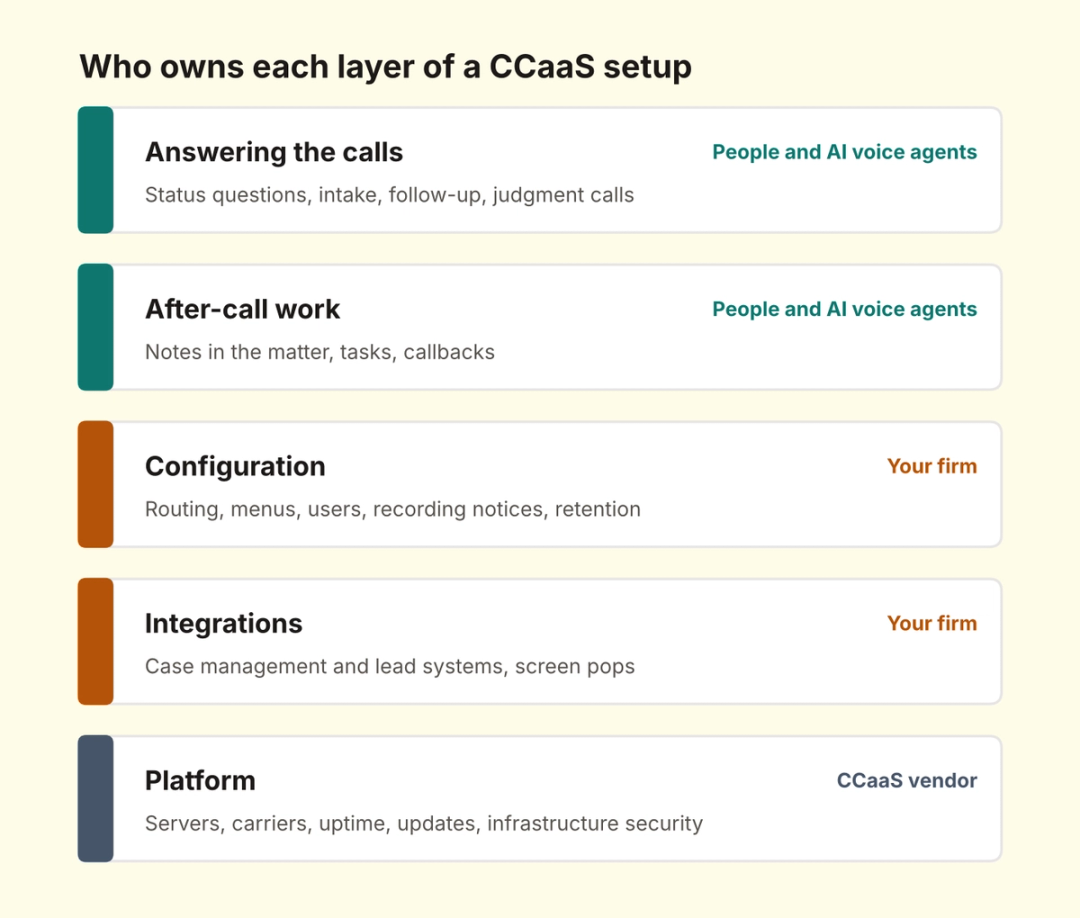
A fourth owner is increasingly common: AI voice agents that answer some of the calls the platform delivers. They sit beside the people answering rather than replacing a layer, and they change how much of the firm's share depends on headcount.
The layers stack in that order, and a problem at any one shows up to the caller as the same thing: a call that wasn't answered well. Starting from the bottom of the stack, the vendor's share is the most clearly defined.
What the CCaaS vendor owns
The vendor keeps the platform running. That covers the servers and data centers, the connections to phone carriers, software updates, and the security of the infrastructure that stores your recordings and call logs.
The vendor's commitments live in the contract and its service level agreement. Read the uptime commitment, how the vendor measures it, how it reports outages, and what service credits apply when it misses, since an outage on a Monday morning costs a plaintiff firm new leads that won't call back.
Data location belongs on the vendor's side of the map as well. Ask which country and data centers hold recordings, transcripts, and backups, and how long each is kept by default, since those answers feed directly into the firm's own confidentiality review.
Support is part of the vendor's share too. Ask what hours support runs, how quickly a severe outage gets a response, and whether setup is done by the vendor or handed to an implementation partner, since that answer decides who you call when a routing change goes wrong.
Vendors also supply the features that regulations require, such as direct 911 dialing and location handling for remote users, though turning them on and keeping addresses current usually falls to the firm. Everything above the platform belongs to the firm, and that list is longer than the word service suggests.
What your firm still owns
The configuration is yours, and at a plaintiff firm it carries most of the day-to-day weight:
- Routing and menus: Which group each call type reaches, and what callers hear before anyone picks up.
- Users and access: Who has a license, who can listen to recordings, and how departing staff lose access on their last day.
- Recording settings: The recording notice, which calls are recorded and how long recordings are kept.
- Integrations: The connections to your case management and lead systems, and whether call details reach the matter.
- Vendor oversight: Reviewing the vendor's security evidence and contract terms before signing and at renewal.
The confidentiality duty doesn't transfer with the subscription. The ABA's Formal Opinion 477R on securing client communications asks lawyers to make reasonable efforts to prevent unauthorized access and to take steps to ensure that outside vendors' conduct fits the lawyer's professional obligations, with stronger protection for more sensitive information.
Day-to-day ownership needs a name as well. Routing rules drift as staff join and leave, and contact center as a service for law firms works best when one person at the firm, often an operations manager, owns the routing, the user list, and the recording settings rather than leaving changes to whoever has the admin password. The same person should read the platform's reports each month, starting with missed calls by hour and by line, since those numbers show where the configuration or the staffing has fallen behind.
Integration work deserves particular attention, because it decides whether CCaaS saves time after each call. CMS write-back turns a call into a note in the right matter, and without it every call ends with someone typing a summary. The largest item the firm owns isn't on the configuration list at all: the people who answer.
What the people answering still own
A CCaaS platform delivers each call to a person. It can ring the right group, show the caller ID and queue the call when everyone is busy, though the answer, the judgment, and the follow-up all depend on who picks up.
At a plaintiff firm, much of that work is routine. As per our estimate, PI case managers spend 50 or more hours a week on calls such as status updates, balance questions, and record confirmations, and the platform routes those calls efficiently without making any of them shorter.
Each call also starts with a lookup. Unless the platform pops the caller's matter on screen, the person answering searches the case management system while the caller waits, and the answer depends on how current the file is and how quickly they find it.
Coverage follows headcount too. Because CCaaS is licensed per user, more coverage means more seats and more people in them, and the busiest hours and the hours after close are where that model runs out. Our breakdown of AI receptionist pricing compares what covering those hours costs under different models, which is where AI voice agents enter the ownership map.
After-hours calls are usually the first test, since after-hours intake for PI firms decides whether a new caller at 9 p.m. reaches anyone at all.
See an AI agent take calls on your phone platform
Watch HelloCounsel answer a status call on a firm's existing phone system, read the answer from the case file, and write the note back to the matter. Book a phone platform demo
Where AI voice agents take part of the firm's share
An AI voice agent connects to the same phone platform as a remote user and answers calls itself. For routine calls, it takes over the part of the firm's share that staffing used to cover: picking up, identifying the caller, answering from the case file, and writing the result back.
Contact center as a service for law firms and AI voice agents divide the work cleanly. The CCaaS platform keeps the numbers, routing, and reporting; the agent takes status calls, after-hours intake, and outbound follow-up, and staff take the calls that need judgment, which the agent passes on by warm transfer or a scheduled callback.
In practice, a firm might give the agent every after-hours call, existing-client status questions during the day, and all provider follow-up, while intake specialists keep daytime new callers and case managers keep anything the agent flags. Our guide to evaluating an AI voice agent covers how to test that split before committing to it.
Supervision stays with the firm. The ABA's Formal Opinion 512 on generative AI places responsibility with the lawyers who use and supervise AI tools, so a supervising attorney should approve what the agent may say and review a sample of its calls. The ownership map is nearly complete, though the riskiest points sit where one owner's layer meets another's.
Where the hand-offs between owners break
Most problems in a CCaaS setup happen at the boundaries. When the vendor has an outage, the platform's failover only works if the firm configured backup routing to mobile apps or another office before it was needed.
When a case manager leaves, calls routed to her extension keep ringing an empty seat until someone at the firm updates the rules, and clients assume the firm has stopped answering. When the case management system changes a field or a login, the integration can stop writing notes without any visible error, and the gap only shows up when someone opens a file and finds no record of last week's calls.
Recording notices sit on a boundary too. The vendor supplies the recording feature, but the firm decides what callers hear, and since federal law allows one-party consent while states such as California require all parties to consent, the notice should be written for the strictest state the firm's callers are in.
The after-hours boundary is the widest. Contact center as a service for law firms will route a 10 p.m. call wherever the firm tells it to, so if no person or agent owns that hour, the platform delivers the call to voicemail exactly as configured. Writing each of these boundaries into the contract and the firm's own procedures is what the next step is for.
What to check in a CCaaS contract
CCaaS contracts are usually multi-year, and the terms that matter most only bite at renewal or exit. Review them with the same care as the feature list.
| Contract term | Why it matters at a law firm | What to ask |
|---|---|---|
| Term and auto-renewal | Decides how long you're committed and when you can leave | What is the notice window before automatic renewal? |
| Minimum seat commitment | Locks in a seat count even if staffing changes | Can seats be reduced mid-term, and at what cost? |
| Renewal price increases | Raises the per-seat price each renewal | Is there a cap on increases, written into the contract? |
| Uptime commitment and credits | Defines what an outage costs the vendor | How is uptime measured, and how are credits claimed? |
| Data ownership and export | Decides whether the firm keeps recordings and call logs after leaving | In what format and how quickly is data returned on exit? |
| Add-on pricing | AI features, storage and extra numbers can cost extra | Which features in the demo are outside our tier? |
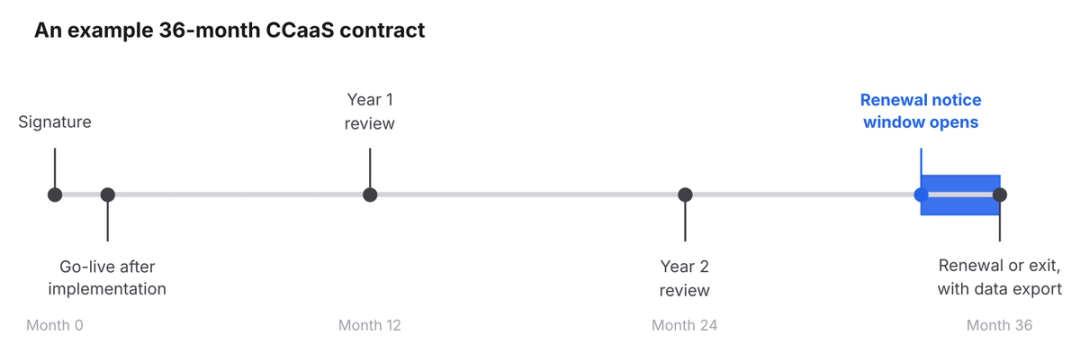
The renewal notice window is the term most often missed. A contract that renews automatically unless the firm gives notice a set number of days before the end date, for example 60 or 90 can extend a disappointing platform for another full term, so the notice date belongs on the firm's calendar from the start.
Exit terms deserve the same attention as the start date. Ask how the vendor supports porting your numbers to a new provider, how recordings and call logs are handed back, and whether any fees apply to that transition, since a firm's numbers and call history are worth more than any single feature. Once the contract covers the platform, what remains is the calls it delivers that nobody on staff is free to take.
How HelloCounsel's agents work alongside a CCaaS platform
HelloCounsel builds AI voice agents for plaintiff personal injury firms, and the agents connect to phone systems including RingCentral and Zoom. The firm keeps its platform, numbers, and routing, and HelloCounsel takes the calls in the firm's share that don't need a person.
On the main line, HelloCounsel's AI receptionist answers in under two rings, matches the caller to the case file, answers status questions from the file, and routes other calls on case data with a live check that the right person is free.
New callers go through AI intake against your criteria in English or Spanish, with the lead written to your intake system.
Outbound agents handle medical records follow-up from the same platform, so calls the firm places are logged the same way as calls it takes.
The same agents run client check-ins after treatment visits and monthly status calls, passing anything that could change the claim to the case manager. Every call is written to the matter in case management systems such as Filevine, Litify, SmartAdvocate, CASEpeer and MyCase.
HelloCounsel has handled more than 30,000 calls, and firms using it have seen a 48% improvement in call reception. Unlike per-seat CCaaS licensing, HelloCounsel's pricing is custom and based on your call and case volume, so covering more hours doesn't mean buying more seats. HelloCounsel is built for personal injury firms whose case managers carry heavy caseloads.
Whichever platform and agents a firm chooses, they only work together if every layer has a named owner.
Write the ownership map before you sign
Before choosing a CCaaS platform, list every layer of your phone operation and write a name next to each one: the vendor for the platform, a specific person at the firm for routing, access, recording settings, and integrations, and the staff or agents who will answer each type of call.
Gaps show up immediately. A layer with no name, such as who reviews recordings or who answers between 6 p.m. and 9 a.m., is a problem the contract won't solve, and finding it before signing means it shapes the vendor choice rather than surprising the firm after go-live.
The same map makes vendor comparisons faster, since each platform can be scored on the layers it actually takes off the firm's hands. If one layer stays open, check whether it is coverage, which the platform can route but only people or AI agents can answer.
Keep the map after signing. Review it at each renewal and whenever staffing or call volume changes, since contact center as a service for law firms only stays useful while every layer still has an owner.
Map who answers your calls with HelloCounsel's founders
Bring your phone platform, call volumes and coverage hours, and leave with the calls an AI voice agent could take on your existing system. Book a call with the founders to map call coverage
Frequently asked questions about contact center as a service for law firms
1. What is contact center as a service for law firms?
It is a subscription to a vendor-run phone platform that handles call routing, phone menus, recording, reporting and integrations. The vendor runs the infrastructure, and the firm configures routing, manages users and staffs the lines, usually paying per user each month.
2. How is CCaaS priced for a law firm?
CCaaS platforms usually charge a monthly license for each user, with tiers deciding which features are included. Recording storage, AI features, extra numbers, and toll-free minutes are often add-ons, and contracts frequently include minimum seat commitments and renewal price increases.
3. Who is responsible for security in a CCaaS setup?
Both the vendor and the firm share it. The vendor secures the platform and infrastructure, while the firm controls user access, recording settings, and retention, and must make reasonable efforts to protect client information, including reviewing the vendor's security evidence before signing.
4. Does CCaaS integrate with law firm case management systems?
Many CCaaS platforms offer prebuilt integrations or APIs that can pop a caller's matter on screen and log calls. Check which case management systems connect directly, what each call note contains, and whether outbound calls are logged to the matter as well.
5. What should a law firm check in a CCaaS contract?
Check the term and auto-renewal notice window, minimum seat commitments, caps on renewal price increases, the uptime commitment and service credits, data export at exit, and which features shown in the demo sit outside the license tier you were quoted.
6. Can HelloCounsel work with a law firm's CCaaS platform?
Yes. HelloCounsel's AI voice agents connect to cloud phone systems, including RingCentral and Zoom, take calls the platform would otherwise queue, answer on the firm's existing numbers in under two rings, and write every call to the matter in the firm's case management system.
Share this article