What a Cloud Contact Center for Law Firms Changes and What It Leaves to You

- A cloud contact center for law firms moves call routing, recording, and reporting from a phone system in the office to a vendor's platform, so staff can answer from any office or from home.
- Client call recordings and transcripts sit with the vendor after the move, so ask for its security report, encryption details, data location, retention terms, and access controls before signing.
- Staff answering from home still need working 911: federal rules require direct 911 dialing on multi-line systems and a dispatchable location, including a way to update it for remote devices.
- FCC rules let you keep your phone numbers when you switch providers in the same area, so list every main line and marketing tracking number before scheduling the port.
- A cloud platform moves the switchboard but not the people, so plan who answers busy and after-hours calls, whether that is more staff, an answering service, or AI voice agents on the same lines.
Moving a law firm's phones to the cloud is, on the technical side, an ordinary project. Retiring the phone system in the server closet, keeping the same numbers and logging into a browser the next morning is a well-worn path for businesses of every size. The switch itself rarely decides whether the move goes well.
What decides it are the questions the old system never made a firm answer. Once call routing, recording, and reporting are live on a vendor's platform, someone has to know where client call recordings are stored and which vendor employees have access to them.
Staff who answer from a kitchen table need 911 to send help to their house rather than the office. Every phone number the firm has printed on a billboard or bought for a campaign has to arrive on the new system on a planned day.
There's a quieter question underneath those, and it usually shows up only once the new system is live. A cloud contact center for law firms can add a line, a queue, or a remote receptionist in minutes, though it doesn't answer a single call on its own. If calls were going to voicemail before the move because nobody was free, they'll go to a cloud-hosted voicemail after it.
None of this argues against the move, which brings real gains for firms with more than one office, remote staff, or growth plans. It argues for treating the move as a set of decisions, starting with an honest picture of what actually changes when the phones leave the building.
What changes when a law firm's phones move to a cloud contact center?
A traditional office phone system, often called a PBX, keeps the routing logic on hardware the firm owns or leases. A cloud contact center runs that same logic on the vendor's servers, and the firm's people reach it through desk phones, a desktop app, or a mobile app wherever they work.
| What changes | On-premise phone system | Cloud contact center |
|---|---|---|
| Where routing rules live | On hardware in your office | On the vendor's platform, edited in a browser |
| Adding a line or a person | A technician, wiring, or new hardware | A new user license, often the same day |
| Staff working remotely | Call forwarding to cell phones, if set up | The same extension on a laptop or mobile app |
| Call recordings and reports | On a local server, if the system records at all | Stored by the vendor and available from anywhere |
| Upgrades and maintenance | Your firm or a phone vendor schedules them | The vendor ships them to every customer |
| An office power or internet outage | Phones in that office go down | Calls can reroute to other offices, mobile apps, or voicemail |
Reliability shifts too. Instead of the office's own hardware and internet line, uptime now depends on the vendor's platform and its published service commitments, so ask what uptime the vendor guarantees, how it reports outages, and what credits apply when it misses.
The flexibility in that table is the main reason firms look at the move, and at a plaintiff firm it shows up in a few specific places.
Why do plaintiff firms move their phones to the cloud?
The first reason is geography. A firm opening a second office, hiring intake staff in another state, or letting case managers work from home adds them as users on the same system, with the same extensions and reporting, instead of buying and wiring hardware in each location.
The second is marketing. Plaintiff firms often run separate phone numbers for television, billboards, search ads, and referral partners, and a cloud contact center for law firms tags each call with the number it came in on, which ties call volume and signed cases back to the source that paid for them.
The third is continuity. A storm, a power cut, or a broken office internet line no longer takes the phones down, because calls can reroute to another office or to staff on mobile apps, and the reporting shows every call wherever it was answered. Each of those gains depends on call data leaving the building, which is the first question a law firm has to settle.
Where does client call data live in a cloud contact center?
Call recordings at a plaintiff firm hold medical details, accident facts, and conversations about strategy, so the vendor that stores them sits inside the firm's confidentiality duty. Model Rule 1.6(c), shown here in Minnesota's version, requires reasonable efforts to prevent unauthorized disclosure of or access to client information.
The ABA applied that duty to remote and cloud-based work in Formal Opinion 498 on virtual practice, which points lawyers to safeguards such as encryption, strong passwords, secure platforms, and protection for recordings and transcripts. In practice, that means asking every cloud vendor for evidence rather than assurances:
- A third-party security report: Such as a SOC 2 Type II report covering the systems that store your calls.
- Encryption details: Whether recordings and transcripts are encrypted at rest and in transit.
- Data location: Which country and which data centers hold your recordings and backups.
- Retention and deletion: How long recordings are kept by default, whether the firm can shorten it, and how data is returned or deleted when the contract ends.
- Access controls: Who at the vendor can open your recordings, and whether those access events are logged.
Access inside the firm needs the same care. A cloud contact center for law firms should let you limit who can listen to recordings by role, and removing a departing employee's access should be part of offboarding, since a remote user's login works from anywhere.
Recording rules travel with the calls too. Federal law allows recording with one party's consent, while states such as California require all parties to consent to recording a confidential call, so the recording notice on a cloud line should meet the strictest state your callers are in. Once the data questions are settled, the next one follows the staff home.
How does 911 work for law firm staff answering from home?
An office desk phone has a fixed address, and a laptop softphone doesn't, which makes 911 a design question for any firm with remote staff. Federal rules cover both: under Kari's Law and the RAY BAUM'S Act, multi-line telephone systems must let users dial 911 directly without a prefix, notify someone on site or off site when a 911 call is made, and send a dispatchable location such as a street address and floor or suite.
For devices that move, the rules took effect in January 2022 and call for an automatic location that is technically feasible or a way for users to update it, as this summary of the compliance dates explains. Ask the vendor how its softphone captures a remote worker's location, and make updating the home address part of onboarding for anyone answering firm calls outside the office.
Decide who receives the on-site notification as well. In a firm where the receptionist and half the intake team work remotely, the notification should reach an office manager or operations lead who can actually respond.
With 911 handled, the remaining migration risk is the numbers clients and leads already dial.
Can a law firm keep its phone numbers when it moves to the cloud?
Yes, within the same geographic area. FCC rules on number porting let a business keep its numbers when it switches providers, the old carrier can't refuse the port over an unpaid balance or termination fee, and simple ports must be processed within one business day.
The risk at a plaintiff firm is the number nobody remembered. Main lines are obvious, but marketing campaigns often run on separate tracking numbers for each billboard, station, search campaign, and referral source, and a tracking number left behind on the old carrier turns a paid lead into a dead line.
Fax numbers deserve a line on that list too, since some providers and insurers still send records by fax, and a fax line that stays with the old provider means records that never arrive.
Build a complete list before scheduling the port: every main line, direct line, fax number, and campaign number, with the carrier and account each one sits on. Schedule cutover away from your busiest hours, and test inbound calls to every number on the first morning, since the integrations that make the new system useful depend on those numbers arriving intact.
Which integrations should a cloud contact center have at a plaintiff firm?
A cloud platform that only rings phones leaves your staff copying call details into the case file by hand. The integrations below decide whether a cloud contact center for law firms saves time after the call or only during it.
| Integration | What it does | What to ask the vendor |
|---|---|---|
| Case management system | Matches the caller to a matter and writes call notes to it | Which systems connect directly, and what does each note contain? |
| Lead or intake system | Creates or updates the lead record for new callers | Does a new caller's information reach the lead record without retyping? |
| Call tracking numbers | Tags each call with the campaign number it came in on | Can reports show calls and signed cases by marketing source? |
| Screen pop | Opens the caller's matter on the answering person's screen | Does the screen pop use our case data or only the caller ID? |
The case management connection matters most, because a call that never reaches the matter has to be reconstructed later. CMS write-back is the difference between a logged call and a phone message, and it carries over whether a person or an agent took the call.
Outbound work belongs in the same review. Case managers who call providers, insurers, and clients from the cloud system should have those calls logged to the matter just like inbound ones, which is also where automating outbound calls at a PI firm starts to pay off.
Integrations also shape reporting, and reporting shapes the budget. Once calls are tagged by campaign and matter, the firm can see which sources produce signed cases and which hours go unanswered, and both feed into what the cloud system really costs.
What does a cloud contact center cost a law firm?
Most cloud contact center pricing starts with a monthly license per user, and the license tier decides which features come included. Recording storage, advanced reporting, AI features such as transcription or summaries, toll-free minutes, and extra phone numbers are often priced as add-ons on top.
One-time costs sit alongside the monthly bill: porting fees where the carrier charges them, headsets and desk phones for staff who want them, and implementation work to build call flows and connect the case management system. Ask every vendor for a total monthly cost per seat with the add-ons your firm will actually use, so the offers can be compared like-for-like. Check the contract term as well, since multi-year commitments and auto-renewal clauses decide how easily the firm can change course if the platform disappoints.
The license bill also scales with headcount, since every person who answers needs a seat. That makes the real cost question the one the platform can't settle by itself: who answers the calls?
Who answers the calls once the phone system is in the cloud?
A cloud contact center for law firms is a switchboard with better reach. It can ring a remote receptionist, overflow to a second office, or send calls to a mobile app, though when every person in the routing group is busy, it still queues the caller, offers a callback, or sends the call to voicemail.
That gap matters most at a plaintiff firm because the calls that slip through include new leads calling more than one firm, many of them after hours, when after-hours intake for PI firms decides whether the caller ever reaches anyone.
Our breakdown of why PI firms lose cases before they even sign them traces how much of that loss starts with an unanswered phone.
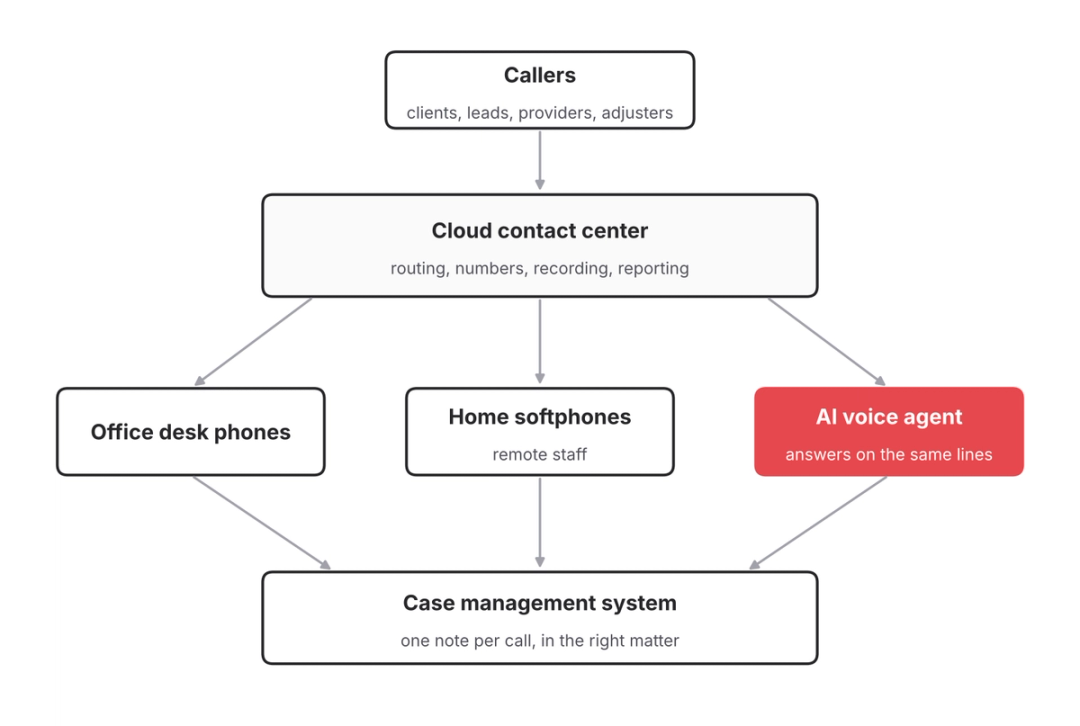
Covering one seat around the clock with people takes about 4.2 full-time employees, because a week has 168 hours and a full-time schedule covers 40 of them. Few firms staff routing groups that deeply, so the gap usually shows up at night, on weekends, and during the busiest daytime hours.
Firms fill the gap in three ways: more staff in the routing groups, an answering service on overflow and after hours, or AI voice agents on the same cloud lines. The comparison of AI and live answering services sets out the trade-offs, and the cloud move makes the third option easier because an AI agent connects to a cloud phone system the same way a remote receptionist does.
Whichever option the firm chooses, it should run through the same cloud system, so every call, answered by a person, a service, or an agent, shows up in one set of reports and one case file.
See an AI agent answer on a cloud phone line
Watch HelloCounsel pick up a call on a cloud phone system, match the caller to the case file, and warm-transfer to the assigned case manager. Book a cloud phone line demo
How HelloCounsel works on top of a cloud phone system
HelloCounsel builds AI voice agents for plaintiff personal injury firms, and the agents connect to phone systems including RingCentral and Zoom. The firm keeps its cloud platform, numbers, and routing, and the agents take the calls in a cloud contact center for law firms that would otherwise queue or send to voicemail.
On inbound calls, HelloCounsel's AI receptionist answers in under two rings, recognizes the caller from the case file, answers status questions from the file, and routes other calls on case data with a live check that the right person is free.
New callers go through AI intake against your criteria, in English or Spanish, and the lead reaches your intake system with the full call context.
Every call is written to the matter in case management systems such as Filevine, Litify, SmartAdvocate, CASEpeer, and MyCase, and the same agents place outbound calls for client check-ins and records follow-up. HelloCounsel has handled more than 30,000 calls, firms using it have seen a 48% improvement in call reception, and pricing is custom, based on call and case volume rather than seats.
Because HelloCounsel prices on volume rather than seats, adding agent coverage to a cloud system doesn't add licenses the way new staff would. The HelloCounsel dashboard shows call volume by caller type and transfer rates, alongside the reporting your cloud platform already produces. With coverage planned, what remains is the migration itself.
What does a cloud migration plan look like for a law firm?
A migration runs smoothly when the decisions above are made in order, before the cutover date forces them. The phases follow the same order as the decisions above.
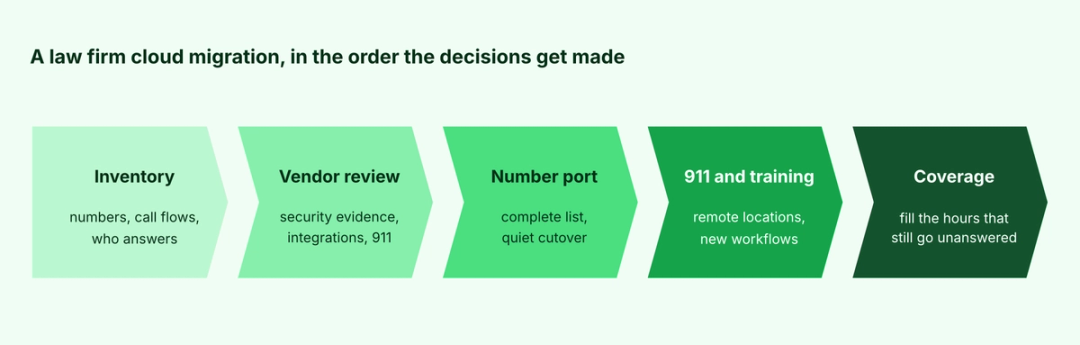
Inventory comes first: every number, every call flow, and every person who answers, including the after-hours arrangements nobody wrote down. Vendor review covers the security evidence, integrations, and 911 handling, and the port is scheduled only once the number list is complete.
Training and 911 setup happen before cutover, so remote staff have their locations recorded and know where calls and voicemails now appear. Keeping the old system available for a few days after the port gives the firm a fallback while every number and call flow is tested.
Clients and referral partners shouldn't notice the move at all. The numbers stay the same, so the only outward change should be that more calls get answered, which is the measure of a cloud migration done well.
Coverage comes last and stays open: once the cloud system is live, the firm can see exactly where calls go unanswered and decide who should take them.
A cloud move is the right moment to decide who answers
Every cloud migration produces a clean map of the firm's phone operation, from numbers and call flows to routing groups and the hours nobody covers. That map is the best information a firm will have about where calls are lost.
Use it. Before cutover, mark the hours and call types that reach voicemail today, and decide whether staff, an answering service, or AI voice agents should take them on the new system. Any of those choices is easier to put in place on a cloud contact center for law firms, and making the choice during the move costs less than revisiting it after.
The same goes for the vendor shortlist. A cloud platform that connects cleanly to your case management system and to AI voice agents keeps every coverage option open, while one that can't will narrow them for the length of the contract.
Plan call coverage for your cloud move with HelloCounsel's founders Bring your number list, call flows and after-hours setup, and leave knowing which calls an AI voice agent could take on your new cloud lines. Book a call with the founders about your cloud move
Frequently asked questions about cloud contact centers for law firms
1. What is a cloud contact center for law firms?
It is a phone system hosted on a vendor's platform instead of hardware in the office. Routing, recording, and reporting run in the cloud, and staff answer from desk phones, laptops, or mobile apps in any office or at home.
2. Is a cloud contact center secure enough for client calls?
It can be if the vendor proves it. Ask for a third-party security report such as SOC 2 Type II, encryption details, data location, retention terms, and access logs, since Model Rule 1.6(c) requires reasonable efforts to protect client information.
3. Do remote law firm staff need 911 settings on cloud phones?
Yes. Kari's Law requires direct 911 dialing on multi-line telephone systems, and the RAY BAUM'S Act requires a dispatchable location with each 911 call. For remote devices, the system must capture location automatically where feasible or let users update their address.
4. Can a law firm keep its phone numbers when moving to the cloud?
Yes, as long as you stay within the same geographic area. FCC rules let you port numbers to a new provider; the old carrier can't refuse over unpaid balances, and simple ports must be processed within one business day. Include every campaign tracking number.
5. Does a cloud contact center answer calls by itself?
Not on its own. It routes calls to your staff, and when everyone is busy, it queues the caller or sends the call to voicemail. Firms add staff, an answering service, or AI voice agents on the same cloud lines to answer those calls.
6. Does HelloCounsel work with cloud phone systems like RingCentral and Zoom?
Yes. HelloCounsel's AI voice agents connect to cloud phone systems, including RingCentral and Zoom, answer calls in under two rings, recognize callers from the case file, and write every call to the matter in your firm's case management system, such as Filevine or Litify.
Share this article