The Best Legal CRM Software for Law Firms in 2026

- A CRM for law firms tracks prospective clients, referral sources, and marketing channels before a case is signed, while case management software takes over once the client is retained.
- For plaintiff firms, the strongest options in 2026 are Lead Docket for Filevine users, Litify for firms on Salesforce, Lawmatics for broad case management sync, Law Ruler, Clio Grow, MyCase, and HubSpot as a general-purpose option.
- How a CRM syncs with your case management system matters more than its feature list, since a lead that has to be retyped at signing slows every new case.
- Most legal CRMs don't publish pricing; MyCase includes its CRM from the Pro tier at $100 per user per month billed annually, and HubSpot publishes general CRM pricing.
- Every CRM depends on leads reaching it, so the phone calls a firm misses or answers without logging never show up in the pipeline, the conversion reports, or the marketing attribution.
A CRM for law firms does a narrow job well. It tracks the people who haven't hired the firm yet: the caller from last night, the web form from a billboard campaign, the referral from a chiropractor, and the follow-up each of them is waiting on. Once a client signs, the case management system takes over, and the CRM's work becomes measuring which sources produced that client.
At a plaintiff firm, a CRM for law firms carries real money. Marketing budgets run across television, search, billboards, and referral relationships, and the CRM is usually the only place the firm can see which of those produce signed cases. It is also where intake staff work their follow-up list, so a lead that slips out of the CRM usually slips out of the firm entirely.
The tools that compete for this job differ less in features than in how they connect. Some are built into a case management platform, some sync with several, and general-purpose CRMs connect to legal software only through third-party apps. The right choice usually follows from which case management system the firm already runs and from how many leads arrive by phone rather than by form.
That last point is easy to miss in a CRM comparison, because a CRM records leads that reach it and has no view of the ones that never do. Before comparing tools, it helps to be clear about where a legal CRM's job starts and stops.
What does a legal CRM do that case management software doesn't?
Case management software runs the matter: documents, deadlines, treatment, medical records, liens, and settlement. A legal CRM runs everything before the matter exists, from the first contact through intake questions, conflict checks, the engagement agreement, and the hand-off into case management.
The boundary is where most of the friction sits. When the CRM and the case management system sync well, a signed lead becomes a matter with its contacts, intake answers, and source attached, and nobody retypes it. When they don't, the intake team copies data across at the exact moment speed matters most.
Many plaintiff firms also use the CRM after signing for referral relationships and reviews, tracking which referral partners send cases and closing the loop with them. That broader role is why a CRM for law firms is judged on more than intake forms.
How we evaluated legal CRM software
We assessed each tool on what its own website and pricing page state, checked in October 2026, and on recurring themes in user reviews. HelloCounsel is our own product; because it is an AI voice agent platform and not a CRM, it isn't ranked here. Six criteria shaped how we ranked each CRM for law firms on this list:
- Intake and e-signature: Custom intake forms, conflict checks, and engagement agreements signed electronically.
- Follow-up automation: Automated texts, emails, and tasks so leads don't wait on a person to remember them.
- Marketing attribution: Reporting that ties leads and signed cases back to the campaign or source.
- Referral tracking: Recording referral sources and, where supported, referral fees.
- Case management sync: Which case management systems the CRM sends signed leads to, and how complete that transfer is.
- Pricing transparency: Whether prices are published or available only through sales.
Applied to seven tools, those criteria produce the comparison below, with HelloCounsel's role as the phone layer covered separately.
Legal CRM software compared at a glance
The table summarizes each tool against the criteria that matter most to a plaintiff firm, using what each vendor states on its own site.
| Tool | Best for | Case management sync named by the vendor | Published pricing |
|---|---|---|---|
| Lead Docket | PI firms on Filevine | Filevine, BestCase, Prevail | No, custom quote. |
| Litify | Larger firms wanting one system from intake to settlement | Built into Litify's own platform on Salesforce | No |
| Lawmatics | Firms that want one CRM to sync with many systems | Clio, Filevine, SmartAdvocate, MyCase, Smokeball, and more | No, quote by tier. |
| Law Ruler | Firms wanting CRM, texting, and marketing automation together | One-time sync to Filevine, plus billing tools | No, quote by tier. |
| Clio Grow | Firms already on Clio Manage | Clio Manage | No, it's included in Clio's Elite plan or as an add-on. |
| MyCase | Firms that want CRM inside their practice management | Built into MyCase | Yes, from the Pro tier. |
| HubSpot | Firms wanting a general-purpose CRM | No native legal sync; third-party apps | Yes. |
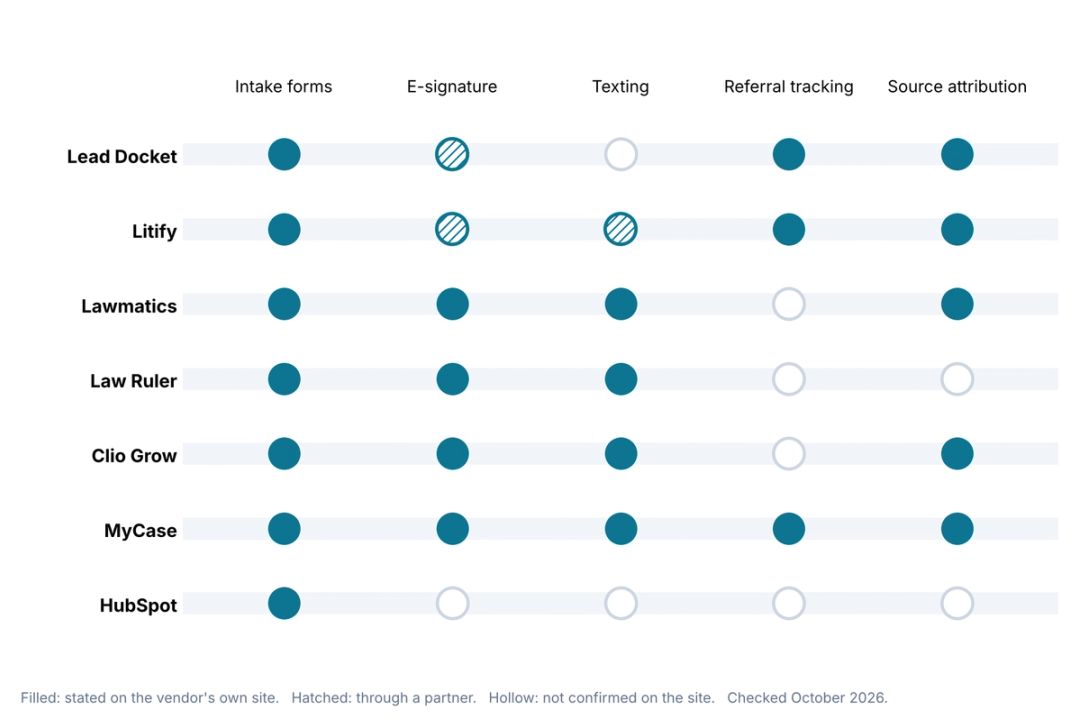
A filled circle means the vendor's own site states the feature; a hollow circle means we couldn't confirm it there, which doesn't always mean the feature is missing. Ask for a live demonstration of any hollow item that matters to your intake process.
One gap runs across every row of that table. Each CRM can only work the leads that reach it, and at a plaintiff firm a large share of leads arrive as phone calls.
Getting phone leads into your CRM before they go cold
As per our estimate, PI firms miss 35 to 50 percent of inbound calls during business hours alone, before counting nights and weekends. Firms that outsource legal intake narrow that gap, though a message-taking service still leaves someone to type the lead into the CRM. A missed caller never becomes a CRM record, and a caller who reaches a busy receptionist often becomes a sticky note that someone types up later, if at all.
HelloCounsel builds AI voice agents for plaintiff personal injury firms, and it works as the phone layer in front of a CRM rather than a replacement for one.
Its agents answer in under two rings, run new callers through AI intake against your criteria, and write the lead with the full call context into your intake system.
HelloCounsel connects to Lead Docket and Lawmatics, among other systems, and to case management systems such as Filevine, Litify, SmartAdvocate, CASEpeer, and MyCase. Existing-client calls go through the AI receptionist workflow instead, so the CRM receives new leads while status calls land in the right matter.
HelloCounsel is built for personal injury firms, and its agents handle English and Spanish on the same call, so Spanish-speaking leads reach the CRM with the same detail as everyone else. With the phone layer covered, the CRMs themselves are next.
See a phone lead land in your CRM
Watch HelloCounsel answer a new caller after hours, run your intake questions, and write the lead to your intake system with the full call summary. Book an intake-to-CRM demo
The 7 best legal CRM software options for law firms
The list runs from tools built for plaintiff firms to general-purpose options, with each entry covering what the CRM does, how it connects to case management, what it costs, and what reviewers raise most often.
1. Lead Docket
Lead Docket, now part of Filevine, describes itself as built to sign the right clients faster, and it is the most plaintiff-focused CRM on this list. It scores each lead's viability, uses AI to summarize case facts and build an intake timeline, and runs custom intake scripts with capture from web chat and answering services.
Its CRM strengths are attribution and referrals. Lead Docket reports marketing ROI by source and campaign, tracks referral sources and referral fees, takes retainer and consultation payments, and integrates with call tracking tools such as CallRail and CallTrackingMetrics. Filevine Sync is the featured case management connection, with BestCase and Prevail also listed.
Pricing is by custom quote. Reviewers on Capterra rate it highly but mention that mapping fields to Filevine takes work and that the interface and reporting feel basic.
It fits best at a PI firm already running Filevine, where it works as a CRM for law firms that hand-signed leads straight into the matter. Firms that lean on referral relationships also benefit from its referral fee tracking, which few general CRMs handle.
2. Litify
Litify is a legal platform built on Salesforce that combines intake and case management, which removes the CRM-to-case-management hand-off entirely. Its plaintiff offering includes dynamic intake questionnaires, an intake qualifier agent that screens prospects against your criteria, and dashboards covering intake conversion rates and time to settlement.
For the CRM side, Litify tracks marketing spend and ROI across campaigns and channels and runs a free referral network for sending and receiving cases. Texting comes through partners such as SMS-Magic, Vonage, and RingCentral rather than as a native feature. Because intake and the matter live in the same system, the lead's answers, documents, and source stay attached from the first call to settlement.
Pricing isn't published. Reviewers on G2 mention slow performance and a learning curve, especially for staff new to Salesforce. It suits larger plaintiff firms that want a single system from first call to settlement and have the staff to administer it.
3. Lawmatics
Lawmatics positions itself as an AI-powered legal CRM and lists personal injury among the practice areas it supports. It covers custom intake forms, appointment scheduling, e-signature, automated conflict checks, email and text campaigns, a Kanban pipeline, and lead source attribution, with AI add-ons for lead scoring.
Its case management sync list is the broadest here: matter data syncs on conversion to Clio, Filevine, SmartAdvocate, and 8am. MyCase, Smokeball, PracticePanther, Neostella, and others. Litify, CASEpeer, and Needles aren't on that list, which matters for firms on those systems.
Pricing is by quote, with tiers that set minimum user counts and contact limits. Reviewers on Capterra mention a long setup and automations that take time to configure.
It suits firms that want a dedicated CRM for law firms that connects to the case management system they already use. Its marketing tools also make it a fit for firms running newsletters and nurture campaigns to past clients and referral partners as well as new leads.
4. Law Ruler
Law Ruler sells a law firm CRM with client intake and marketing automation, and personal injury is one of its featured solution areas. It includes intake forms with custom logic, one-click e-signature, text campaigns and automated follow-up, email and voice marketing automation, a built-in softphone, and document automation.
Its Filevine integration is a one-time sync from Law Ruler to Filevine, with changes in Filevine not syncing back, according to Law Ruler's own support documentation. Other listed integrations include CallRail, Smith.ai, Zapier, and billing tools such as Tabs3 and TimeSolv.
Pricing is by quote, billed monthly on an annual term. Some reviewers on Capterra report gaps with third-party tools and slow performance in parts of the system.
It suits firms that want texting and marketing automation in the same CRM and can work with a one-way case management hand-off. Its built-in softphone also lets intake staff call and text leads from inside the CRM, which keeps call activity next to the lead record.
5. Clio Grow
Clio Grow is the client intake and CRM product from Clio, focused on client acquisition. It offers custom intake forms sent by website, email, or text; automated engagement letters with e-signature; an intake pipeline with automated steps and conflict checks; appointment booking with text reminders; review requests; and lead source reporting.
Its main connection is Clio Manage, where records sync on conversion. Clio's site doesn't name Grow-specific integrations with plaintiff case management systems such as Filevine or Litify, so Grow makes most sense for firms already running Clio.
Grow is included in Clio's Elite plan and available as an add-on to other plans, with prices available through sales. Reviewers on G2 mention gaps in the Grow-to-Manage integration and limited automation. For a Clio firm, it is the shortest path to a CRM for law firms that shares data with the case side without a third-party connector.
6. MyCase
MyCase, now branded 8am MyCase, builds lead management and client intake into its practice management platform. Its Pro tier adds custom intake forms with conditional logic, a built-in CRM pipeline, tracking of leads and conversion by practice area and marketing channel, referral source tracking, and automated follow-ups by email and text.
Because the CRM and case management are one product, there's no sync to configure. MyCase publishes pricing, with intake and CRM starting at its Pro tier, priced at $100 per user monthly on annual billing or $120 on monthly billing.
Reviewers on G2 mention price increases over time and the effort involved in building intake forms. It suits small and mid-sized firms that want CRM and practice management in one subscription. Firms that outgrow their intake tools can still connect to a dedicated CRM such as Lawmatics, which lists MyCase among its integrations.
7. HubSpot
HubSpot is a general-purpose CRM with a free tier and paid Sales Hub plans, and some law firms use it for marketing-heavy intake. It covers contact records, pipelines, lead capture forms, marketing emails, and reporting across marketing and sales.
It has no legal-specific features, so intake questionnaires, conflict checks, and case management sync depend on third-party apps or custom work. Salesforce sits in the same category; its law firm targets large firms, and plaintiff firms usually reach it through Salesforce-based legal platforms such as Litify.
HubSpot publishes pricing: Sales Hub Starter is $20 per seat per month billed monthly, and Professional is $100 per seat billed monthly with a required one-time onboarding fee. Reviewers on Capterra mention costs that climb with contacts and features and reporting limits with multiple pipelines. HubSpot can serve as a CRM for law firms with in-house technical help, though a plaintiff firm will spend that effort recreating features the legal CRMs above include.
How much legal CRM software costs in 2026
Only two tools on this list publish full CRM pricing, so most comparisons end in sales calls. The figures below were checked on vendor pricing pages in October 2026.
| CRM | Pricing published? | What we could verify |
|---|---|---|
| MyCase | Yes | Pro tier with CRM and intake: $100 a user each month when billed annually, $120 when billed monthly |
| HubSpot | Yes | Free tier for up to two users; starter from $20 per seat monthly; Professional at $100 per seat monthly plus a $1,500 onboarding fee |
| Clio Grow | Partly | Included in the Elite plan; add-on pricing through sales; the $49 Starter plan excludes Grow |
| Lawmatics | No | Tiers set minimum users and contact limits; quote required |
| Lead Docket | No | Custom quote |
| Law Ruler | No | Quote required; billed monthly on an annual term, with a discount for prepaying |
| Litify | No | Demo request required |
Ask every vendor for the price at your actual user count and lead volume, including add-ons such as AI features, extra texting, and onboarding, since per-user minimums and contact limits change the total more than the headline tier.
Minimums are common in this category. Lawmatics sets minimum user counts on each tier; Law Ruler's Enterprise plan starts at ten users, and HubSpot's The professional plan carries a one-time onboarding fee, so a small intake team can pay for more seats than it uses. Price rarely settles the choice on its own, though.
How to choose the right CRM for your firm
The case management system a firm already runs usually narrows the field faster than any feature comparison.
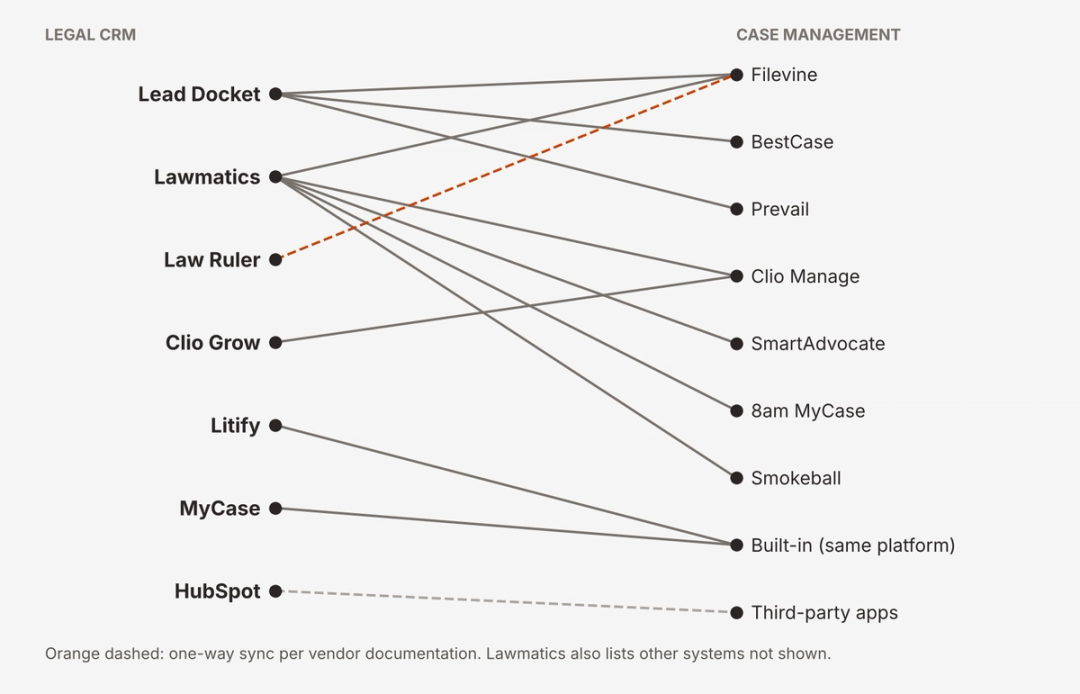
Read the map from your own case management system outward, then use the situations below to break any tie:
- Running Filevine: Start with Lead Docket for its Filevine Sync, or Lawmatics if you also want broad marketing automation.
- Running SmartAdvocate, Clio, MyCase, or Smokeball: Lawmatics syncs with all four, and Clio and MyCase users can also consider each platform's built-in option.
- Wanting one platform for intake and case management: Litify or MyCase removes the hand-off between systems.
- Prioritizing texting and marketing automation: Law Ruler and Lawmatics put both inside the CRM.
- Wanting a general-purpose CRM: HubSpot works if someone can build the legal intake, conflicts, and case management connection around it.
Whichever tool leads the shortlist, test it on your own leads. Load a month of real inquiries, including phone leads, run them through the trial, and check how many reach a signed matter in your case management system without retyping.
Our list of the best legal intake software covers the tools that sit alongside a CRM at the intake stage.
Our guide to personal injury software tools maps how CRM, case management, and phone systems fit together. Once a tool wins the trial, moving the firm's existing leads into it is the next risk to manage.
How to move leads into a new legal CRM
Switching CRMs mid-year risks losing the very data a CRM exists to hold. Before signing, ask the outgoing vendor how open leads, closed leads, referral sources, and campaign history are exported and in what format.
Map the fields before migration, starting with lead source and referral source, since attribution history is the hardest thing to rebuild. Move open leads first so intake follow-up doesn't stall, and keep call tracking numbers pointing at the same campaigns so reports stay comparable before and after the switch.
Plan the case management connection at the same time. A new CRM for law firms is only finished when a signed test lead shows up in the case management system with every field and its source in place, and CMS write-back from your phone layer lands in the same place. Even a perfect migration, though, only moves the leads the old system captured.
A CRM shows what happened to the leads it saw
Every tool on this list does its best work on the leads that reach it, which makes the size of that inflow the first number to check. Compare the calls your phone system received last month with the leads your CRM recorded, and the difference shows how many prospective clients never entered the pipeline at all.
Closing that gap is often worth more than switching CRMs. A firm that answers and logs every call gives whichever CRM for law firms it chooses complete data, and complete data is what makes the attribution reports, the follow-up automation, and the conversion numbers trustworthy. Our breakdown of why PI firms lose cases before they even sign them traces where those early losses start.
Once the inflow is complete, the CRM comparison becomes simpler too, because each trial can be judged on the same full set of leads rather than on whatever happened to be typed in.
Compare your calls to your CRM leads with HelloCounsel's founders Bring last month's call volume and CRM lead count, and see how many callers never reached your pipeline and how an AI voice agent would capture them. Book a call with the founders to review your lead gap
Frequently asked questions about CRM for law firms
1. What is a CRM for law firms?
A CRM for law firms tracks prospective clients from first contact through intake, conflict checks, and the signed engagement agreement. It also records referral sources and marketing channels, then hands signed clients to the case management system that runs the matter.
2. What is the best CRM for personal injury law firms?
It depends on the case management system you already use. Lead Docket suits Filevine firms, Litify suits firms wanting one Salesforce-based system, and Lawmatics syncs with Clio, Filevine, SmartAdvocate, and others. HelloCounsel captures phone leads for whichever of these CRMs you choose.
3. How much does legal CRM software cost?
Most legal CRMs require a quote from sales. MyCase includes its CRM from the Pro tier at $100 per user per month billed annually, and HubSpot publishes general CRM pricing. Ask every vendor for the total at your user count, including add-ons and onboarding fees.
4. What is the difference between a legal CRM and case management software?
A legal CRM manages prospective clients before they sign, including intake questions and answers, follow-up, conflict checks, referrals, and marketing attribution. Case management software runs the matter after signing, including documents, deadlines, treatment tracking, medical records, liens, and the settlement itself.
5. Can a legal CRM capture phone leads automatically?
Only if something answers and logs the call first. Call tracking tools tag the source, but a CRM records a phone lead only when a person or an AI voice agent captures the caller's details and writes them into the system.
6. Does HelloCounsel work with legal CRMs?
Yes. HelloCounsel's AI voice agents connect to Lead Docket and Lawmatics among other systems, answer calls in under two rings, run new callers through your intake criteria, and write each lead with its full call summary into your intake system.
Share this article