Personal Injury Law Firms
8 Best Personal Injury Software Tools for Law Firms in 2026

- The best personal injury software starts with the system of record: pick a case management platform that fits your firm size, case mix, and appetite for configuration, then add specialist tools around it.
- 8am CasePeer, SmartAdvocate, CloudLex, and Neos are built for plaintiff work, while Filevine, Litify, and Clio bring broader platforms with growing PI and AI features.
- Published prices run from $49 to $160 per user a month, and a 10-user firm pays roughly $10,800 to $19,200 a year before implementation and add-ons on the PI-specific plans that list prices.
- Settlement disbursement and medical liens make trust accounting a buying criterion, since Model Rule 1.15 requires lawyers to keep client funds separate and account for them promptly.
- HelloCounsel adds the phone layer beside your case management system, handling inbound and outbound plaintiff calls and writing every outcome into the case file.
Software for personal injury attorneys now covers far more than case management, which makes it harder to compare. One shortlist can hold a PI-specific case management system, an enterprise legal platform, an AI demand tool, and a voice agent, all serving the same firm while owning different work.
The cleanest way to buy is to choose the system of record first, then add specialist layers only where a workflow still eats staff time or forces re-entry. This comparison follows that order, from intake through treatment, records, demand, settlement, and closeout.
How Do the 8 Best Personal Injury Software Tools Compare?
The strongest personal injury software choice depends on the layer you are buying. Replacing your case management system is a far bigger decision than adding one specialist workflow around the system you already run.
| Software | Best for | What it owns | Published pricing |
|---|---|---|---|
| HelloCounsel | Plaintiff call operations | Reception, intake, case opening, records follow-up, and check-in calls | Custom, based on call and case volume |
| 8am CasePeer | Purpose-built PI case management | Intake, treatment, negotiation, settlement, reporting | $90 to $160 per user a month |
| SmartAdvocate | Large PI and mass tort caseloads | Configurable case management with SmartIntelligence AI | Custom quote |
| CloudLex | A PI-only cloud platform | Intake, matters, records, settlement, and Lexee AI | Custom quote |
| Neos by Assembly | Case management plus NeosAI | Intake through disbursement, liens, NeosAI | $109 per user a month (Essentials) |
| Filevine | Deep workflow configuration | Custom workflows, reporting, LOIS AI, partner ecosystem | Custom quote |
| Litify | Enterprise plaintiff firms on Salesforce | Enterprise case operations, analytics, LitifyAI | Custom quote |
| Clio | Firms mixing PI with other practice areas | Broad practice management plus a PI add-on | From $49 per user a month; PI add-on quoted |
What Does Personal Injury Software Cost in 2026?
Only three of the eight case management platforms here publish prices, and even those are starting points. At list price, a 10-user firm pays $10,800 a year on 8am CasePeer Basic, $13,080 on Neos Essentials, and $19,200 on CasePeer Advanced.
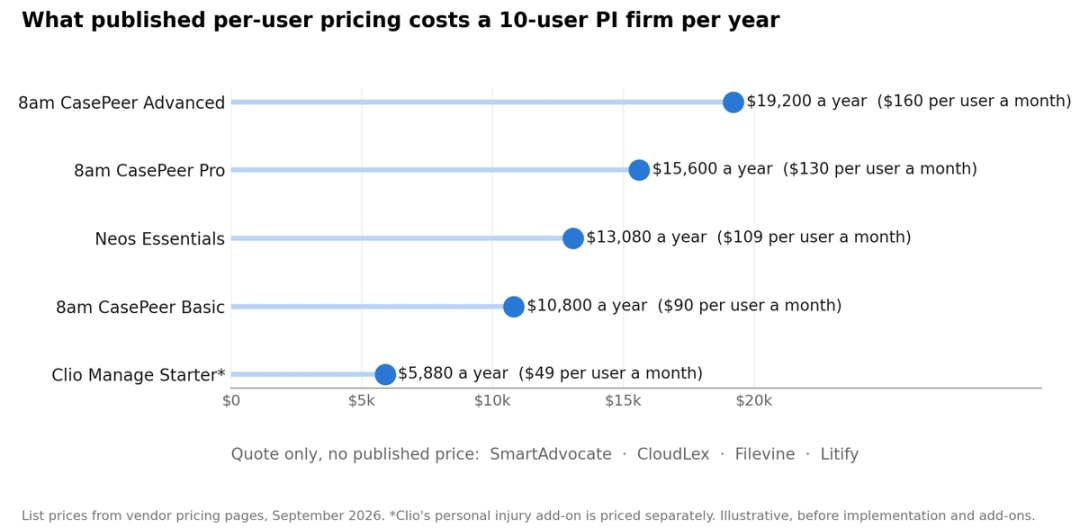
The subscription is rarely the biggest number in year one. Migration, implementation, training, integrations, and the internal time to run the system often decide the real cost, so ask every vendor for a first-year total on your own user count.
Plan tiers also gate the features PI firms care about most. On Neos, NeosAI, texting, and call tracking sit in the Platinum tier, and Clio's personal injury features are an add-on priced through sales.
Which Features Matter Most in Personal Injury Software?
Personal injury software earns its keep on the workflows that repeat on every case. Test these eight on a real matter during any trial, since they separate PI-built platforms from general practice tools.
| Feature | Why it matters | What to test |
|---|---|---|
| Treatment tracking | Treatment drives damages and case value | Providers, visit dates, and gaps in care on one screen |
| Medical records requests | Late records stall every demand | Request status, follow-up dates, and fee tracking |
| Lien management | Lienholders share in the settlement | Balances by provider and payer, updated before disbursement |
| Statute of limitations tracking | A missed deadline ends the claim | Automatic dates by case type and jurisdiction |
| Settlement statements | Clients and lienholders need a full accounting | Statements generated from case data, not retyped |
| Client communication | Status calls crowd case managers' days | Texting, portal updates, and scheduled check-ins |
| Demand drafting AI | Drafting is a major time sink | Draft quality, citations to records, and review time |
| Call handling | Most calls on a case come after intake | Who answers, who calls out, and where the note lands |
What Are the 8 Best Personal Injury Software Options in 2026?
Each option below gets the same treatment: what it is, where it fits, its current published pricing, one clear strength, and one limitation. The aim is a shortlist built around your workflow rather than eight products forced into one feature grid.
1. HelloCounsel runs plaintiff call operations beside your CMS
HelloCounsel is an AI voice agent for plaintiff firms that sits beside your case management system and handles the phone work around a case. It answers in under two rings, recognizes callers against your case files, and writes every call into the case file as a note your team can see.
- Reception and Qualification: 24/7 answering with caller identification, qualification against your criteria, and warm transfer to the right person.
- Case opening: Once the fee agreement lands, the agent opens the file, gets the claim number from the adjuster, and collects missing documents. See automated case opening.
- Medical records retrieval and organizing: Agents submit and re-submit requests and follow up with providers by phone, email, and fax, as covered in our guide to AI for medical provider calls.
- Lead follow-up and Client Check-ins: Outbound calls follow up with leads and check in with clients after appointments, covering legal and medical coordination.
- Case management: Insurance claim opening, hold-time handling, and task completion keep each case moving inside your CMS.
- CMS write-back: Direct integrations with SmartAdvocate, Filevine, Litify, Lead Docket, CASEpeer, MyCase, and Lawmatics, and new systems are added on request.
Pricing: Custom, based on your firm's call and case volume rather than seats, with no per-minute billing. You pay only for the tasks agents complete.
Strength: It owns outbound follow-up as well as inbound calls, with 30,000+ calls handled, 93% SOP precision in every call, and a 48% improvement in call reception rates. Limitation: It works inside your case management system, so you still need one; it is not built for general-practice firms.
2. 8am CasePeer is purpose-built PI case management
8am CasePeer is built for personal injury, with intake, treatment tracking, negotiation, client communication, task automation, and reporting organized around plaintiff workflows. That structure cuts the configuration needed to model a PI case from scratch.
- PI workflow depth: Treatment, providers, negotiation, settlement, and case stages are core product concepts.
- Client communication: Texting, e-signatures, reminders, and a client portal sit close to the matter.
- Reporting: Turnkey reports and dashboards help operations leaders track case and firm performance.
Pricing:Basic is $90, Pro $130, and Advanced $160 per user a month, with no long-term contract or setup fee. Strength: A PI-first data model gets a plaintiff firm to a usable system without a long configuration project. Limitation: Firms running several unrelated practice areas may prefer a broader platform.
3. SmartAdvocate handles high-volume PI and mass tort work
SmartAdvocate is a plaintiff and litigation case management platform with deep workflow configuration. SmartIntelligence, launched in August 2026, covers intake voice AI with voice agents and an intake assistant coach, along with demand letter and medical chronology generation, document classification, case assembly, a settlement value assistant, and customizable AI agents.
- Workflow configuration: Automation can vary by case type, status, staff assignment, and referral source.
- Plaintiff operations: Medical records, documents, deadlines, communications, settlement data, and mass tort work live in one system.
- Partner ecosystem: More than 175 integration partners, from lien resolution and medical record retrieval to answering services and call tracking.
Pricing: Custom by firm, users, configuration, and implementation. Strength: High-volume firms get a broad operating surface in one case system, with AI built into it. Limitation: Depth means a heavier implementation, so confirm which SmartIntelligence features are live for your firm rather than on the roadmap.
4. CloudLex keeps the whole PI lifecycle with one vendor
CloudLex is built only for plaintiff personal injury firms and spans intake, matter management, documents, calendars, client communication, medical records, settlement management, and reporting. Its Lexee AI captures pre-intake details by voice and website chat, drafts demand packages for review, builds medical summaries and timelines, answers questions from case context, and turns voice notes into tasks.
Best fit: PI-only firms that want intake, records, settlement, and AI from one vendor.
Pricing: Custom quote. Strength: Intake, matter data, records, and settlement work stay close together with one PI-only vendor. Limitation: Mixed-practice firms should test whether a PI-only structure fits the rest of the business, and separate core platform pricing from optional AI and service layers.
5. Neos by Assembly pairs PI case management with built-in AI
Neos by Assembly covers personal injury from intake through disbursement, including medical records, treatment, liens, case costs, communications, deadlines, and reporting. On the Platinum tier, NeosAI adds document generation, summarization, extraction, and chat, and Demands Plus (in early access) builds chronologies and demand letters from records already in the file.
Pricing: Essentials is $109 per user a month billed yearly; Premium and Platinum are quoted. Strength: Case management and case-aware AI share one record, with no export to a separate drafting tool. Limitation: Neos targets firms with three or more users, and the AI features most PI firms want require the top tier.
6. Filevine offers the deepest workflow configuration
Filevine combines lead and case management, custom workflows, reporting, documents, communication, and a large partner ecosystem. Its LOIS Console, launched on June 2, 2026, runs AI agents across matters that write results back into the system of record and act on them, such as writing tasks, moving deadlines, and generating documents. Since August 2026, LOIS has been available as a 90-day free trial in an isolated sandbox.
Best fit: Operations-heavy firms with complex teams or process rules.
Pricing: Custom, shaped by modules, implementation, integrations, and firm size. Strength: Operations-heavy firms get room to model how they actually run cases. Limitation: Flexibility creates ownership work, so budget for process design, configuration, and ongoing administration.
If your main problem sits outside the case platform, our case for automating outbound calls at a PI firm separates configuration work from repetitive phone work.
Filevine firms can also compare AI voice agents for Filevine directly.
7. Litify serves enterprise plaintiff firms on Salesforce
Litify is an enterprise legal platform built on Salesforce for larger plaintiff organizations that want case operations, reporting, intake, and data governance on one architecture. On June 23, 2026, it launched LitifyAI Instant Demands through a partnership with Supio, generating demand packets inside the plaintiff workflow. Firms looking at Supio on its own can check our Supio pricing breakdown.
Litify says Instant Demands and its other AI agents automate an estimated 20% to 50% of pre-litigation processes. Pricing: Custom enterprise quote. Limitation: The Salesforce architecture can be heavier than a smaller firm needs, so price admin ownership and implementation alongside the license.
Litify firms looking at the phone layer separately can compare AI receptionists for Litify.
8. Clio fits mixed-practice firms that also handle PI
Clio is a broad legal platform with a personal injury add-on covering medical records management, damages tracking, settlements management, and HIPAA compliance with a business associate agreement. Clio Grow adds intake and CRM, including Grow AI phone, email, and web chat agents.
Pricing: Clio Manage starts at $49 per user a month, and the personal injury add-on is priced through sales. Strength: Mixed-practice firms get one platform with a much stronger PI story than a few years ago. Limitation: A PI-only firm should compare treatment, lien, settlement, and mass tort depth against platforms built for plaintiff work.
Keep your case management system and fix the phone
Pick one call workflow from your firm, and we'll walk through what the agent completes and the note it leaves in your case file. Book a workflow walkthrough
Settlement Funds Make Trust Accounting a Buying Criterion
Every PI settlement moves money through trust, and medical lienholders often have a claim on part of it. ABA Model Rule 1.15 requires lawyers to hold client and third-party funds separate from their own and keep complete records of them for a set period after the representation ends, five years in the Model Rule.
The same rule requires lawyers to promptly notify a client or third person when funds arrive, promptly deliver what they are entitled to, and give a full accounting on request. For a PI firm, the third persons are usually lienholders, so your software should track each lien, its current balance, and the disbursement statement it feeds.
| What to test | Why it matters under Rule 1.15 |
|---|---|
| Lien tracking by provider and balance | Third persons with an interest in settlement funds must be notified and paid promptly |
| Settlement statements generated from case data | A full accounting has to match what was received and disbursed |
| Trust ledger or accounting integration | Client and third-party funds must stay separate from firm funds |
| Record retention and audit history | Complete records must be preserved for the period your state sets |
Did You Know
In the 2024 ABA Legal Technology Survey Report, released in March 2025, 30% of respondents said they used AI technology, up from 11% in 2023. Adoption is moving faster than most firms' review processes.
Best Medical Record Management Software for Personal Injury Law Firms
Medical records decide damages, and late or incomplete records stall every demand. These are the platforms above that handle records best, and the part of the records workflow each one owns.
- CloudLex: best for keeping records inside a PI-only platform. Lexee AI builds medical summaries and timelines from the file.
- Neos by Assembly: best for records, treatment and liens on one record. Demands Plus, in early access, builds chronologies from records already in the case.
- SmartAdvocate: best for high-volume and mass tort records work, with medical chronology generation and document classification through SmartIntelligence.
- 8am CasePeer: best for treatment tracking, with providers, visit dates and gaps in care organized around the PI case.
- Clio: best for mixed-practice firms, through a personal injury add-on with medical records management and a HIPAA business associate agreement.
- HelloCounsel: best for the chase itself. Agents submit and re-submit records requests, follow up with providers by phone, email and fax, and write every status into your case management system.
If you would rather hand the whole records function to a service, compare the best medical records retrieval companies instead.
How to Choose Software for Personal Injury Attorneys
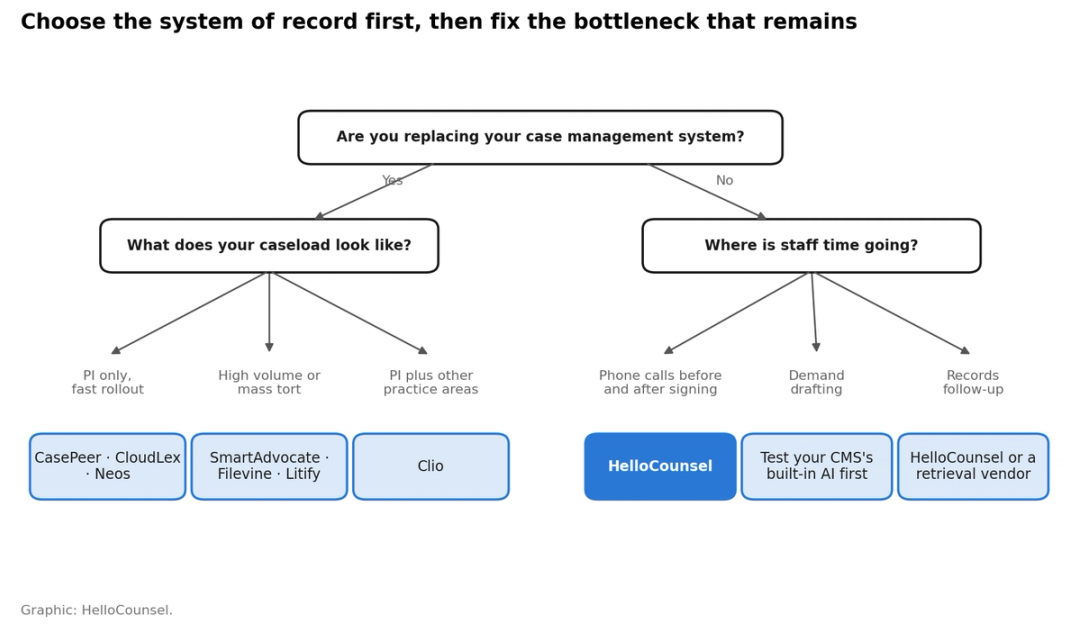
Choosing personal injury software comes down to the type of firm you run, the workflow causing the most friction, and how much implementation work your team can own. Start with the case management system if you are replacing it; if it already works, keep it and add tools only for workflows that stay manual or fragmented.
| If your firm | Start with | Then test |
|---|---|---|
| Is PI-only and wants a faster rollout | 8am CasePeer, CloudLex, or Neos | Treatment, liens, settlement, reporting, and migration |
| Runs high-volume PI or mass tort | SmartAdvocate, Filevine, or Litify | Automation depth, batch work, and admin ownership |
| Handles PI alongside other practice areas | Clio | PI workflow depth against cross-practice consistency |
| Likes its CMS but staff are buried in calls | Keep the CMS and add a call layer | Inbound and outbound calls, retries, escalation, and write-back |
| Likes its CMS but demands are the bottleneck | Your CMS's built-in demand AI first | Draft quality, review time, and cost per demand |
Before adding any tool, pressure-test the integration with a real workflow:
1. Use a real matter: Test with fields, stages, contacts, and documents that match your actual cases.
2. Run it the way staff will: Include the real intake source, handoff, call, or exception rather than the vendor's demo path.
3. Inspect the destination: Check exactly which field, note, task, or document lands in the case file.
4. Count manual steps: List what staff still copy, correct, or re-enter.
5. Force an exception: Test a failed transfer, a missing document, or a second follow-up attempt.
6. Assign ownership: Decide who changes rules, reviews exceptions, and owns the integration after launch.
What Should You Ask About AI Features in Personal Injury Software?
Nearly every platform on this list now markets AI, so AI availability no longer separates personal injury software. The useful comparison is the exact workflow the AI runs, what it reads, who reviews its output, and where the result lands.
- Source data: Does the AI work from the records already in the matter, or from files someone uploads separately?
- Review step: Who checks a chronology, demand draft, or call summary before it reaches a client or adjuster?
- Output location: Does the result land in the case record, or in a separate tool your team has to check?
- Exception path: What happens when the AI is unsure, the record is incomplete, or a caller needs a person?
- Data use: Does the vendor train its models on your firm's case data, and can you get that answer in writing?
These questions track the duties in ABA Formal Opinion 512, which asks lawyers using generative AI to understand the tool, protect client information under Model Rule 1.6, and supervise its output and vendors under Rules 5.1 and 5.3.
A demand or chronology feature that saves drafting time still needs a reviewer, so price the review hours alongside the license when you compare personal injury software. Firms that want that review handled outside the firm can compare AI paralegal platforms built for PI.
Where Should the Phone Layer Sit in a PI Software Stack?
The phone layer sits beside the case management system, not inside the demand or records tools. By our analysis, a typical PI case generates around 150 calls, and only about 10 of them happen at intake, as we break down in how many calls a PI case generates.
Most case management platforms log calls, and some now answer new leads, but few make the outbound provider, adjuster, and client calls that fill a case manager's week. That is the gap a call layer is built for, and the value only lands when each outcome reaches the case file, which is why CMS write-back matters.
Clients judge the firm by how fast someone picks up. In Martindale-Avvo's 2026 State of the Legal Consumer report, 47.6% of consumers named responsiveness as a key criterion when choosing a lawyer, and that expectation continues once the case is signed.
Test a call layer the same way you test the platform: one real call type, the note it leaves, and the staff steps that disappear. Our guide on how to evaluate an AI voice agent lists the questions to ask.
How Should You Build Your PI Software Stack?
Build the stack around how your firm actually runs cases. For many firms that starts with a platform built for plaintiff work, while larger or more complex operations may get more from Filevine or Litify, and mixed-practice firms may prefer Clio.
Core platforms now handle much more intake, demand, records, and AI work than they did, so every added tool needs a clear operating reason. Keep a specialist when it removes a meaningful block of work and returns the result to the system of record, and skip it when it duplicates the platform or adds a queue. For the standalone options, see our guide to AI tools for personal injury lawyers.
If case managers still spend their days on repetitive inbound and outbound calls, test how HelloCounsel handles one of those workflows against your current SOP. If your gap is new-lead intake instead, our roundup of the best PI intake software for law firms covers that layer.
See HelloCounsel on your actual workflow
Bring one call process your team handles today. We'll show you where the agent fits, what gets completed, and what still goes to a person. Book a demo
Frequently Asked Questions
These answers cover the practical questions PI firms raise when changing or adding personal injury software.
1. What is the best software for personal injury attorneys?
It depends on the layer you need. 8am CasePeer, CloudLex and Neos suit PI-only firms wanting a fast rollout, SmartAdvocate, Filevine and Litify suit high-volume or mass tort work, and Clio suits mixed-practice firms. HelloCounsel adds the phone layer beside any of them.
2. What is the best medical record management software for personal injury law firms?
CloudLex and Neos keep records, treatment and liens inside a PI-built platform, SmartAdvocate suits high-volume and mass tort records work, and CasePeer is strongest on treatment tracking. HelloCounsel handles the records chase, writing every request and follow-up into your case management system.
3. How long does it take to switch personal injury case management software?
Plan for data migration, configuration, training, and a period of running both systems. Ask each vendor for a written timeline based on your case count, integrations, and custom fields rather than a typical estimate.
4. Can we keep our current CMS and still add AI?
Yes. Most platforms now ship built-in AI, and specialist tools connect through integrations. Test whether the AI output lands in your existing case record before adding another system to monitor.
5. What data should we clean before migrating?
Start with open cases, contacts, providers, lien balances, and deadlines, since those break workflows first. Closed cases can often move later or stay archived with a read-only export.
6. Do we need a business associate agreement with PI software vendors?
It depends on your role and the data involved. Clio's personal injury add-on includes a business associate agreement; for other vendors, ask counsel which agreements your workflows require.
7. How does HelloCounsel work with our case management system?
HelloCounsel handles inbound and outbound plaintiff calls and writes every outcome into your case file. Direct integrations cover seven case systems, including SmartAdvocate, Filevine, Litify, and CASEpeer, with more built when a firm asks.
Share this article