Alternatives & Comparison
5 Nexa Alternatives for Personal Injury Firms in 2026

- Nexa already covers more than basic call answering. Its current plans include 24/7 live reception, scripting, lead qualification, scheduling, and, on larger plans, intake, inbound and outbound sales, and CRM integration.
- The strongest Nexa alternatives solve the work Nexa still leaves with your team. For PI firms, that may be plaintiff-specific reception, after-hours coverage, active-case follow-up, case-file write-back, or a different pricing model.
- Answering Legal and LEX Reception are strong human-first options when legal-trained reception and intake are the priority.
- Smith.ai fits firms that prefer per-call billing and want the flexibility to compare human-first and AI-first call handling.
- Ruby makes initial budgeting easier with published minute tiers and 24/7 human reception.
- HelloCounsel fits a broader plaintiff call-operations problem: Office-hours and after-hours reception, supported outbound case workflows, continued follow-up, and case-management-system documentation.
- Compare what happens after the call, not only who answers it. Caller identification, context, follow-through, escalation, documentation, and the work that remains with staff usually tell you more than a feature checklist.
Switching away from Nexa can leave a personal injury firm with the same phone workload under a different invoice. Nexa already provides 24/7 live virtual reception, custom scripting, scheduling, lead qualification, and progressively deeper intake, outbound, and CRM capabilities across its 100, 300, and 500-minute plans.
The useful question is therefore not simply which Nexa alternatives answer calls. It is which one removes the specific work your firm is still doing after the call gets answered. That may be daytime overflow, after-hours calls, provider follow-up, case-manager callbacks, documentation, or repeated administrative work around an active case.
The strongest Nexa alternatives also tend to differ at the workflow level rather than on a single reception feature. One may give you better legal-trained human coverage. Another may change how outbound work, case context, or documentation gets handled.
If you are still deciding whether the underlying problem calls for another staffed service or a different operating model, our comparison of AI receptionists vs. virtual receptionists for PI firms explains where each approach fits.
Our Top Picks for Nexa Alternatives
These five Nexa alternatives solve different versions of the call workload. Start with what you actually want to take off your team's plate.
| Best For | Option | Why It Makes the Shortlist |
|---|---|---|
| Plaintiff call operations across office hours and after hours | HelloCounsel | Plaintiff-specific AI voice agents for reception, after-hours coverage, supported outbound workflows, continued follow-up, and case-file write-back |
| Legal-trained human intake | Answering Legal | 24/7 human legal reception, custom legal intake, integrations, and a substantial free trial |
| Legal-only human service with prospect follow-up | LEX Reception | Legal reception, intake, bilingual answering, after-hours coverage, and outbound lead follow-up |
| Per-call human and AI options | Smith.ai | Published human-first pricing, AI-first plans, intake, scheduling, integrations, and outbound capabilities |
| Transparent minute pricing | Ruby | Published 50, 100, 200, and 500-minute tiers with 24/7 live reception and outbound call assistance |
What Nexa Already Covers, and Where to Pressure-Test It
Nexa is a multi-industry virtual receptionist provider rather than a legal-only answering service. Its current public plans are based on 100, 300, and 500 voice minutes.
All three currently list 24/7 answering, live virtual receptionists, custom scripting, appointment scheduling, lead qualification, a client portal, and 24/7 support. Nexa 300 adds client and patient intake plus inbound and outbound sales. Nexa 500 also lists CRM integration.
That makes several common reasons for leaving Nexa too broad. “We need 24/7 answering,” “we need intake,” or “we need outbound calls” does not identify the actual gap.
When comparing Nexa alternatives, a PI firm needs to pressure-test how those capabilities behave inside its operation.
| Nexa Area | Current Public Position | What a PI Firm Should Test |
|---|---|---|
| 24/7 reception | Live reception across listed plans | How office-hours overflow, after-hours calls, active clients, providers, adjusters, and prospects are handled differently |
| Intake | Client and patient intake on Nexa 300 and 500 | Whether your actual PI intake fields, qualification criteria, transfer rules, and escalation process are followed |
| Outbound | Inbound and outbound sales on Nexa 300 and 500 | Whether the scope matches lead follow-up or the active-case workflows your staff actually needs covered |
| CRM connection | CRM integration on Nexa 500 | What gets created automatically, where it lands, and what your team still has to enter or interpret |
| Pricing | Voice-minute plan structure | Included minutes, overage behavior, add-ons, outbound usage, and total cost during a busy month |
Do not test only new-client intake. Use an existing client asking for an update, a provider checking on a records request, an adjuster returning a call, and a caller reaching the firm after hours.
Those scenarios tell you whether the service only receives information or actually changes the work that follows.
The volume behind those calls is also easy to underestimate. Our breakdown of how many calls a PI case can generate maps the different callers and interactions that accumulate across a matter rather than treating every phone interaction as intake.
The same approach applies to missed calls. A voicemail may create a callback, a second matter lookup, another note, and another attempt to reach the caller. Our analysis of the hidden cost of missed calls at a personal injury firm looks at that downstream workload in more detail.
Before pricing any Nexa alternatives, pull 60 to 90 days of call data and separate:
- Who called: Prospect, active client, provider, adjuster, vendor, referral source, or irrelevant caller.
- When they called: Office hours, overflow period, after hours, weekend, or holiday.
- Direction: Inbound or outbound.
- Duration: Actual handle time.
- What happened next: Resolved, transferred, messaged, called back, entered into the case file, or followed up again.
- Who finished the work: Vendor, intake staff, receptionist, case manager, paralegal, or attorney.
That gives you something more useful than a monthly minute total.
How We Compared the Nexa Alternatives
HelloCounsel publishes this comparison, so we have an obvious bias. We have still evaluated each option against the same operating questions and included situations where another provider may fit better.
Most Nexa alternatives can answer an incoming call. The meaningful differences tend to appear in who handles the call, what context is available, whether outbound work is supported, and what reaches the case file when the interaction ends.
For a PI firm, answering the call is one criterion. The larger question is what happens across the entire workflow.
| Criterion | What to Look For | Why It Changes the Decision |
|---|---|---|
| Coverage window | Office hours, overflow, after hours, weekends, and holidays | Two products can both say “24/7” while playing very different roles in your phone operation |
| Human or AI model | Who answers and where a human takes over | Sensitive intake may justify a person even when repetitive operational calls do not |
| Legal and plaintiff context | Caller identification, case context, terminology, scripts, and case stage | A generic legal intake script and an active PI matter require different information |
| Inbound scope | Reception, intake, routing, status inquiries, and overflow | Determines how much of your incoming call queue moves away from staff |
| Outbound scope | Lead callbacks, provider calls, records follow-up, treatment calls, or insurer work | “Outbound” can describe several completely different products |
| Follow-through | Whether one attempt ends the task or the workflow continues | Many plaintiff workflows require repeated follow-up rather than a single completed call |
| Post-call handoff | Message, email, CRM entry, case-file note, task, or completed supported outcome | Determines how much administrative work survives the call |
| SOP support | How firm-defined rules are followed and exceptions escalated | Repeatable work should behave consistently without turning judgment-heavy calls into automation |
| Pricing basis | Minute, call, custom scope, fixed monthly, or separate outbound product | Different billing units produce very different cost exposure |
| Implementation | Scripting, integration, testing, routing, and training | Feature depth has little value if the live workflow does not match your operating process |
This framework also prevents a false comparison. A legal-trained receptionist may be the better Nexa alternative when the main problem is first-touch legal intake. A broader workflow product becomes more relevant when the phone is already being answered but case managers still own the follow-up.
If you want to stay within the staffed-reception category, our comparison of the best legal answering services for personal injury firms covers those models in more depth.
5 Nexa Alternatives for Personal Injury Firms
The Nexa alternatives below are compared on fit, operating model, core capabilities, pricing, strengths, and limitations.
1. HelloCounsel: Best for plaintiff call operations
Best for: Mid-market plaintiff firms that want reception coverage during normal office hours and after hours, while also reducing supported outbound call work around active cases.
HelloCounsel provides AI voice agents for plaintiff law firms. Reception covers the firm's inbound phone operation rather than only after-hours intake. Depending on the configured workflow, an agent can answer the firm's mainline, identify the caller, use relevant case context, follow the firm's SOP, handle or route a supported request, and capture the outcome.
After-hours attendance is part of that coverage. A call arriving when the intake or reception team is unavailable does not have to become tomorrow's voicemail queue.
The product also works in the other direction. Supported outbound workflows include medical-record follow-up, treatment-related calls, insurance-claim workflows, and other defined administrative follow-up.
Once a HelloCounsel agent is invoked for a supported workflow, it can continue the required follow-ups according to that firm's SOP rather than treating the first attempt as the end of the task.
That difference is particularly important when comparing HelloCounsel with answering services. Our HelloCounsel vs Nexa comparison runs that test against Nexa directly.
A traditional answering service may answer the caller, capture information, and relay the request to your team. HelloCounsel is designed to reduce that relay work where the workflow is supported: identify the caller, understand relevant matter context, take notes during the interaction, carry the defined process forward, and write the supported outcome back into the case file.
This is a process-efficiency argument rather than an “AI answers better than humans” argument.
The documentation problem created by conventional answering-service handoffs becomes especially relevant when your staff has to turn messages into case notes after somebody else already handled the conversation.
Key features:
- Office-hours and after-hours reception: Covers incoming calls across the firm's operating window rather than positioning AI solely as an overnight intake tool.
- Caller identification and context: Uses available caller and case context so supported conversations do not always begin as context-free message taking.
- Supported outbound workflows: Handles defined follow-up work such as medical-record, treatment, and insurance workflows.
- Continued follow-up: Once invoked for a supported task, the agent can continue the required follow-ups according to the firm's SOP.
- Case-file documentation: Captures supported notes and outcomes in the connected case-management workflow rather than creating another manual handoff.
- SOP execution: HelloCounsel reports a 93% success rate executing/following each client's SOP.
- Plaintiff focus: Built around the prospective clients, active clients, providers, adjusters, and administrative workflows common to plaintiff practices.
- Human escalation: Calls that require staff involvement can be transferred or escalated according to the firm's configured rules.
The outbound side deserves its own evaluation because answering an inbound call and repeatedly working an open task are different operational problems. Our guide to automating outbound calls at a PI law firm explains the distinction.
CMS integration: For publication, SmartAdvocate is the live case-management integration. Firms using other systems should confirm current availability and exact read/write behavior during evaluation rather than assuming an integration from a logo, roadmap item, or older product document.
Pricing: HelloCounsel pricing is custom-scoped around the firm's expected licenses, supported workflows, and usage. The commercial model is fixed monthly within an agreed volume tolerance, so an ordinary busy-month fluctuation does not automatically produce the same cost movement as minute-based billing.
The pricing discussion should therefore focus on the work included in scope and the minutes or staff steps the workflow removes, rather than reducing the decision to the cheapest receptionist rate.
Pros:
- Broader call-operations scope: Inbound reception, after-hours attendance, supported outbound work, follow-up, and documentation can sit inside one operating model.
- Reduced relay work: Caller identification, relevant context, parallel note-taking, follow-up, and case-file write-back can remove steps between the call and the case team.
- Plaintiff-specific fit: The product is designed around the callers and workflows of plaintiff firms rather than a broad small-business answering category.
- Outcome-oriented pricing model: Cost is not directly tied to every additional minute of conversation.
Cons:
- Narrower intended customer: A general-practice firm or very small practice needing only a simple answering service may find the scope unnecessary.
- Current live CMS publication is limited: SmartAdvocate is the confirmed live integration approved for publication.
- Human preference still matters: Firms that deliberately want a person on every sensitive first-touch intake call may retain human coverage for that part of the workflow.
- Workflow boundaries require setup: Legal judgment, unusual exceptions, and relationship-heavy conversations should remain with the appropriate firm staff.
See the workflow before comparing another rate card. Bring a week of call logs and one SOP. Map what happens during office hours, after hours, and after the first call, then identify which supported steps could be handled without adding another callback queue. See the HelloCounsel product
2. Answering Legal: Best for legal-trained human intake
Best for: Firms that want a human receptionist focused on law firms, 24/7 coverage, customizable intake, legal-software integrations, and a meaningful trial before committing.
Answering Legal is built specifically for law firms. Its current public materials describe 24/7 live answering, custom legal intake, transfers, appointment scheduling, bilingual capabilities, overflow handling, and integrations with legal systems.
Its current trial provides up to 400 minutes for 14 days, requires no credit card, and can include custom legal intake and CRM integrations.
Among the human-first Nexa alternatives, Answering Legal makes the most sense when legal specialization and a staffed caller experience matter more than expanding into active-case outbound workflows. Firms already on Answering Legal can compare Answering Legal alternatives.
Key features:
- Legal-focused reception: The service is designed for law firms rather than a broad multi-industry customer base.
- 24/7 call answering: Receptionists can cover after hours as well as daytime overflow.
- Custom legal intake: Firm-specific intake protocols can be configured before calls go live.
- Transfers and scheduling: Receptionists can route calls and manage appointments according to configured rules.
- Legal-software integrations: Its current materials list integrations with multiple legal CRM and practice-management platforms.
Pricing: Final dollar pricing requires a quote. Firms should model the included minutes, overage terms, and busiest-month usage rather than comparing only a sales estimate.
Pros:
- Legal specialization: Useful when a trained human first-touch experience is the principal requirement.
- Substantial trial: The 400-minute, 14-day trial gives firms room to test real call behavior before committing.
- Flexible reception role: Can be evaluated for full coverage, overflow, or after-hours handling.
Cons:
- Public dollar comparison remains limited: A sales conversation is required for final plan pricing.
- Human reception remains the core operating model: Heavy provider, records, treatment, and insurer follow-up should be separately scoped.
- Post-call effort still needs testing: Confirm what enters your systems and which actions remain with your intake or case team.
3. LEX Reception: Best for legal-only human service with outbound lead follow-up
Best for: Firms that want 24/7 legal reception, legal intake, bilingual answering, and human outbound follow-up focused on prospects and clients.
LEX Reception is another legal-focused human service. Its current public materials include 24/7 reception, legal intake, bilingual reception, overflow handling, customized scripts, and outbound follow-up. Its outbound offer is described particularly around prompt client and lead follow-up.
That scope can be valuable for speed-to-lead. It should not automatically be treated as equivalent to repeated provider, medical-record, treatment, or insurer workflows after a client signs. Firms already on LEX can compare LEX Reception alternatives.
LEX also uses minute-based billing. Its FAQ states that each call is rounded up to the next full minute, so a call lasting two minutes and 28 seconds is recorded as three minutes.
Key features:
- 24/7 legal reception: Human receptionists are available around the clock.
- Legal intake: Receptionists gather information and qualify prospective clients using the firm's configured process.
- Outbound follow-up: LEX supports prompt client and lead follow-up.
- Bilingual reception: English and Spanish handling is available.
- Overflow and after-hours scripts: Firms can configure different flows for out-of-hours, holiday, intake, and overflow calls.
Pricing: LEX bills by receptionist minutes. Its public materials confirm whole-minute rounding and the ability to change plan size as usage changes.
Pros:
- Legal-only positioning: A natural alternative when your main concern with Nexa is multi-industry reception.
- Outbound prospect follow-up: Useful when your intake operation needs faster response to incoming leads.
- Human experience: Keeps live reception at the center of the caller interaction.
Cons:
- Whole-minute rounding: Short calls can consume more plan capacity than their exact duration.
- Metered usage: Higher call volume or longer conversations increase minute consumption.
- Outbound scope differs from active-case automation: Lead follow-up should not be assumed to cover provider and records work.
4. Smith.ai: Best for per-call billing and flexible human or AI coverage
Best for: Firms that prefer per-call economics and want to choose between human-first and AI-first call handling.
Smith.ai serves law firms alongside other industries. Its human virtual receptionist plans include 24/7 bilingual reception, intake and lead screening, appointment booking, warm transfers, recording and transcripts, instant outbound calls, and follow-up capabilities.
Its current human-first pricing is:
- Starter: 30 calls for $300 per month, with $11.50 per additional call.
- Basic: 90 calls for $810 per month, with $10.50 per additional call.
- Pro: 300 calls for $2,100 per month, with $8.50 per additional call.
- Enterprise: Custom pricing.
Smith.ai also has separate AI-first plans, so firms should confirm which model they are comparing instead of treating “Smith.ai” as one standardized receptionist service.
Key features:
- Human-first reception: Live reception is available around the clock.
- AI-first alternative: Firms can choose AI-based call handling for different workloads.
- Lead screening and intake: Callers can be qualified according to configured criteria.
- Appointment booking and transfers: Common front-office actions are supported.
- Outbound support: Human receptionist plans include instant outbound calls, while larger outreach campaigns are sold separately.
Pricing: Human reception is billed by answered call rather than talk time. Larger outreach campaigns have their own commercial structure.
Pros:
- Per-call billing: Longer conversations do not consume a minute bank.
- Published core pricing: Buyers can calculate starting reception costs before a sales call.
- Model flexibility: Human-first and AI-first services allow firms to compare different operating approaches.
Cons:
- Multi-industry platform: Plaintiff-specific active-case behavior needs to be tested rather than assumed.
- Higher volume still increases spend: Per-call billing removes duration exposure, not call-count exposure.
- Outbound categories differ: An instant callback or outreach campaign is not automatically equivalent to a matter-driven workflow that repeats until an administrative task reaches its defined outcome.
5. Ruby: Best for transparent minute pricing and premium human reception
Best for: Firms that want an established human virtual receptionist service and public pricing that can be modeled before a sales conversation.
Ruby serves multiple industries, including legal. Its current public receptionist pricing lists:
- 50 minutes: $250 per month.
- 100 minutes: $395 per month.
- 200 minutes: $720 per month.
- 500 minutes: $1,725 per month.
Ruby describes 24/7 answering, bilingual reception, routing, scheduling, and outbound calls among its available capabilities.
Of the Nexa alternatives on this list, Ruby is particularly useful when price visibility is one of the main reasons you are shopping.
Key features:
- Live human reception: Calls are handled by human receptionists.
- Published pricing: Four public minute tiers make base-cost modeling straightforward.
- 24/7 coverage: Reception can extend beyond office hours.
- Bilingual answering: English and Spanish service is available.
- Outbound assistance: Ruby can place outbound calls on the firm's behalf.
- Call routing: Handling can vary according to the type of call.
Pricing: Ruby's current published plans range from $250 for 50 minutes to $1,725 for 500 minutes per month.
Pros:
- Price visibility: You can apply the published tiers to your own call history.
- Human caller experience: Useful when a live person on every answered call is a deliberate service choice.
- Established front-office capabilities: Reception, routing, bilingual answering, scheduling, and outbound assistance are part of the service.
Cons:
- Minute exposure: Longer calls and busier months use plan capacity faster.
- Multi-industry model: PI firms still need to pressure-test active-client, provider, adjuster, and intake scenarios.
- Post-call work may survive: Confirm whether the interaction finishes the job or creates another task for the case team.
The pricing difference between these Nexa alternatives becomes clearer when you compare the billing unit itself. Our 2026 guide to virtual receptionist pricing for law firms goes deeper into minute-based plans, per-call plans, overages, intake scope, outbound work, and the labor that remains inside the firm.
The Pricing Model Changes More Than the Headline Rate
Price comparisons between Nexa alternatives can become misleading quickly because a 300-call package and a 300-minute package describe completely different amounts of capacity.
A fixed monthly scope introduces another model again.
| Model | Examples in This Comparison | What Makes Cost Rise | Where It Can Fit |
|---|---|---|---|
| Minute-based | Nexa, LEX, Ruby | Longer calls, more calls, and usage beyond included minutes | Firms with predictable call duration and manageable minute volume |
| Quote-based legal human service | Answering Legal | Plan size, included usage, and agreed overage terms | Firms prioritizing legal-specialized human reception |
| Per-call | Smith.ai human-first | Number of answered calls and overage | Firms with longer calls where minute billing creates more exposure |
| Fixed monthly, custom-scoped | HelloCounsel | Material movement beyond agreed workflow and volume scope | Plaintiff firms pricing broader inbound and supported outbound workflows |
The vendor's invoice is only part of the comparison.
Suppose a provider calls about medical records. Your receptionist takes a message. A case manager opens it, finds the matter, calls the provider back, waits for an answer, records the outcome, and creates another task because the records still have not arrived.
The receptionist did its job. The case-management team still finished the workflow.
That residual work is why CMS write-back for PI firms deserves its own buying question. Ask exactly what gets written, where it lands, whether the correct matter is updated, and which steps remain after the call closes.
Outbound needs the same level of precision.
Ruby can make outbound calls. LEX offers outbound follow-up. Smith.ai includes outbound capabilities and sells separate outreach campaigns. Nexa lists inbound and outbound sales on higher tiers.
Those capabilities may all be valuable. They still do not describe the same job.
Ask whether your vendor can own:
- Lead follow-up: Calling a new inquiry quickly.
- One-time callbacks: Returning a call according to a configured request.
- Campaign outreach: Working through a contact list.
- Provider follow-up: Calling about an open records or treatment task.
- Repeated attempts: Following up again if the required outcome is not reached.
- Task-driven case work: Acting from a matter-specific trigger or open task.
- Documentation: Recording what happened in the appropriate case workflow.
- Escalation: Handing an exception to a person when the SOP requires it.
“Outbound calling” alone does not tell you which of those you are buying.
How to Choose the Right Nexa Alternative for Your Firm
Choosing among Nexa alternatives should start with three months of call data, not another vendor demo.
Split the workload by caller, time, direction, reason, and downstream action. Then identify which part of the operation you actually want the next provider to own.
| If Your Firm... | Start With... | Why |
|---|---|---|
| Wants a legal-trained human answering new-client calls | Answering Legal or LEX Reception | Legal-specific human reception is the main value |
| Wants published human-reception pricing | Ruby or Smith.ai | Both publish core pricing, although they use different billing units |
| Has long intake calls | Smith.ai | Per-call billing removes direct exposure to handle time |
| Wants legal reception plus outbound prospect follow-up | LEX Reception | Outbound lead follow-up sits alongside human legal intake |
| Needs office-hours and after-hours reception plus supported active-case follow-up | HelloCounsel | The scope extends from inbound plaintiff reception into supported outbound workflows, follow-up, and case-file documentation |
| Needs broad multi-industry live reception | Nexa may still fit | Nexa already covers substantial reception, intake, and sales functionality |
If the audit shows that existing-case communication is consuming more capacity than intake, our guide to reducing case-manager workload at a PI firm can help separate repetitive operational work from conversations that genuinely require case-manager judgment.
Then put every finalist through the same tests.
1. Show us office-hours and after-hours handling
Use at least three calls:
- A prospect during a daytime call spike.
- An active client after hours.
- A provider calling while the relevant case manager is unavailable.
Ask whether the workflow changes based on who is calling and when.
2. Show us a real PI intake flow
Use your own intake criteria rather than the vendor's demo script.
Include one ordinary qualifying call and one call that should transfer, escalate, or stop under your firm's rules.
3. Show us an active-client call
Ask how the caller is identified, what case context is available, and what happens if the question moves beyond the supported administrative workflow.
4. Show us the post-call record
Open the system of record.
Do not settle for “we integrate.”
Ask:
- What note was written?
- Which matter received it?
- Which fields changed?
- Was a task created?
- Did the existing workflow update?
- Does anybody still have to copy information manually?
For firms using SmartAdvocate, our AI intake assistant guide for SmartAdvocate firms provides additional questions for evaluating caller context and case-management handoff.
5. Show us what “outbound” means
Ask the vendor to distinguish among:
Lead follow-up, callback assistance, campaign calling, provider follow-up, records work, treatment calls, insurer work, and repeated task-driven follow-up.
If they cannot describe your workflow in those terms, the word “outbound” is not giving you enough information.
6. Price our busiest month
When evaluating Nexa alternatives, use the highest realistic monthly call volume rather than your average month.
Include:
- Base plan.
- Overage.
- Longer calls.
- After-hours usage.
- Intake.
- Scheduling.
- Bilingual requirements.
- Outbound work.
- Integration.
- Setup.
- Internal work that survives the vendor interaction.
7. Define the human boundary
Every product needs one.
Identify what the system handles, what it transfers, what it escalates, and what should remain with attorneys, case managers, or intake staff.
A vendor that admits where humans should remain in the process is easier to evaluate than one claiming every call can be automated.
8. Measure operational ROI, not activity
Calls answered is an activity metric.
Look farther downstream:
| Metric | What It Tells You |
|---|---|
| Answer rate | Whether incoming calls are being picked up |
| Transfer rate | How much work still reaches staff |
| Callback volume | Whether answering actually reduces the downstream queue |
| Repeat-call rate | Whether callers are getting what they need the first time |
| Case-file documentation rate | Whether conversations become usable operational records |
| Staff time per call workflow | Whether your team actually spends less time handling the process |
| Outbound completion | Whether follow-up reaches the defined outcome rather than stopping after one attempt |
| Escalation quality | Whether exceptional or judgment-heavy matters reach the right person with enough context |
This also gives you a better way to evaluate AI. Thomson Reuters' estimate of nearly 240 hours of expected annual time savings per legal professional is an industry projection, not proof that every AI tool produces the same result.
Measure the steps that disappear in your own operation.
For a broader view of where call operations sit within the current legal AI market, our guide to AI tools for personal injury lawyers separates voice workflows from drafting, case preparation, intake, research, and other product categories.
Choose the Alternative That Changes the Workload
The best Nexa alternatives are the ones that fix a problem you can point to in your call data.
If Nexa is already covering your phones and the missing piece is legal specialization, a legal-only human service may be enough.
If you mainly want more visibility into the bill before you buy, Ruby and Smith.ai publish enough core pricing to build a useful starting model.
If your case managers are still receiving messages, making provider calls, repeating follow-ups, documenting conversations, and carrying the work that started with the phone, replacing one receptionist with another may not reach the actual constraint.
HelloCounsel becomes relevant when you want to evaluate the call operation as a workflow: office-hours and after-hours reception, caller identification, relevant case context, supported outbound work, continued follow-up, SOP execution, escalation, and case-file documentation.
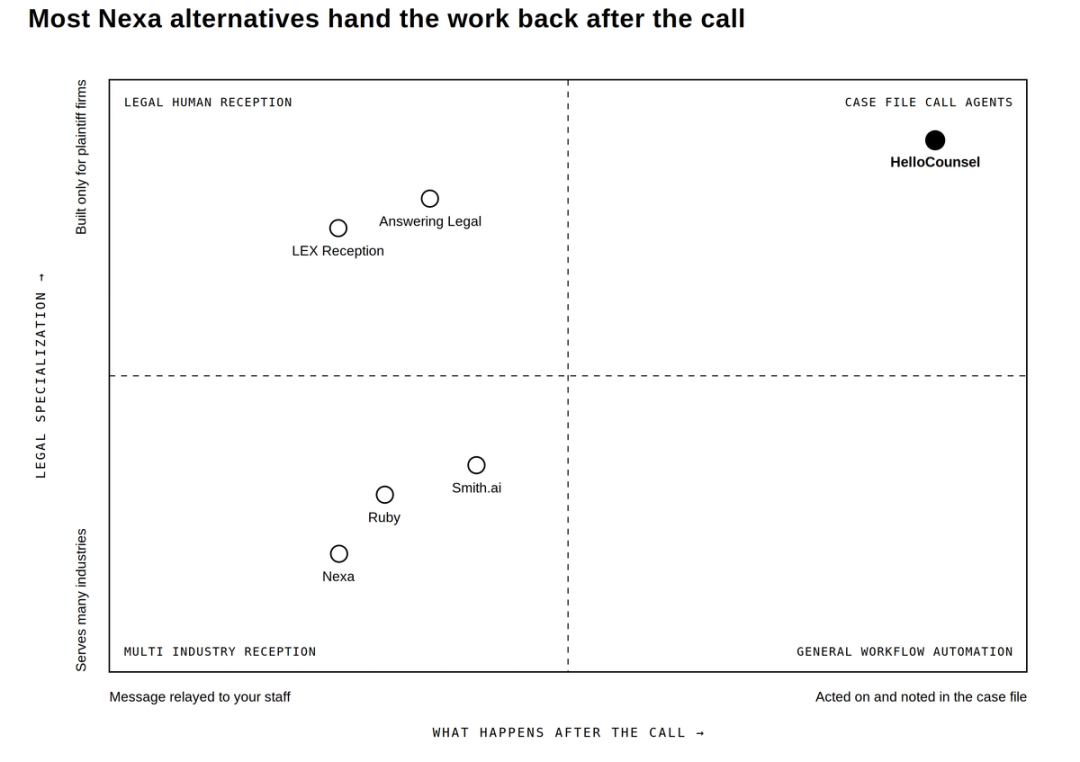
That is ultimately the useful distinction between the Nexa alternatives in this comparison. They do not merely price call answering differently. They leave different amounts and types of work with your firm after the interaction ends.
The decision should still start with your own call logs.
Bring one week of calls and one SOP to a HelloCounsel evaluation. We can map what your team handles today, what should remain human, which supported workflows could move to an agent, and what SmartAdvocate should contain when that work is finished. Book a call with the founders
Frequently Asked Questions
What are the best Nexa alternatives for personal injury law firms?
The best Nexa alternatives depend on the workload. Answering Legal and LEX fit human legal reception. Ruby and Smith.ai offer more pricing visibility. HelloCounsel fits plaintiff firms evaluating office-hours and after-hours reception alongside supported outbound workflows and case-file documentation.
Is Nexa a legal-only answering service?
No. Nexa serves legal alongside other industries. PI firms should test their own prospective-client, existing-client, provider, adjuster, and after-hours workflows rather than judging the service solely by its broader industry positioning.
Does Nexa publish its pricing?
Nexa currently publishes the features and included voice minutes for its 100, 300, and 500 plans, but not the final dollar prices on its public plans page. Firms need a quote to model the full cost.
Does Nexa make outbound calls?
Yes. Nexa 300 and Nexa 500 currently list inbound and outbound sales. PI firms should confirm whether that scope matches prospect follow-up, active-case operations, or the specific outbound workflow they want covered.
Which Nexa alternatives focus specifically on legal clients?
Answering Legal and LEX Reception focus on legal reception. HelloCounsel is narrower, providing AI voice agents for plaintiff law-firm workflows. Ruby and Smith.ai serve legal firms alongside customers in other industries.
Is per-call pricing better than per-minute pricing for a law firm?
It can be when conversations are long. Per-call pricing removes direct exposure to call duration, while minute pricing may work well for shorter calls. Compare both against your actual call count, duration, overage, and required workflows.
Should a PI firm use both human reception and AI voice agents?
It can. A firm may keep humans on sensitive first-touch calls while using AI for defined reception or repetitive operational workflows. The split makes sense only when each service owns a clear part of the workload rather than creating duplicate handoffs.
Share this article