AI for Plaintiff Law Firms
AI Receptionist vs Virtual Receptionist for Law Firms

- The AI receptionist vs virtual receptionist choice turns on one thing, which is whether the person or system answering can see the matter the caller is asking about.
- A virtual receptionist handles the new claimant call well and routes everyone else back to your team, since the service is locked out of your case management system.
- At 100 active cases, a case manager fields roughly 15,000 calls a year, and new intake accounts for only a few hundred of them.
- Ask any vendor for a transcript rather than a message, because four logged fields will not settle a dispute over how a caller was qualified.
- Virtual receptionists still fit firms with modest post-sign volume that prefer a human voice on the line, which is a stance rather than a compromise.
The AI receptionist vs. virtual receptionist comparison is usually framed as software against people. The more useful distinction is access, meaning whether whoever answers can open the matter the caller is asking about.
A virtual receptionist is a trained person at an off-site contact center working from a script your firm approves. They greet the caller, run the qualification questions you supplied, and pass a message back to your team. An AI receptionist is software that answers the line, runs the same qualification, and in the stronger implementations reads and writes your case management system while the call is still live.
That difference sets a ceiling on how much of a plaintiff firm's call volume either model can finish. New claimant calls need no file access, so both models handle them. Existing clients, medical providers, and adjusters are all calling about a specific matter, and a service locked out of that matter can only take a message and route it back.
For a firm whose log is mostly new intake, the two models are close substitutes. For a firm whose log is mostly existing matters, they are not comparable on the same terms. For a side by side comparison, see our list of the best AI receptionists for law firms.
What a virtual receptionist can see when your phone rings
A virtual receptionist sees your script, your practice areas, and whatever the caller volunteers. What they cannot see is your case management system, because the service has no access to it.
That constraint is structural rather than a service quality issue. Firms with excellent virtual receptionists hit the same wall, because the wall is a permissions boundary rather than a training gap.
The result is that any caller whose question depends on the file gets a message taken and a callback promised. Your case manager then returns the call, which means the work moved rather than disappeared.
Where each model's coverage ends on a plaintiff firm's line
The proportions matter here more than the capability list.
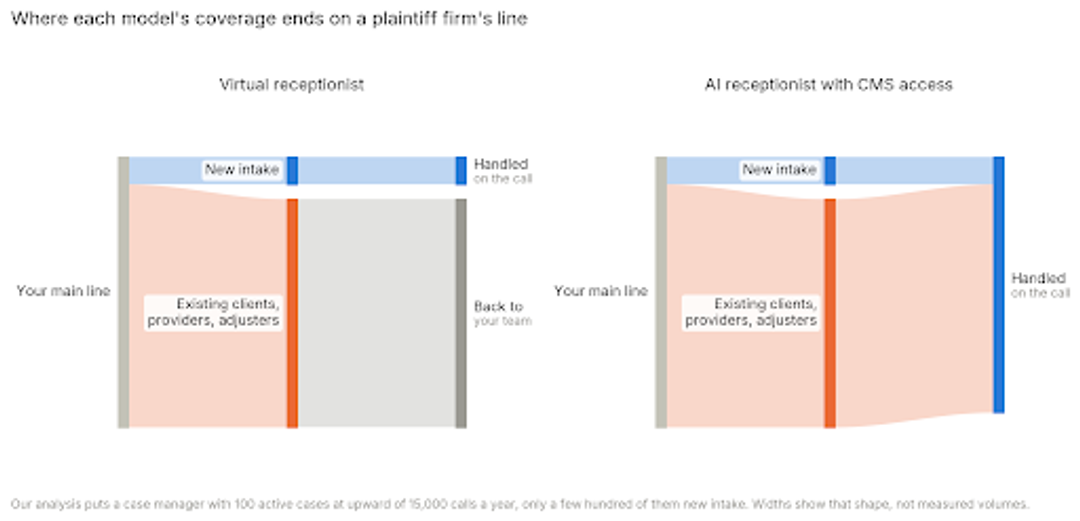
Intake is the thin band. Our analysis puts a case manager with 100 active cases at upward of 15,000 calls a year, and only a few hundred of those are new intake. The rest is treatment questions, record chasing, adjuster callbacks, and status updates.
A virtual receptionist covers the thin band cleanly and returns the thick one. That is why firms report solving their after-hours problem and finding the daytime workload unchanged.
Not every AI receptionist can see the matter
The category is wider than the label suggests, and the AI receptionist vs virtual receptionist comparison breaks down if you assume every agent has file access.
Plenty of AI receptionists answer, qualify against a script, and email you a summary. Of the five callers below they behave exactly like a virtual receptionist because they have the same permissions boundary and only a different voice.
The distinguishing capability is a two-way connection to your case management system: reading the matter during the call and writing the outcome back when it ends. Ask which specific systems a vendor connects to by name. A vendor that answers with "we integrate with most systems" or points at Zapier is describing a data export rather than live matter access.
This matters more than it sounds. An agent with a script and no file access solves your after-hours intake and nothing else, which is the same purchase as a virtual receptionist at a different price.
The after-hours problem and the daytime problem are different
Most firms buy for after-hours and then discover the daytime problem underneath it.
After hours, the question is whether anyone picks up at all. Voicemail loses the caller, which is the hidden cost of missed calls most firms only see in hindsight, and both models fix it equally well for a new claimant.
During business hours your phones are already answered. The problem is that answering them costs your case managers the day, and a service that takes messages adds a callback queue rather than removing work.
That is the half a virtual receptionist cannot reach, and it explains why firms with solid after-hours coverage still feel understaffed at 2pm. The arithmetic behind it sits in our breakdown of case manager workload.
Work out which of the two you are actually solving before you compare vendors, because the answer changes which model fits.
How the two models handle your five callers
Five caller types account for almost everything on a plaintiff firm's main line. Run any vendor against these rather than against a feature list.
The new claimant. Both models handle this well. A virtual receptionist runs your qualifying script and books the consult. An agent does the same and opens the matter, which removes a step your intake team would otherwise do in the morning.
The existing client asking about their case. A virtual receptionist takes a message, because the answer lives in a system they cannot open. An agent identifies the caller against the file, gives the current status, and logs the exchange to the matter.
The medical provider or records clerk. A virtual receptionist cannot confirm which request the clerk is calling about. An agent can match the call to the open records request and update its status, which matters because a returned provider call is hard to get back.
The adjuster. Verification is the problem. A virtual receptionist has no way to confirm the caller is who they say, so the call routes to staff. An agent verifies against the claim and captures what was said into the matter.
The solicitation call. Both screen these. The difference is cost rather than capability, and it lands differently depending on whether you pay per minute or per call.
What lands in your system after the call
The artifact each model produces is the part firms underestimate at purchase and feel at renewal.
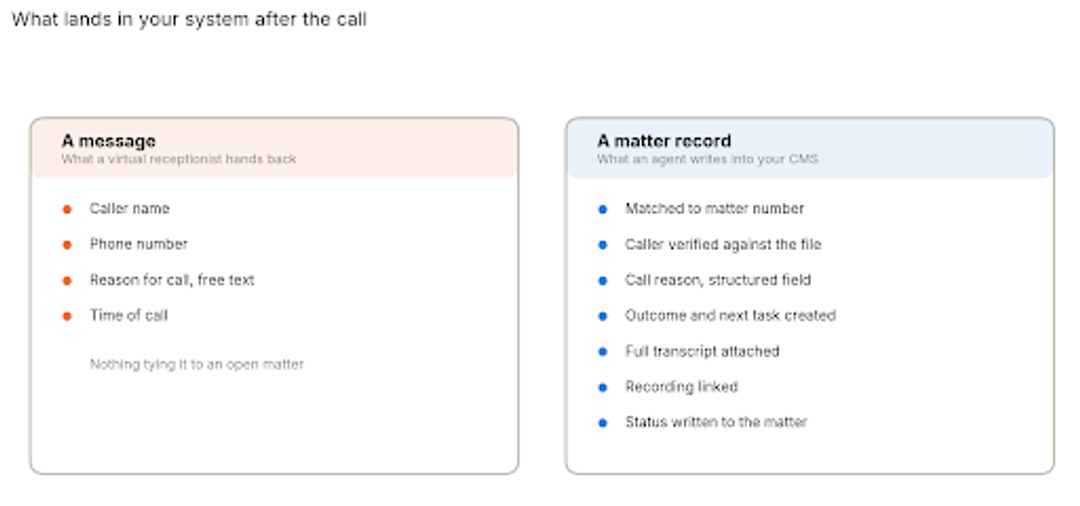
A message gives you the caller, the number, a free-text reason, and a time. Somebody then reads it, opens the matter, works out the context, and calls back.
A matter record gives you the same call already attached to the file, with the outcome and the next task in place. CMS write-back is what makes that difference, and it is the single capability worth checking hardest in a demo.
The transcript is the underrated half. When a firm believes a caller was handled wrongly, a transcript settles it in minutes, and a message log leaves you inferring what happened from four fields.
Mark up your own call log
Take one week of inbound calls and sort them into two piles: answerable from a script, and answerable only from the file. The ratio between those piles tells you which model fits, and it takes about twenty minutes. Book a demo
What the rules say about an AI voice on your line
Answering a call with an AI voice and placing one are treated differently, and firms often ask about the wrong half.
Inbound is the straightforward side. Nothing prohibits an AI agent from answering your main line, and the questions that arise are the ordinary ones about supervising non-lawyer assistance and protecting client information, which apply to a virtual receptionist just as much.
Outbound is where the rules bite. In a February 2024 declaratory ruling, the FCC confirmed that AI-generated voices count as "artificial" under the Telephone Consumer Protection Act, which brings outbound calls using them inside the Act's consent requirements. Statutory damages run at $500 per violation and up to three times that for willful violations under 47 USC 227(b)(3).
For a plaintiff firm that means follow-up calls to leads deserve a closer look than inbound answering does. Calls to your own signed clients about their matter sit on different footing from marketing calls to prospects who never contacted you, and any vendor selling outbound should be able to explain where its workflows sit on that line.
Recording consent is the other question worth asking. Several states require all parties to consent, so check how a vendor handles the disclosure and whether the setting varies by the caller's state rather than your own.
Where virtual receptionists still make sense
Three situations genuinely favour the human model, and none of them is a consolation prize.
Firms that want a person on every call as a matter of policy should hire a person on every call. That preference is legitimate, clients notice it, and no agent replaces it.
Firms with modest post-sign volume get less from matter access, since the thick band in the diagram above is thin for them. A solo practice with twenty active files has a different problem from a firm with four hundred.
Firms taking intake in languages beyond English and Spanish will find the human services broader. Most AI agents, ours included, cover two languages well and stop there.
What to ask during a pilot
Feature lists do not separate these vendors. Four questions during a trial do.
Give me a call where the caller was already a client. Listen to whether the caller had to explain who they were. That single recording tells you more than any capability matrix.
Show me where that call landed. Ask to see the record in your own system, not a screenshot from theirs. If the answer is an email, you have a message service.
What happens when the agent cannot resolve it? Escalation should be a configured rule with a named destination, not a transfer to whoever is free.
What does the transcript look like? Ask for a real one from your own pilot. Summaries vary in quality and transcripts do not.
Where HelloCounsel fits
HelloCounsel is our own product. It sits on the AI side of this comparison and was built for plaintiff personal injury work specifically.
The agent answers in under two rings at any hour and matches the caller to the case file before the call is handled. New callers run through your qualification criteria, and once a fee agreement lands the agent opens the matter, pulls the crash report, opens the insurance claim, and sends the Letter of Representation.
Post-sign calls run on the same agents. Medical records retrieval works provider phone trees and re-requests until the file arrives, treatment check-ins run after appointments at twice the frequency most firms manage manually, and lead follow-up closes the loop on callers who did not sign.
Direct integrations cover SmartAdvocate, Filevine, Litify, and Lead Docket, with custom builds for other systems. Across 30,000 calls and 500 hours of call time, firms working with us have seen a 48% improvement in call reception rates.
Pricing is fixed monthly from $500, scoped to expected volume with 20% tolerance either way. The cost comparison against metered answering services runs that math in full.
The limits are worth stating. English and Spanish only, it runs inside your case management system rather than replacing it, and firms tracking cases in spreadsheets are not a fit. Human escalation is available on any flow.
How to choose between an AI receptionist and a virtual receptionist
The ratio in your call log decides the AI receptionist vs virtual receptionist question. When the calls you lose are new callers outside business hours, a virtual receptionist solves that and costs less to set up.
If most of what you are missing is your own clients waiting on a callback, matter access is the thing you are buying, and a service without it will move the work rather than remove it.
Volume swing is the second factor. Metered human services price the busiest month highest, which is the argument for a fixed plan when marketing spend moves your call load.
Our guide to choosing a phone answering service covers procurement in order.
For the underlying volume, how many calls a PI case generates is the number to work from.
What to do before your next vendor call
Spend twenty minutes with last week's call log before you take another demo, sorting each call by whether a script alone could have closed it.
That ratio answers the AI receptionist vs virtual receptionist question more reliably than any comparison table, including this one. A log dominated by new callers points somewhere different from one dominated by existing clients, and both patterns are common.
Get a scoped figure against your own call mix
Send last week's call log split and your case management system. We will come back with a fixed monthly price, what it covers beyond intake, and a walkthrough on three of your own recordings. Talk to the HelloCounsel founders
Frequently asked questions
What firms ask most when weighing an AI receptionist vs virtual receptionist for a plaintiff practice.
1. What is the difference between an AI receptionist and a virtual receptionist?
One is staffed by people, the other by software. The practical split is permissions: most staffed services work from a script alone, while the stronger agents hold live access to the file the caller is asking about.
2. Can an AI receptionist handle existing client calls?
Yes, where the agent holds live access to your system. Without it, a client asking about treatment or an adjuster deadline gets the same message slip a staffed service would take.
3. Is an AI receptionist cheaper than a virtual receptionist?
Usually, since published AI plans charge a fraction of staffed per-call rates. The larger saving is staff time on calls that never reach your team rather than the invoice itself.
4. Do clients mind talking to an AI receptionist?
Reaching someone who can answer at the hour they call matters more to most callers than who answers. Sensitive call types can route straight to staff through escalation rules.
5. Which suits a small law firm better?
It depends on your caseload rather than your headcount. A practice carrying twenty open files rarely needs live case access, while one carrying two hundred feels its absence every afternoon.
6. What should a firm check in a pilot?
Ask for a recording of a call from an existing client, then ask to see where that call landed in your own system. An email summary rather than a matter record tells you what you have bought.
Share this article