Alternatives & Comparison
Best Alternatives to LEX Reception for Personal Injury Law Firms in 2026

- LEX Reception is still a strong human-first legal receptionist service: It provides 24/7 live answering, legal intake, outbound lead follow-up, scheduling, and legal-software integrations.
- The biggest LEX buying friction is pricing visibility: LEX explains that it bills by receptionist minute and rounds every call up to the next full minute, but the dollar rate remains behind a sales form or call.
- Do not reduce the comparison to inbound versus outbound: LEX, Ruby, Smith.ai, Alert Communications, and Back Office Betties all document some outbound capability. The real question is what outbound work they handle and whether it continues until the task is complete.
- Do not assume LEX creates manual re-entry on every call: LEX documents CRM and legal-tech integrations that can push new-contact and intake data into connected systems. Test the depth of that sync for existing matters before you buy.
- HelloCounsel is the different operating model in this list: It is built for plaintiff-firm call operations, including routine inbound calls and supported post-signature outbound workflows, with Smart Advocate as the currently confirmed live CMS integration.
- Choose by your actual call mix: Human-first coverage, per-call economics, mass tort scale, transparent rate cards, or end-to-end workflow completion lead to different winners.
Our Top Picks
- HelloCounsel: Best for PI firms that want inbound and post-signature call workflows completed and logged, not only answered.
- Answering Legal: Best for firms that want legal-trained, human-first 24/7 coverage with an all-inclusive feature set.
- Smith.ai: Best for firms that want per-call pricing and a choice between human-first and AI-first reception.
- Alert Communications: Best for high-volume legal intake, advertising campaigns, and mass tort surges.
- Ruby: Best for firms that want a premium human receptionist experience with fully published core pricing.
- Back Office Betties: Best for smaller law firms that want legal-only daytime coverage, precise minute billing, and a smaller receptionist team.
LEX Reception is relatively easy to understand and harder to price. It gives law firms 24/7 human answering, bilingual support, legal intake, live transfers, scheduling, outbound follow-up, document sending, payment taking, and integrations with legal software. Its billing mechanics are also clear: receptionist time runs from pickup to hang-up, and partial minutes are rounded up to the next full minute.
What LEX does not publish is the dollar rate. You submit your firm details or speak with sales to see the plan that applies to you.
If you are comparing LEX Reception alternatives, that lack of public pricing is only part of the reason to look around. For a personal injury firm, the more important question is whether a human, per-minute reception model still fits the way your phone operation works once most of the workload extends beyond new-client intake into active-case calls, records, treatment, insurers, and repeated follow-up.
Responsiveness is still worth solving. Clio's 2024 secret-shopper study found that only 40% of 500 law firms answered its test phone call, while 48% were effectively unreachable by phone even after callbacks. Clio's client-intake findings make a strong case for reliable coverage.
Once coverage is handled, though, the question changes. You are no longer asking whether somebody picks up. You are asking how much of the work created by that call is finished before your own team has to touch it.
Why PI Firms Still Compare LEX Reception Alternatives
LEX solves the missed-call problem well. Firms still compare LEX Reception alternatives when one of the following operating constraints matters more than the strengths of a human-only legal service.
1. You want pricing you can model before a sales call
Ruby, Smith.ai, Alert Communications, and Back Office Betties all publish at least part of their current rate structure. LEX does not publish dollar rates. For an operations leader comparing several vendors, that makes the first pass slower even though LEX is transparent about how minutes are counted.
2. Full-minute rounding does not fit your call mix
Per-minute pricing is not automatically bad. It simply makes duration and rounding part of the economics. A firm with many short status calls, wrong numbers, or quick routing calls can use billed minutes faster than actual talk time suggests. A firm with long, detailed intake calls may prefer per-call billing instead.
3. Your outbound work goes beyond lead follow-up
LEX has outbound follow-up, so the old claim that it is inbound-only is wrong. The better question is scope. LEX emphasizes prompt follow-up on inquiries, reminders, documents, and client or lead contact. A PI firm may also need repeated medical-record follow-up, treatment calls, insurance-claim opening, provider phone trees, and continued follow-up until a supported task is complete. Those are different outbound workloads.
4. You need deeper active-matter context on every call
LEX can use customized call flows and CRM integrations, but human reception still depends on the information exposed to the receptionist and the workflow configured for that call type. If your requirement is to identify an existing caller, load matter context, take notes in parallel, act against the current case phase, and continue supported follow-ups, evaluate that workflow end to end rather than treating every integration logo as equivalent.
5. You want AI economics or a hybrid model
LEX deliberately stays human-only. That is a strength for firms that want every caller to reach a person first. It is also the reason firms that want AI-first answering, hybrid escalation, or workflow automation will naturally evaluate a different category.
How We Ranked These LEX Reception Alternatives
We ranked the LEX Reception alternatives for a plaintiff-firm buyer rather than for a generic small business. The same criteria were applied to every option:
- Legal and PI workflow fit: How much legal context is built into intake and call handling?
- Pricing behavior: Is the model per minute, per call, or fixed, and can you see the rate before sales?
- Outbound scope: Does outbound mean lead callback, or can the service work post-signature operational calls too?
- Case-system behavior: Does call data reach the system of record automatically, and how deep is the mapping?
- Coverage model: Is it 24/7, business hours, human-only, AI-first, or hybrid?
- Operational fit: What work still lands on the firm after the vendor finishes its part?
The 6 Best LEX Reception Alternatives for PI Firms
| Alternative | Model | Published pricing | Best fit |
|---|---|---|---|
| HelloCounsel | AI voice agent, plaintiff-only | Custom fixed monthly | PI firms that want call workflows completed and logged |
| Answering Legal | Human, legal-only | Dollar rate not public | Human-first legal intake with bundled features |
| Smith.ai | Human-first or AI-first | Yes | Per-call economics and a human or AI choice |
| Alert Communications | Human plus AI options, legal-only | Yes for legal answering | High-volume PI and mass tort intake |
| Ruby | Human-first, multi-industry | Yes | Premium 24/7 human reception with transparent pricing |
| Back Office Betties | Human, legal-only | Yes | Smaller firms needing weekday legal reception and precise billing |
1. HelloCounsel: Best for PI firms that want call workflows completed, not only answered
Best for: PI firms that want call workflows completed, not only answered.
HelloCounsel is built specifically for plaintiff-firm call operations. For a direct side-by-side, see our HelloCounsel vs LEX Reception comparison. It answers routine inbound calls, identifies callers and matter context before the conversation, captures notes in parallel, and can carry supported outbound workflows such as records follow-up, treatment tracking, and insurance-claim work. Once an agent is invoked on a supported task, it can continue the required follow-ups rather than stopping after the first call. The point is not a more human-sounding greeting. It is moving the supported workflow forward and logging the result back to the matter.
Key Features
- Caller and matter identification: Uses caller information and relevant case context so existing-client, provider, insurer, and other supported calls do not start without context.
- Inbound and outbound workflows: Covers reception plus supported post-signature work such as medical-record follow-up, treatment-related calls, insurance-claim opening, and other repeatable administrative workflows.
- Case-management workflow support: HelloCounsel is designed to work alongside the firm's existing case-management system rather than replace it. Relevant matter context can support the conversation, while supported notes and outcomes are written back into the case workflow.
- Technology integration: The agents connect with the firm's operational stack so call handling, case context, documentation, and follow-up are not isolated in a separate receptionist tool.
- Confirmed case-management integrations: Current integrations include Filevine, SmartAdvocate, Litify, Lead Docket, and Clio.
- Parallel note capture: Captures relevant call information while the conversation is taking place instead of relying on a staff member to reconstruct the interaction later.
- Follow-through: Once invoked for a supported workflow, the agent can continue the required follow-ups according to the firm's defined process rather than stopping after one unsuccessful attempt.
- Firm-specific SOP execution: Agents are configured against the firm's own operating procedures and escalation rules rather than relying on a generic legal call script.
- Human escalation: Legal judgment, case valuation, negotiations, strategy, sensitive exceptions, and other work requiring professional judgment remain with the firm's people.
That integration depth is especially relevant when comparing LEX Reception alternatives. A contact synced into a CRM, a message delivered by email, and a supported outcome written into the active case workflow can all be called an “integration,” but they leave very different amounts of work with your team.
Pricing
Pricing is custom-scoped by the firm, with a fixed monthly figure based on the agreed licenses, usage, and expected volume. The model is outcome-oriented rather than minute-based, with a tolerance range around the scoped volume.
Pros and Cons
| Pros | Cons |
|---|---|
| Purpose-built for plaintiff-firm call operations. | Not a human receptionist service, so firms requiring a person on every call may prefer LEX or another live service. |
| Fixed monthly model avoids per-minute call-length exposure. | Smart Advocate is the only integration currently confirmed live internally. |
| Supported workflows can continue beyond the first call and write the outcome to the matter. | Not a case management system, demand-drafting tool, or substitute for legal judgment. |
For more on the operational difference between a call summary and a case-file update, see what CMS write-back means for a PI firm.
2. Answering Legal: Best for legal-trained human reception with an all-inclusive feature set
Best for: Legal-trained human reception with an all-inclusive feature set.
Answering Legal is the closest human-first alternative when legal specialization matters most. It serves law firms only, provides 24/7 U.S.-based live answering, bilingual English and Spanish support, custom legal intake, scheduling, overflow coverage, and direct integrations with common legal systems. It also offers a free trial and month-to-month service. The product is designed around live people, not an AI-first front desk. Firms moving off the service can review our list of Answering Legal alternatives for PI firms.
Key Features
- Legal-only receptionists: Staff are trained specifically for law-firm calls and intake.
- 24/7 live answering: Coverage includes after-hours and overflow calls.
- Custom intake: Firm-specific legal intake scripts are included.
- Direct integrations: Current materials name systems such as Clio Grow, Lawmatics, PracticePanther, and MyCase.
- Bilingual support: English and Spanish reception is included.
- Free trial and month-to-month service: Firms can test the workflow before a longer commitment.
Pricing
Answering Legal does not publish its dollar rates. Its help center describes pricing as flat-rate and all-inclusive, while its separate cost explainer says the service is billed by the minute. Read those together as a custom monthly plan sized around minute usage, and ask for included minutes, overage treatment, and the exact monthly number in writing before comparing it with LEX.
Pros and Cons
| Pros | Cons |
|---|---|
| Legal-only human experience. | Dollar pricing is still sales-gated. |
| Feature bundle reduces add-on complexity. | The public materials use both flat-rate and minute-based language, so the quote needs careful review. |
| Free trial lowers evaluation risk. | No dedicated post-signature PI operations layer is documented in the way a workflow-focused voice agent handles it. |
3. Smith.ai: Best for per-call pricing and a choice between human-first and AI-first reception
Best for: Per-call pricing and a choice between human-first and AI-first reception.
Smith.ai belongs on the shortlist because it lets a firm choose the operating model instead of changing vendors. Its Virtual Receptionists are human-first and available 24/7. Its separate AI Receptionist is AI-first, with live-agent involvement available. The human service supports intake, scheduling, warm transfers, payment collection, conflict checks, email and SMS follow-up, and instant outbound calls. Smith.ai also sells separate Outreach Campaigns for broader outbound work. If you already use Smith.ai, see our breakdown of Smith.ai alternatives for PI firms.
Key Features
- Two service models: Human-first Virtual Receptionists and a separate AI-first Receptionist.
- Per-call billing: Long intake calls do not keep a per-minute meter running.
- 24/7 bilingual coverage: Human Virtual Receptionists include English and Spanish.
- Legal workflows: Intake, conflict checks, scheduling, warm transfers, and payment collection are documented.
- Outbound capability: Instant outbound calls are included in the human receptionist feature set, with larger outreach campaigns sold separately.
- Integration options: Legal and general business integrations are available.
Pricing
Human Virtual Receptionist plans currently list 30 calls for $300 per month, 90 calls for $810, and 300 calls for $2,100, with overage from $11.50 down to $8.50 per call by tier. The separate AI Receptionist starts at $0 for 25 calls, with paid Pro from $150 for 75 calls and Enterprise from $500 for 300. Do not compare the AI plan directly with LEX as if both are human services.
Pros and Cons
| Pros | Cons |
|---|---|
| The per-call model can suit long legal intake calls. | Human workflow add-ons can raise the effective cost. |
| Published pricing makes budget modeling easier. | Not legal-only. |
| Firms can choose human-first or AI-first without changing vendors. | Broader outbound campaigns have separate pricing and setup. |
4. Alert Communications: Best for high-volume PI intake and mass tort surges
Best for: High-volume PI intake and mass tort surges.
Alert Communications is a legal-only intake operation built for scale. It combines 24/7 live answering, bilingual intake, conflict screening, retainer workflows, outbound calling, and direct connections to legal CRMs and case-management systems. Its strength is not a boutique receptionist feel. It is campaign capacity when a firm expects a large volume spike and needs prospects qualified and moved toward a retainer quickly.
Key Features
- Legal-only intake operation: Alert has served the legal market for decades.
- 24/7 bilingual coverage: Live teams handle calls around the clock.
- Mass tort and campaign capacity: Built for high-volume claimant surges.
- Outbound calling: Alert documents outbound calling as part of intake and marketing workflows.
- CRM and CMS integrations: Current materials document direct intake delivery to systems including Filevine, Lead Docket, Clio Grow, and CASEpeer.
- Retainer workflows: Qualified leads can move into e-sign retainer steps.
Pricing
Alert currently publishes legal answering at $2.50 per minute with a $100 monthly floor. Other intake and retainer workflows can have different pricing, so a firm using the full service should price the complete scope rather than applying the answering rate to every workflow.
Pros and Cons
| Pros | Cons |
|---|---|
| Strong legal and PI specialization. | A high-volume call-center model may be more than a smaller firm needs. |
| Best fit here for mass tort and advertising-driven surges. | Full intake and retainer pricing still needs scoping beyond the base answering rate. |
| Current answering rate is publicly visible. | Human staffing means cost still scales with usage. |
5. Ruby: Best for transparent 24/7 human receptionist pricing
Best for: Transparent 24/7 human receptionist pricing.
Ruby is the cleanest alternative when the firm likes the human-first model but wants to see the price before talking to sales. It provides 24/7 live receptionists, bilingual support, intake, scheduling, payment collection, transcripts, sentiment analysis, and outbound call assistance. It is a multi-industry service rather than a legal-only one, which is the main trade-off against LEX. Firms already on Ruby can compare Ruby Receptionists alternatives for PI firms in our separate guide.
Key Features
- 24/7 live reception: Human coverage includes nights, weekends, and holidays.
- Bilingual support: Spanish and bilingual call handling are available around the clock.
- Legal-friendly workflows: Lead qualification, intake, scheduling, and payment collection are included capabilities.
- Outbound assistance: Ruby currently documents outbound call assistance in all core plans.
- Transparent plan tiers: Core receptionist pricing is fully published.
- AI assistance: Transcripts, sentiment analysis, and AI-supported call flows are available without changing the human-first model.
Pricing
Ruby currently lists 50 minutes for $250 per month, 100 for $395, 200 for $720, and 500 for $1,725. The feature set is broadly the same across tiers, with the plan difference driven mainly by included minutes. Larger plans require a conversation with sales.
Pros and Cons
| Pros | Cons |
|---|---|
| Published pricing is easy to compare. | Not legal-only. |
| Strong reputation for a polished human caller experience. | Per-minute economics still rise with call duration and volume. |
| 24/7 coverage plus outbound assistance. | Public pricing does not show every overage detail a high-volume firm may need. |
6. Back Office Betties: Best for smaller firms wanting legal-only daytime coverage and precise minute billing
Best for: Smaller firms wanting legal-only daytime coverage and precise minute billing.
Back Office Betties is a useful contrast to both LEX and the large call-center model. It serves law firms only, keeps each firm on a relatively small receptionist team, supports custom legal intake and outbound calls, and bills actual call time instead of rounding every partial minute up. The trade-off is hours: Reception coverage is Monday through Friday from 5 a.m. to 5 p.m. Pacific, not 24/7.
Key Features
- Legal-only receptionists: U.S.-based staff are trained for law-firm calls.
- Smaller assigned team: The company says firms typically have 8 to 10 receptionists handling their account.
- Precise minute billing: A 2 minute 15 second call is billed as 2.25 minutes, not 3.
- Custom legal intake and routing: Workflows are designed around the firm.
- Outbound calls: Receptionists can contact clients, leads, or colleagues to gather or relay information.
- Clio Grow integration: Qualified leads can be sent into Clio Grow.
Pricing
New clients begin with a $399 Fit-to-Firm onboarding covering 30 days or 100 minutes, whichever comes first. Current monthly prices shown are $369 for 100 minutes, $686 for 200, $1,286 for 400, and $1,486 for 500. Annual billing is discounted by about 10 percent.
Pros and Cons
| Pros | Cons |
|---|---|
| Legal-only team and custom workflows. | Not 24/7. |
| No rounding on partial minutes. | Coverage is weekday daytime Pacific hours. |
| Published pricing makes comparison easier. | Clio Grow is the clearest named legal integration on the current pricing page, so firms on other systems should verify the exact workflow. |
Do Not Reduce This Decision to Inbound Versus Outbound
LEX, Ruby, Smith.ai, Alert Communications, and Back Office Betties all document outbound capability in 2026. The meaningful difference is what kind of outbound work gets done.
| Outbound question | Why it matters |
|---|---|
| What triggers the call? | A web-lead callback is different from a records follow-up generated by an active case. |
| What caller types are supported? | Leads and clients are only part of PI phone volume. Providers, insurers, lien holders, and vendors create post-signature work. |
| Does the workflow continue? | One attempted call is different from repeated follow-up until a supported task is complete. |
| What happens after the call? | A message, CRM contact, case note, task, and structured matter update are different outcomes. |
| Who handles exceptions? | The right system should know when to escalate to a case manager or attorney rather than improvising. |
For a PI firm, that distinction matters because the phone does not stop after the retainer. HelloCounsel's analysis of how many calls a PI case generates shows why client, provider, insurer, and lien-holder calls create a separate operational layer. The relevant question is how much of that layer a vendor actually owns.
LEX Integrations Are Real, but Test the Depth
LEX states that it can add new contacts automatically to connected CRMs and sync data in real time in some workflows. That is meaningful but the real remaining diligence question is scope.
A new-lead record pushed into a CRM is not the same as updating the correct active matter with a provider status, task, transcript, or next action. Ask the vendor to demonstrate your exact workflow inside your exact system. If you use Smart Advocate, HelloCounsel has a live integration there.
Use this CMS write-back checklist to separate a contact sync, a message push, and a true matter-level update during vendor demos.
How to Choose the Right LEX Reception Alternative
| If your firm needs… | Start with… | Why |
|---|---|---|
| Human-only, legal-trained 24/7 reception | LEX or Answering Legal | Both are legal-focused and built around live receptionists. |
| Published pricing before a demo | Ruby, Smith.ai, Alert, or Back Office Betties | Each publishes meaningful current pricing information. |
| Per-call instead of per-minute billing | Smith.ai | The human receptionist product charges by call, which can suit long intakes. |
| Mass tort or campaign surge capacity | Alert Communications | Its operating model is built around high-volume legal intake and retainer workflows. |
| Legal-only support with a smaller team and no rounding | Back Office Betties | A fit for firms that can live with weekday daytime coverage. |
| Inbound plus post-signature PI workflow completion | HelloCounsel | The product is built around plaintiff call operations rather than reception alone. |
Whatever the shortlist, pull at least three months of call data before the first demo. Split calls by inbound versus outbound, pre-signature versus post-signature, caller type, duration, and action required afterward. That reveals whether you are buying reception coverage, intake capacity, or a workflow layer.
Practical Tip
Do not ask each vendor to run its favorite demo. Give every shortlist vendor the same five real PI scenarios: A new lead, an existing client status call, a provider records update, an adjuster callback, and an outbound follow-up that fails on the first attempt. Compare what the vendor completes, what it escalates, and what appears in the case system afterward.
If AI Is on the Shortlist, Add a Governance Check
A human-only service like LEX avoids some AI-specific questions. If you are comparing HelloCounsel, Smith.ai's AI Receptionist, or another AI voice product while choosing LEX Reception alternatives, add security, supervision, and escalation to the evaluation. ABA Formal Opinion 512 emphasizes lawyers' continuing duties around competence, confidentiality, communication, and supervision when using generative AI tools. Read ABA Formal Opinion 512.
For voice workflows, the operational version is straightforward: Know what the agent can do, what data it can access, what it is prohibited from deciding, when it hands the matter to a person, and what record of the interaction lands in the file. No receptionist or AI agent should independently provide legal advice, value a claim, determine liability, or make legal strategy decisions.
The Bottom Line
The best LEX Reception alternative depends on which part of the model you want to change. Answering Legal is the closest human-first legal specialist. Smith.ai changes the billing unit and lets you choose human-first or AI-first. Alert is built for high-volume legal intake. Ruby gives you a transparent premium human rate card. Back Office Betties gives smaller firms legal-only daytime support with precise minute billing. For a wider look at live services, see our guide to the best legal answering services for PI firms.
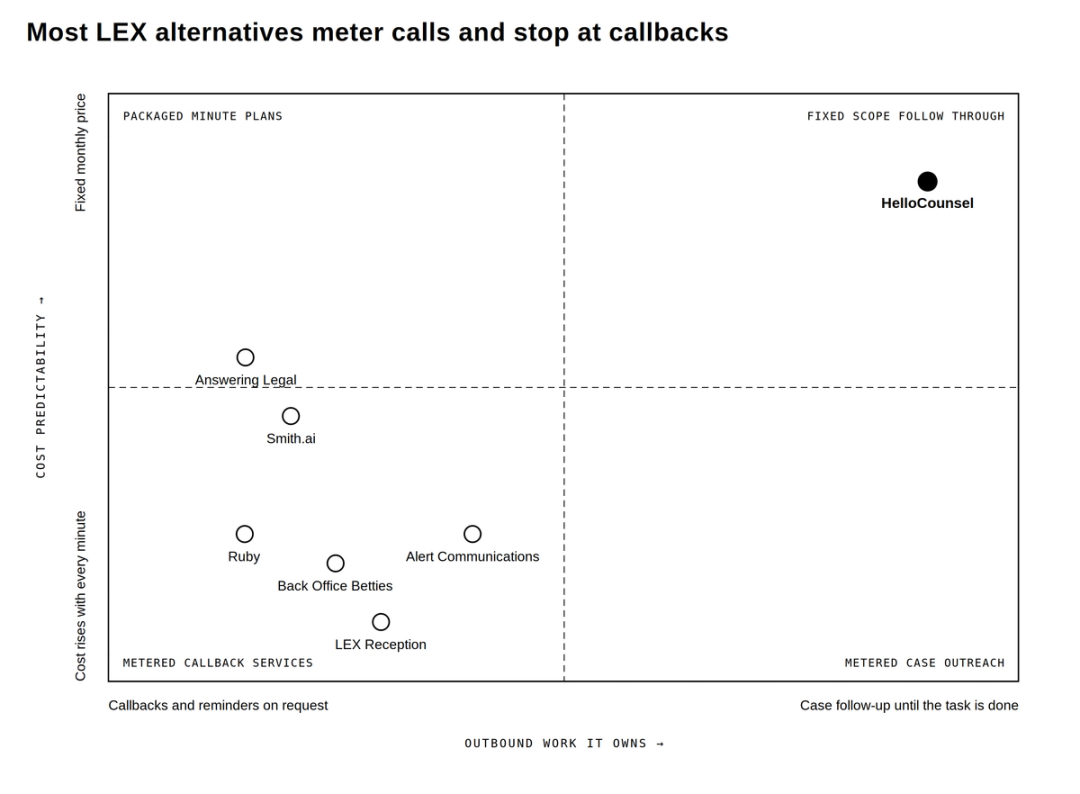
HelloCounsel is the different answer because it is built for plaintiff-firm call operations rather than reception as a standalone service. If your problem is that active-case calls, records follow-up, treatment work, and repeated outbound tasks still land on case managers after reception is covered, compare the workflow that gets completed, not only who answers first.
If that is your bottleneck, see how HelloCounsel handles inbound and outbound PI workflows with our team.
Frequently Asked Questions
What are the best LEX Reception alternatives in 2026?
For PI firms, the strongest LEX Reception alternatives are HelloCounsel for workflow-focused call operations, Answering Legal for human-first legal reception, Smith.ai for per-call human or AI service, Alert Communications for mass tort and high-volume intake, Ruby for transparent 24/7 human pricing, and Back Office Betties for smaller firms wanting legal-only daytime support.
Does LEX Reception publish its pricing?
LEX publishes the pricing model but not the dollar rate. It bills by receptionist minute, rounds partial minutes up to the next full minute, and asks prospects to submit details or call sales to see plan pricing.
Does LEX Reception make outbound calls?
Yes. LEX documents outbound follow-up for leads and clients, including prompt lead response, reminders, document sending, and related follow-up. The question for a PI firm is whether that scope covers the post-signature workflows it wants to remove.
Does LEX Reception integrate with legal software?
Yes. LEX lists integrations with systems including Clio, MyCase, PracticePanther, Filevine, and Lawmatics, and says contact or intake data can sync into connected systems. Ask the vendor to demonstrate the exact fields and active-matter workflows you need.
Is Answering Legal cheaper than LEX?
You cannot determine that from public rate cards because neither publishes a simple dollar plan comparison. Answering Legal describes an all-inclusive monthly model sized around minute usage. Get both quotes against the same three months of call data and compare the billable-unit rules.
Is Smith.ai a direct alternative to LEX Reception?
Yes, if you need receptionist and intake coverage, but choose the right Smith.ai product. Its human Virtual Receptionists are the closer like-for-like comparison. Its AI Receptionist is a separate AI-first service with different pricing.
Which LEX alternative is best for a high-volume PI firm?
If the volume is primarily campaign-driven intake, Alert Communications is built for mass tort and advertising surges. If the volume is active-case phone work across clients, providers, insurers, records, and treatment, evaluate a workflow-focused plaintiff voice agent such as HelloCounsel.
Is HelloCounsel a direct LEX Reception alternative?
It overlaps on reception and intake, but the operating model is different. LEX is a human legal receptionist service. HelloCounsel is a plaintiff-focused AI voice agent built to handle supported inbound and post-signature call workflows and write outcomes back to the case file.
Should I choose a human receptionist or an AI voice agent?
Choose a human-first service when every caller must reach a person and empathetic live reception is the primary requirement. Choose an AI or workflow-focused agent when repeatable call volume, post-signature follow-up, faster context retrieval, and automated documentation are the larger bottlenecks. Many firms may use a mix.
Share this article