What to Look for in Inbound Call Center Software for Law Firms

- Inbound call center software for law firms covers three different products: contact center platforms that route calls to your staff, answering or intake services that put outsourced people on your line, and AI voice agents that answer and complete the call.
- Most calls to a plaintiff firm come from people already attached to a case, such as existing clients, medical providers, and adjusters, so software built only around lead capture misses most of the volume.
- The features that separate law firm software from generic call center tools are caller ID matched to the case file, routing by case data, and notes written back to the case management system.
- Call recording rules differ by state, with federal law allowing one-party consent and states such as California requiring the consent of all parties, so recording notices need to fit the strictest state involved.
- Before signing, test any vendor on a week of your real calls, including status checks, provider callbacks, and adjuster messages, and ask to see the exact note it writes to the case file.
Most of the people who call a personal injury firm aren't new leads. They're existing clients asking where the case stands, medical providers chasing a bill or a records request, and adjusters returning a call about liability or policy limits. When software for the firm's main line is chosen with intake in mind, those calls, which fill most of a case manager's day, barely figure in the decision.
That caller mix is the first thing to understand before you compare inbound call center software for law firms, because the label covers three different products:
- Contact center platforms: Route each call to your own staff through phone menus, queues, and routing rules.
- Legal answering and intake services: Put an outsourced receptionist on your line to take a message or run an intake script.
- AI voice agents: Answer the call, match the caller to the case file, and finish routine requests, transferring the rest to your staff.
Each one handles that caller mix differently. A platform decides which of your people the call reaches, a service decides who takes the message, and an AI voice agent decides whether the call needs a person at all, which is why the question of who is calling settles more of the choice than any feature list.
Five kinds of callers reach a plaintiff firm's main line
As per our estimate, a case manager carrying 100 cases fields roughly 15,000 calls a year, and only a few hundred of them are new intake. The rest come from people already attached to a case, which is why the number of calls a PI case generates shapes what the software has to do the moment the phone rings.
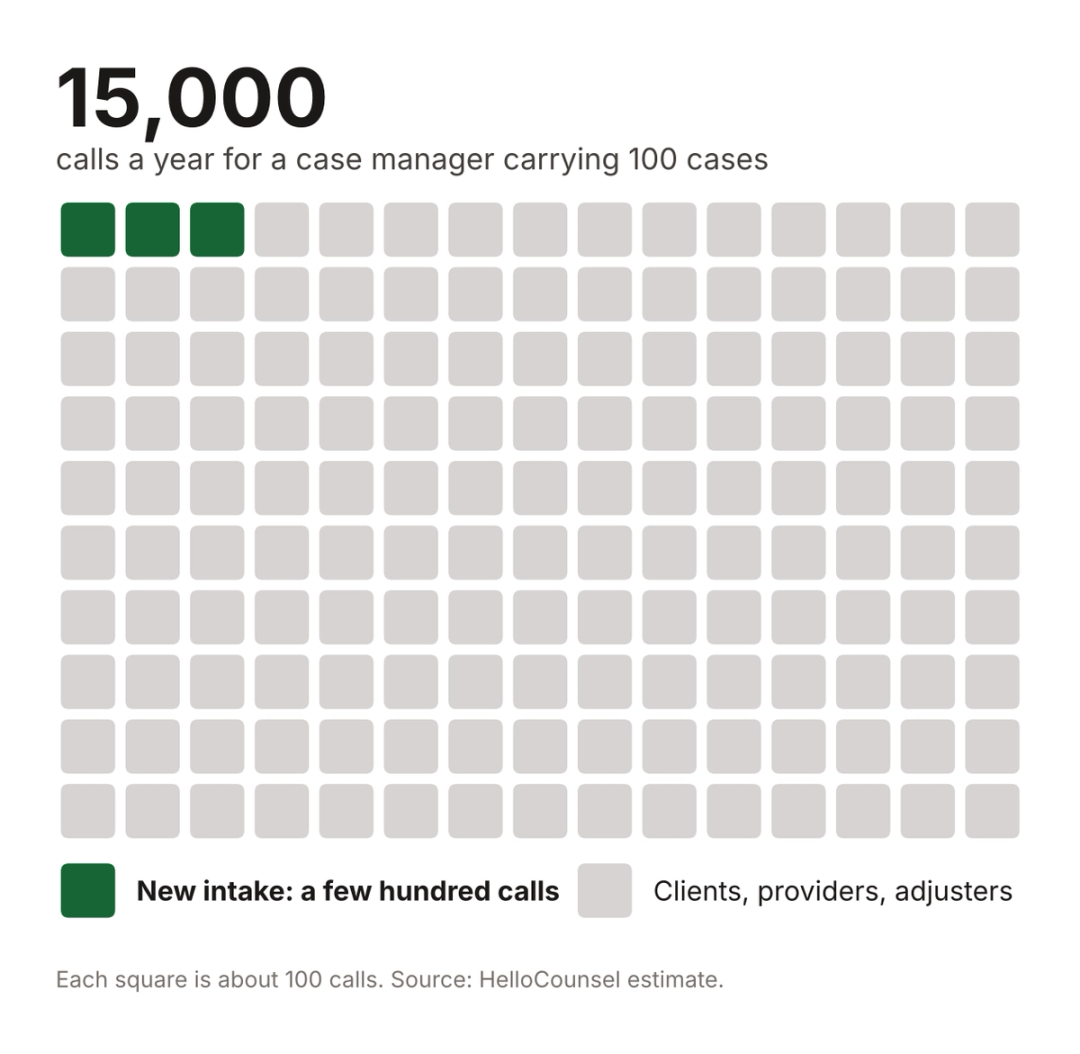
Software designed around lead capture handles the smallest slice of that volume well and passes everything else to whoever is free. Each caller type asks something different of the system, starting with the one vendors usually design for first.
New prospective clients
A prospective client often calls more than one firm, so the first requirement is that someone answers. In the secret shopper study behind the 2024 Clio Legal Trends Report, only 40% of law firms answered the phone, down from 56% in 2019. As per our estimate, PI firms miss 35 to 50 percent of inbound calls during business hours alone, before after-hours calls are counted.
This caller needs an immediate answer at any hour, an intake path that applies your firm's criteria, and a quick hand-off to whoever signs cases. Overnight and weekend calls are where coverage usually breaks, and after-hours intake for personal injury firms works differently with an AI voice agent than with an answering service.
Existing clients
Existing clients call far more often than new leads, and most want one thing: where the case stands. A routing system can send that call to the assigned case manager, though it can't answer it, so the call lands on a person who may be in a meeting, on another line or out for the day.
Software that fits this caller recognizes the number, pulls the matter from the case management system, and either answers the status question from the file or transfers to the right person with the matter already open. The call then needs to be logged to the matter through CMS write-back, since a status call that never reaches the file tends to get made again the following week.
Language support carries extra weight with this group. A Spanish-speaking client may call dozens of times over the life of a case, and a system that handles Spanish only through a separate queue or an interpreter line adds a delay to every one of those calls.
The right person also changes as the case moves. In the first days after signing, a client's questions belong with intake or case opening, during treatment with the case manager, and after a demand goes out with whoever is handling negotiation, so routing that reads the case stage sends the call to the person who can actually answer it.
Medical providers and billing offices
Providers call about records requests, outstanding bills, and lien balances, and they usually need a specific person, such as the records specialist or the case manager on the matter. The software should identify the provider, attach the call to the right case, and route by role instead of to whoever happens to be free.
These calls are often callbacks on requests your firm started, so the context already sits in the file. A system that logs each provider call to the matter keeps medical records follow-up from restarting at zero every time a records clerk calls back. Lien holders and health insurers asking about subrogation follow the same pattern, needing the matter identified before anyone can say anything useful.
Insurance adjusters
Adjusters call with claim numbers rather than client names, keep business hours, and expect to reach the case manager. The software should match a claim number or adjuster name to the matter and route to the assigned case manager, and when that person is unavailable, take an exact message with the claim number, the adjuster's direct line, and the reason for the call.
Adjuster calls are often the ones a case is waiting on, such as a liability decision, a policy limits answer, or a request for a recorded statement. A message missing the claim number or the callback line can turn a five-minute return call into two days of phone tag.
Vendors, solicitors, and wrong numbers
Marketing calls, vendor pitches, and wrong numbers take seconds each but interrupt whoever answers. Good software screens them out before they reach a case manager and logs them, so a run of spam on one line shows up in reporting.
Features that decide whether call center software fits a law firm
Vendors selling inbound call center software for law firms all list routing, recording, and analytics. The differences that matter to a plaintiff firm sit in how those features connect to the case file.
| Feature | What it does for a law firm | What to ask the vendor |
|---|---|---|
| Caller ID matched to the case file | Recognizes existing clients, providers and adjusters before anyone says hello | Does it match numbers against our case management system or only a separate contact list? |
| Routing by case data | Sends the caller to the person assigned to that matter | Can routing rules read the assigned case manager and the case stage? |
| Case management system write-back | Puts a note, summary and transcript in the matter | Which systems does it write to directly, and what does each note contain? |
| After-hours and overflow coverage | Answers when every line is busy or the office is closed | Who answers at 9 p.m., and where does that call end up? |
| English and Spanish handling | Serves Spanish-speaking callers without a second queue | Can one call switch languages partway through? |
| Warm transfer with context | Passes the caller to a person along with the reason for the call | Does the person receiving the transfer see the matter and the reason? |
| Reporting by caller type | Shows volume from clients, leads, providers and adjusters separately | Can we see unanswered calls by caller type and by case? |
| Recording with consent controls | Plays the right notice and stores recordings securely | Can the notice vary by state, and who can access stored recordings? |
The first three rows separate software built for a law firm from software adapted to one. A platform that routes well but can't read the case file still leaves your staff looking up every caller by hand. The remaining rows carry weight in proportion to your call mix, so a firm with a large Spanish-speaking client base should weigh language handling as heavily as routing.
Watch a call routed on case data
See HelloCounsel recognize an existing client from caller ID, pull the matter from the case management system, and warm-transfer the call to the assigned case manager. Book a call routing demo
Call recording consent rules differ by state
Recording is a standard feature in contact center software, and the law that governs it isn't uniform. Federal law permits recording when one party to the call consents, under 18 U.S.C. § 2511(2)(d).
Several states set a stricter rule. California's Penal Code § 632 prohibits recording a confidential communication without the consent of all parties, so a firm taking calls from clients in more than one state needs a notice that satisfies the strictest state involved, confirmed with counsel for each jurisdiction.
Ask every vendor how its recording notice is configured, whether it can vary by caller location, and who can access stored recordings, since those files hold confidential client information.
The same question applies to call transcripts and notes. Model Rule 1.6(c), reflected here in Minnesota's version, requires a lawyer to make reasonable efforts to prevent unauthorized disclosure of or access to client information, so ask where call data is stored, whether it's encrypted at rest and in transit, and who at the vendor can see it.
Routing software still needs a person at the end of every route
A contact center platform, the most established form of inbound call center software for law firms, works as a switchboard with rules. It decides which phone rings, and when every phone in the group is busy, it holds the caller in a queue, offers a callback or sends the call to voicemail.
That model fits a firm with enough intake and case staff to cover its busiest hours. Seats are typically priced per agent, so coverage grows only with headcount, and the hours with the most calls need the most seats while quiet hours leave some of them idle.
Phone menus add their own friction for a law firm. A client who presses the new-case option because it's the first one offered lands with intake, and a provider who can't find a records option often picks the operator, so menus work best when the system already knows who is calling and skips the menu entirely.
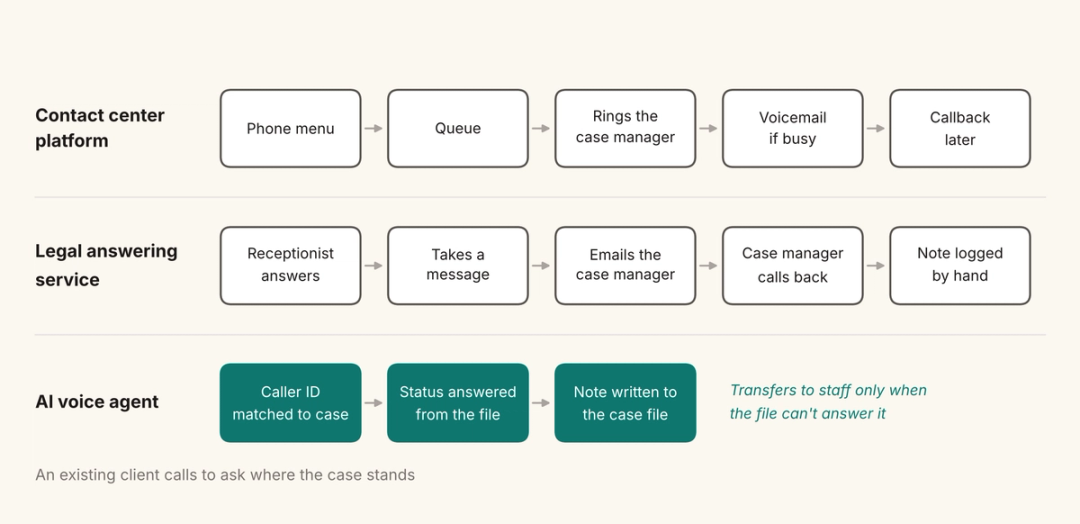
Legal answering services add people to the line, though without case context a status call usually ends as a message for the case manager to return. The comparison of legal answering services for PI firms shows how much that varies by provider.
How an AI voice agent works with your phone system and case file
An AI voice agent, the newest option in inbound call center software for law firms, sits on the same phone system and answers the call itself instead of placing it in a queue. HelloCounsel builds AI voice agents for plaintiff personal injury firms, and its agents answer in under two rings, after hours, on holidays and during overflow.
HelloCounsel's AI receptionist matches caller ID to the case file before answering, answers status questions from the file, and routes other calls on case data with a live check that the right person is free. If that person is busy, the agent schedules a callback, and every call is written into the case file as a note the whole team can see.
The HelloCounsel dashboard reports call volume by caller type, transfer rates and clients who haven't been reached, which gives you the caller-type breakdown without exporting and sorting call logs by hand.
New callers go through AI intake against your firm's criteria, and the agents handle English and Spanish on the same call, including a switch partway through. HelloCounsel connects to phone systems, including RingCentral and Zoom, and writes to case management systems such as Filevine, Litify, SmartAdvocate, CASEpeer, and MyCase.
HelloCounsel has handled more than 30,000 calls, and firms using it have seen a 48% improvement in call reception. Pricing is custom and based on your firm's call and case volume, not on seats, and the receptionist is priced at a quarter of the cost of virtual receptionists.
Settlement conversations, legal advice, and anything outside your firm's defined workflows go to your staff by warm transfer. When a question goes beyond what the file holds, the agent transfers the caller or schedules a callback with the right person. HelloCounsel is built for personal injury firms whose case managers spend their days on calls that a system with case context could answer.
Call metrics that show whether the software is working
Every platform produces a dashboard, and the default numbers can mislead a law firm. Answer rate tells you whether calls were picked up, though it says nothing about whether the caller got an answer or the matter reached the right person.
Track answered and unanswered calls by caller type, since a 90% answer rate can hide the fact that most of the missed calls were existing clients asking for status. Average handle time works the same way: a short call is only better if the required information was captured and the next action was completed.
Two numbers matter more for inbound call center software for law firms than any default chart. One is time from a missed or transferred call to the callback, and the other is the share of calls that produced a note in the matter, because a call that never reaches the case file has to be reconstructed by whoever takes the next one.
How the three software categories compare on staffing, pricing, and rollout
The three categories differ in who ends up talking to the caller and in how each one is priced, which shapes the rollout as much as the feature list does.
| Category | What it does when the phone rings | Who talks to the caller | Usual pricing basis |
|---|---|---|---|
| Contact center platform | Queues the call, plays a phone menu, and routes it to an available staff member by the rules you set | Your staff | Per agent seat, per month |
| Legal answering or intake service | Forwards the call to an outsourced receptionist who takes a message or runs an intake script | The service's receptionists | Per minute, per call or a monthly plan |
| AI voice agent | Answers, identifies the caller against the case file, completes routine requests and transfers the rest | An AI voice agent, with your staff on transfers | Varies by vendor; HelloCounsel prices on call and case volume |
A contact center platform usually means porting or forwarding your numbers, building phone menus and routing groups, connecting the platform to your case management system where an integration exists, and training staff on the new desktop. The routing rules are only as current as whoever maintains them, so plan for an owner after launch. Whichever category you choose, write down the routing rule for each caller type before kickoff, because that document becomes the configuration brief for a platform, the script for a service, and the SOP for an agent.
An answering or intake service is faster to start, since it mostly means forwarding calls and agreeing on scripts and message delivery. The ongoing work sits with your team, which reads each message, acts on it, and logs it to the matter.
Rolling out an AI voice agent involves connecting it to your phone system and case management system, configuring scripts and SOPs, and running live test calls before launch. HelloCounsel's onboarding follows that sequence, and firms typically go live with HelloCounsel in under two weeks.
Questions to ask every vendor during a trial
A demo shows the software at its best, while a trial on your own numbers shows how it handles the calls your firm actually receives. Take these to every vendor on your shortlist:
- Your real caller mix: Ask the vendor to handle a week of live calls, including status checks, provider callbacks and adjuster messages, beyond new leads.
- The busy-line test: Ask what happens to the caller when every person in the routing group is already on a call.
- The note in the file: Ask to see the exact note written to your case management system after a status call.
- The Spanish call: Ask for a test call that starts in English and switches to Spanish partway through.
- The unanswered-call report: Ask for a report of unanswered calls by caller type at the end of the first week.
AI vendors also deserve a transcript review against your firm's SOPs, and the criteria for evaluating an AI voice agent for your law firm go deeper on scoring that pilot. Run the trial during an ordinary week, since a holiday week's call mix tells you little about how the software will handle a Monday after a marketing push.
A week of your own call log shows which software category fits
Choosing inbound call center software for law firms starts with your own data, so before comparing vendors, pull a week of inbound calls and sort them into new leads, existing clients, providers, adjusters, and noise. If new leads make up most of the log and you have the intake staff to cover peak hours, a contact center platform can do the job.
If existing clients, providers, and adjusters dominate, the deciding question is whether the software can read the case file and finish the call. That points toward an AI voice agent working on top of your phone system, with your staff taking the calls that need judgment.
A mixed log often suits both: a contact center platform for the intake team's routing and an AI voice agent on overflow, after hours, and for existing-client calls. Starting the agent on overflow and after-hours calls first lets you compare its notes with your staff's before giving it more of the line.
Either way, count the calls nobody answered. A missed lead and a missed client status call cost the firm in different ways, and the hidden cost of missed calls at a PI firm puts numbers on both.
Review your inbound call mix with HelloCounsel's founders
Share a week of inbound call volume by caller type and see which calls an AI voice agent would answer and which would route to your staff. Book a call to review your inbound calls with the founders
Frequently asked questions about inbound call center software for law firms
1. What is inbound call center software for law firms?
It is software that handles calls coming into a law firm. The category includes contact center platforms that route calls to staff, answering or intake services that use outsourced receptionists, and AI voice agents that answer, identify the caller, and log the call.
2. Is a contact center platform the same as a legal answering service?
No. A contact center platform routes calls to your own staff using queues and phone menus, while a legal answering service puts its own receptionists on your line. One gives you routing tools, and the other gives you people who answer.
3. Which features matter most in law firm call center software?
For a plaintiff firm, caller ID matched to the case file, routing by case data, and notes written back to the case management system matter most. After-hours coverage, English and Spanish handling, warm transfers with context, and reporting by caller type come next.
4. Can law firms record inbound calls?
Federal law allows recording with one party's consent, but states such as California require the consent of all parties to a confidential call. Firms taking calls across states should use a notice that meets the strictest rule and confirm requirements with counsel.
5. How is inbound call center software priced?
Contact center platforms usually charge per agent seat each month, and answering services charge per minute, per call, or by monthly plan. HelloCounsel's pricing is custom, based on your firm's call and case volume rather than on the number of seats.
6. Does HelloCounsel handle both inbound and outbound calls?
Yes. HelloCounsel answers inbound calls with caller ID matched to the case file and places outbound calls such as client check-ins and medical records follow-up. Every call is written to the case file, and calls needing judgment go to your staff.
Share this article