Virtual Receptionist vs In-House Receptionist: Cost and Trade-offs for Plaintiff Firms

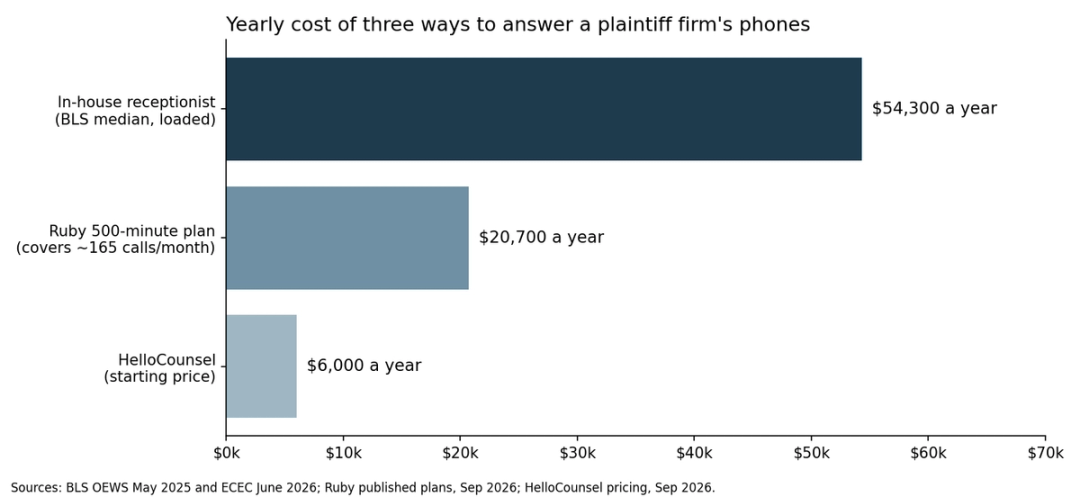
- In-house cost: An in-house receptionist at the BLS median of $38,010 costs a firm about $54,300 a year once benefits are added, before recruiting, training, or backup coverage.
- Coverage gap: One full-time receptionist covers about 40 of the week's 168 hours, so evenings, weekends, lunch, and sick days still need a plan.
- Virtual cost: Virtual receptionist plans bill by the minute, and Ruby's published rates run from $5.00 down to $3.45 a minute.
- Volume ceiling: A plaintiff firm taking about 1,200 calls a month outgrows published virtual receptionist plans quickly, since they top out at 500 minutes.
- Where each wins: In the virtual receptionist vs in-house receptionist split, in-house wins on walk-in clients, paperwork, and referral relationships, while virtual wins on after-hours and overflow coverage.
- Shared gap: Both models answer inbound calls and hand the follow-up back to your team, so provider, adjuster, and client-update calls still land on case managers.
- Third option: HelloCounsel's AI voice agents answer every call, place outbound follow-ups, and write notes to the case file on fixed pricing from $500 a month.
A receptionist in the US earned a median of $38,010 in May 2025, according to the Bureau of Labor Statistics. Benefits make up another 30.0% of private-industry compensation, so one in-house receptionist costs roughly $54,300 a year for about 40 hours of coverage a week.
Virtual receptionists swap the salary for a per-minute bill and answer the phone at 9 p.m. For a busy plaintiff firm, every minute counts toward that bill, and a TV campaign month can double it.
The virtual receptionist vs in-house receptionist decision comes down to three questions: what each costs at your real call volume, which hours each covers, and what happens to the work once the call ends. HelloCounsel adds a third option, AI voice agents on a fixed monthly price that holds when the phones get busy.
| Factor | In-house receptionist | Virtual receptionist |
|---|---|---|
| Fixed monthly cost | Yes. Salary plus benefits, about $54,300 a year | No. Billed by the minute, $3,000 to $20,700 a year on Ruby's published plans |
| Covers nights and weekends | No. About 40 of 168 hours a week | Yes. Up to 24/7 |
| Handles surge months at no extra cost | No. One person takes one call at a time | No. Surges are covered, and every extra minute is billed |
| Knows your clients personally | Yes, over time | No. Agents rotate |
| Handles walk-ins, mail, and documents | Yes | No |
| Places outbound case follow-up calls | No. Rarely has the time | No. Outside the core service |
| Writes notes into your case management system | No. Depends on someone typing them | No. Messages arrive by email or app |
What Is an In-House Receptionist?
An in-house receptionist is a firm employee who sits at the front desk, answers the main line, greets visitors, and handles the office's first layer of admin work.
At a plaintiff firm, the role grows past the phone. The best receptionists know which clients are in treatment, which adjuster calls every Tuesday, and which referral attorney expects a partner on the line. That knowledge takes years to build, which is why a long-time receptionist is hard to replace.
An in-house receptionist helps a firm in five ways:
- Answer the main line: Greets callers by name and routes them to the right person in the building
- Receive visitors: Checks in clients, witnesses, couriers, and vendors
- Handle paperwork: Sorts mail, scans records that arrive by fax or post, and manages deliveries
- Protect relationships: Recognizes referral sources and long-time clients without a script
- Cover light admin: Scheduling, supply orders, and whatever else lands on the front desk
What an In-House Receptionist Really Costs
Salary is the first line in any virtual receptionist vs in-house receptionist comparison, and only the start. A fully loaded cost adds benefits, hiring, training, and the coverage gaps one person cannot fill.
Salary
BLS reports a median annual wage of $38,010 for receptionists as of May 2025. Firms in higher-cost metros pay more, and a legal receptionist handling intake questions often commands a premium.
Benefits and the loaded number
In the BLS Employer Costs for Employee Compensation release for June 2026, wages made up 70.0% of private-industry compensation and benefits made up 30.0%. Applied to a $38,010 salary, that implies about $54,300 a year, or roughly $4,525 a month.
Did You Know
Private-industry benefit costs rose 3.8% in the 12 months ending June 2026, faster than wages at 3.1%, according to the BLS Employment Cost Index. A receptionist's loaded cost rises each year even without a raise.
Costs outside the paycheck
- Recruiting: Job posts, interviews, and partner time spent hiring
- Training: Weeks of learning your case types, staff, and caller rules
- Equipment: A desk, a phone seat, and software licences
- Backup coverage: Someone has to answer during lunch, PTO, and sick days
The coverage math
A full-time receptionist works about 40 hours a week, and the week has 168. That leaves roughly 76% of the hours uncovered, including every evening and weekend, when many injured people finally sit down to call a lawyer. Slow callbacks after hours are a common reason firms lose cases before signing, and those unanswered calls carry the hidden cost of missed calls.
What Is a Virtual Receptionist?
A virtual receptionist is a live person working remotely for a third-party service who answers your firm's calls under your name. They greet callers, take messages, schedule appointments, and transfer calls, without sitting in your office.
Most services work from shared teams, with several agents covering your line in shifts. That is how they offer after-hours and holiday coverage without you hiring anyone. A virtual receptionist helps a firm in five ways:
- Answer overflow: Picks up when the front desk is already on a call
- Cover after hours: Answers evenings, weekends, and holidays
- Take messages: Sends caller details to your team by email, app, or text
- Run simple intake: Collects basic details from new callers using your script
- Handle bilingual calls: Many services offer Spanish-speaking agents
What a Virtual Receptionist Really Costs
On the other side of the virtual receptionist vs in-house receptionist math, pricing is usage-based. You buy a bundle of minutes or calls each month, and the bill climbs with your call volume.
Published per-minute plans
Ruby is one of the few services that publishes full plan pricing. Its site lists these plans as of September 2026:
| Plan | Monthly price | Effective rate per minute |
|---|---|---|
| 50 minutes | $250 | $5.00 |
| 100 minutes | $395 | $3.95 |
| 200 minutes | $720 | $3.60 |
| 500 minutes | $1,725 | $3.45 |
Ruby's page lists no setup or activation fees, and larger plans are quoted through sales. It does not state an overage rate, so ask about it before signing.
What plaintiff-firm volume does to the bill
Take a firm handling about 55 calls a day on its main line, or roughly 1,200 calls a month. At an assumed three-minute average call, that is about 3,600 minutes a month. Both figures are illustrative.
That volume sits far beyond the largest published plan. The 500-minute plan, at $20,700 a year, covers only about 165 calls a month at that call length, and the rest goes to a custom quote. The busiest months, when marketing is working, become the most expensive, which is the cost a fixed monthly price removes.
Virtual Receptionist vs In-House Receptionist: Which Firms Choose Each?
Plenty of firms use both, with an in-house receptionist on the daytime front desk and a virtual service catching overflow and after-hours calls. Each model still has a clear home.
Who an in-house receptionist fits best
- Firms with walk-in traffic: Clients, witnesses, and couriers arriving at a physical office
- Relationship-driven practices: Firms where referral attorneys expect a familiar voice
- Firms with heavy paper flow: Records still arriving by mail and fax
- Single-office firms with steady daytime volume: One person can keep up with the line
These firms choose in-house for control, continuity, and a person who learns the firm's clients over time.
Who a virtual receptionist fits best
- Firms losing after-hours calls: Leads calling at night or on weekends
- Firms with overflow at peak times: Mornings and lunch hours when the front desk is busy
- Smaller or remote teams: No front desk to staff
- Firms needing backup coverage: Sick days and vacations without a temp
These firms choose virtual for longer coverage hours without a new hire or a recruiting cycle.
What Both Receptionist Models Have in Common
In a virtual receptionist vs in-house receptionist comparison, the two models look different on the invoice and work the same way on the phone.
Both handle inbound calls only
An in-house receptionist and a virtual receptionist both wait for the phone to ring. Neither is set up to call a provider about a records request, check in with a client after a physical therapy visit, or open an insurance claim, which is the case for automating outbound calls.
Both take messages and pass the work along
When an adjuster calls about a claim, the receptionist takes the details and passes them to the case manager, whose desk is already full.
Both leave the case file to someone else
An in-house receptionist may jot a note, and a virtual receptionist emails a summary. Either way, someone still opens the case management system and types it in, usually later and often with details missing. It is also where client communication slips. That gap is the root of the answering service documentation problem.
What Real Users Say About Each Model
Reviews add a user view to the virtual receptionist vs in-house receptionist question, though only the virtual side gets reviewed. On Ruby's Capterra listing, one reviewer praised the service for representing law firms well. Another, who left, wrote that they were "charged 200 minutes for $650 per month" and later found cheaper options.
Virtual receptionist reviews follow that split: callers get a friendly, professional voice, and firms complain about the bill as volume grows. On the in-house side, turnover is the number that matters.
Worth Knowing
BLS projects about 1.7 million openings a year across office and administrative support roles from 2025 to 2035, mostly to replace workers who leave. Each departure resets training and takes client knowledge with it.
Virtual Receptionist vs In-House Receptionist
| Criteria | In-house receptionist | Virtual receptionist |
|---|---|---|
| Predictable monthly cost | Yes. Salary is fixed | No. Bills rise with minutes |
| After-hours coverage | No. Business hours only | Yes. Nights and weekends |
| Handles simultaneous calls | No. One call at a time | Yes. Shared team |
| Personal knowledge of clients | Yes. Builds over years | No. Agents rotate |
| Front-desk and paperwork duties | Yes | No |
| Outbound case follow-up | No | No |
| Writes notes into your case management system | No | No |
| Survives staff turnover | No. Knowledge leaves with the person | Yes. The service keeps staffing the line |
The ratings below reflect what a mid-market plaintiff firm needs, on a 1 to 5 scale where 5 is an excellent fit.
| Aspect | In-house | Virtual | Verdict |
|---|---|---|---|
| Cost at high call volume | 3/5 | 2/5 | In-house cost stays flat, while per-minute plans climb with every campaign |
| Coverage hours | 2/5 | 5/5 | Virtual covers nights and weekends that in-house cannot |
| Client relationships | 5/5 | 3/5 | A long-time receptionist knows clients and referral sources by name |
| Handling surges | 1/5 | 4/5 | Shared virtual teams absorb spikes, at a price |
| Post-call follow-through | 2/5 | 1/5 | Both hand the work back to case managers |
| Documentation | 2/5 | 2/5 | Both depend on someone typing notes into the case file |
Choose in-house if your office sees walk-ins, your partners value a familiar voice, and daytime volume is steady. Choose virtual if after-hours leads are slipping away and you can live with a bill that rises in busy months.
The Calls Neither Receptionist Finishes
Most of a plaintiff firm's phone traffic is not new leads. HelloCounsel's analysis puts a typical personal injury case at around 150 calls over its life, and most of those arrive after the client signs, as the breakdown of how many calls a PI case generates shows.
Those calls come from clients in treatment, medical providers, adjusters, lien holders, and vendors. A receptionist, in-house or virtual, can answer them but cannot finish them. The records request still needs a follow-up call, the client still needs a check-in, and the adjuster's update still needs to land in the file, so the overflow lands on paralegals and case managers.
Common Mistake
Treating overflow as free. When paralegals cover the phones, the firm pays a paralegal's rate for reception work, and BLS puts the median paralegal wage at $62,890, well above a receptionist's.
Picking a side in the virtual receptionist vs in-house receptionist debate does not change who finishes the work behind each call. That is the gap HelloCounsel is built to close.
How HelloCounsel Answers and Finishes the Call
Picture a firm that keeps its in-house receptionist for the front desk and pays a virtual service for after-hours calls. Messages arrive by email every morning, case managers spend afternoons on hold with provider records departments, and the case file shows only what someone remembered to type.
HelloCounsel's AI voice agents cover the calls and the work behind them for personal injury, workers' comp, and mass tort firms. The agent, Counsel, answers inbound calls, places outbound ones, and writes the outcome into your case management system, alongside the receptionist your clients already know. That case-aware handling is why a generic AI receptionist rarely fits a PI firm.
Key features
- Caller pre-identification: The agent checks the caller against the case management system before handling the call, so it knows whether it is speaking with a client, provider, adjuster, or new prospect, which matter is involved, and which case staff to route to
- Custom call flows: Separate flows for new callers, current clients, providers, adjusters, attorneys, and after-hours traffic, each following your firm's SOP
- 24/7 answering: Picks up every call on the main line, including nights, weekends, and campaign spikes
- AI intake: Qualifies intake calls against your criteria in seconds and writes intake notes directly into the case management system
- Bilingual English and Spanish: Handles both languages on one line, including callers who switch mid-conversation, with no transfer
- Lead follow-up: Calls back new leads who did not sign on the first call and logs each attempt
- Case opening: Once a lead qualifies, creates the matter in your case management system, enters contact, incident, and insurance details, sends the retainer, and assigns the case to your team
- Medical records retrieval and organization: Organizes records requests on each new matter from day one, then works provider phone trees and hold queues, confirms request status, and repeats follow-up until the records arrive
- Client check-ins: Runs regular status calls so clients hear from the firm on a schedule, and logs anything new to the case file
- Treatment check-ins: Places scheduled client calls after each visit, captures updates, and escalates when the case manager needs to step in
- Insurance claim opening: Opens claims with carriers through outbound calls
- Hold-time handling: Works insurer and provider phone menus and waits in hold queues, then connects your staff when a person answers
- Task completion: Each supported call ends with the action done and the case file updated, so staff do not have to act on a forwarded message
- CMS write-back: Direct integrations with SmartAdvocate, Filevine, Litify, Lead Docket, and Clio, with custom integrations available for other systems
- Call reporting: A dashboard measures call volume, caller type, transfers, and script adherence, so you can size the phone load before and after launch
- Human escalation: Your transfer rules send sensitive, judgment-heavy, or out-of-scope calls to the right person with context loaded
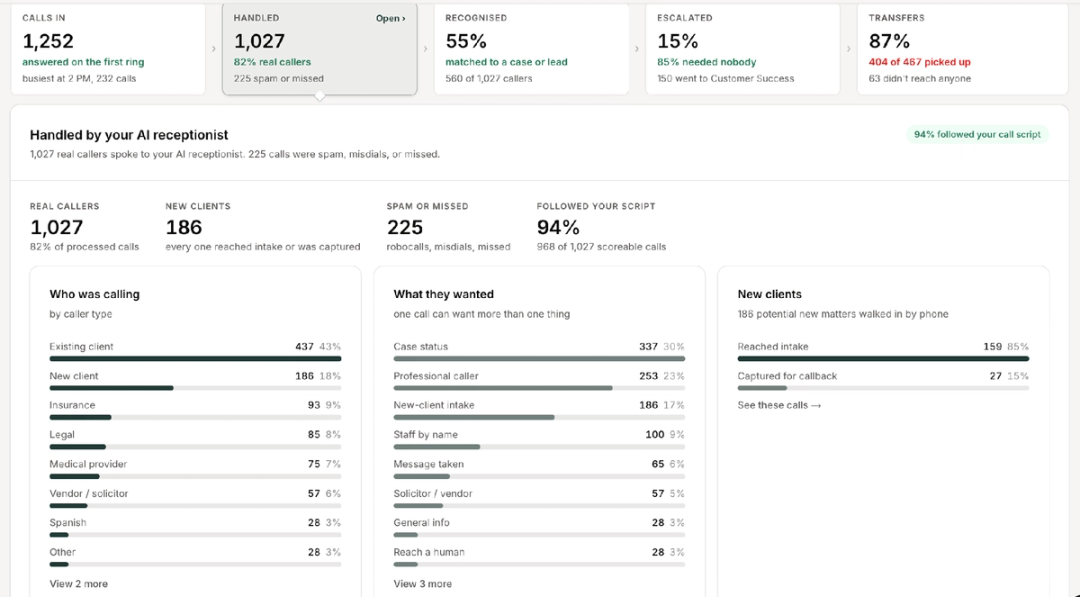
Every call that ends with a note already in the file is one your team does not have to reconstruct, which is the point of CMS write-back.
HelloCounsel by the Numbers
- 25,000+ calls handled - 500+ hours of call time handled - 93% SOP precision in every call - 48% improvement in call reception rates Figures reported by HelloCounsel.
"Working with HelloCounsel has been an outstanding experience. Their commitment to client service and innovation is evident in everything they do. We've been extremely impressed with our new AI receptionist, Kate, and the impact it's already making for our firm. I'm excited to continue exploring additional solutions that allow our case managers to focus more time on delivering exceptional client care." Anthony Ramos, COO, Pendergast Law
HelloCounsel pricing
HelloCounsel starts at $500 per month (pricing as of September 2026), with no per-minute billing and no setup fee. Plans are scoped to your licences and expected call volume with a 20% tolerance either way, so a campaign month does not change the invoice. Onboarding is one hour-long call, and every engagement starts with a two-week pilot.
How the three options compare
| Factor | In-house receptionist | Virtual receptionist | HelloCounsel |
|---|---|---|---|
| Fixed, predictable monthly cost | Yes. Salary | No. Billed per minute or call | Yes. From $500 per month |
| 24/7 coverage | No | Yes | Yes |
| Outbound calls to providers and clients | No | No | Yes |
| Case opening and records organization | No. Handled by intake and case staff | No. Messages go back to your team | Yes. Matter setup and records requests organized after intake qualifies |
| Routing by case phase | Yes, if experienced | No | Yes |
| Notes written to the case file | No | No | Yes |
| Call performance reporting | No | Limited to service reports | Yes. Volume, caller type, and transfers |
| Walk-ins and paperwork | Yes | No | No |
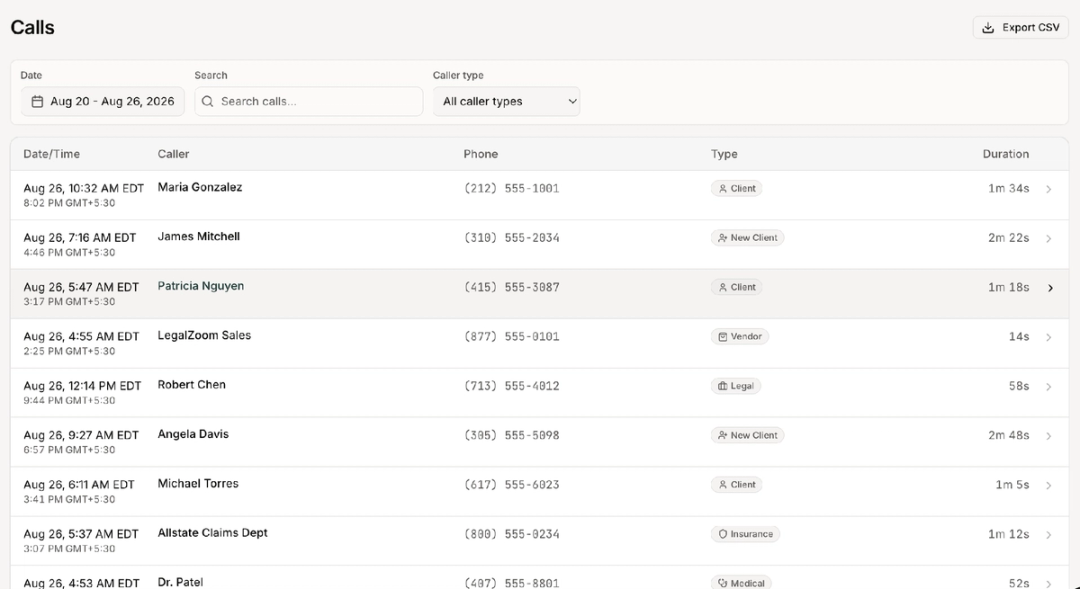
For most plaintiff firms, the strongest setup pairs a front-desk receptionist for walk-ins with HelloCounsel on overflow, after-hours calls, and the follow-up behind them. The difference between an AI receptionist and a virtual receptionist explains how that split works.
Nine Questions to Ask Before You Choose
Most of the answers are already in your phone logs and case management system.
1. How many calls does your main line take each month? Pull 30 days of call logs, multiply by an average call length, and price the minutes against per-minute plans
2. When do those calls arrive? If a large share comes after 5 p.m. or on weekends, one in-house hire will not cover them
3. Who are the callers? Split the log into new leads, existing clients, providers, adjusters, and vendors; new leads are usually the smallest group
4. What happens after each call? List the follow-up each call type creates, such as a records request, a client update, or a note in the file
5. Who covers the phones when the front desk is busy? If it is a paralegal or case manager, add their time to the cost
6. How often does the bill change? Compare your three busiest months with your three slowest; a large gap favors fixed pricing
7. Where do call notes end up? Open five recent matters and check whether last week's calls are documented
8. Does it do the work after the call? Ask whether the option can open the case once intake qualifies, organize medical records requests, and run lead follow-ups and regular client check-ins. An in-house or virtual receptionist answers the call and hands this work back to your team
9. How many staff hours will it take back? Ask which call types it would take over, then test it on your own calls and compare case manager phone hours before and after
Question four usually decides the in-house receptionist vs virtual receptionist choice, since neither model finishes the follow-up work. Our guide on how to choose a phone answering service covers the vendor questions.
Virtual Receptionist vs In-House Receptionist vs AI: Choosing Your Setup
| If your firm | Choose | Why |
|---|---|---|
| Has case managers stuck chasing records | HelloCounsel | Outbound calls run until records are confirmed |
| Needs every call documented in the case file | HelloCounsel | Notes are written to the matter at call end |
| Gets overage bills in campaign months | HelloCounsel | Fixed price from $500 per month |
| Has paralegals covering the phones | HelloCounsel | Agents take overflow and route by case phase |
| Loses leads after 5 p.m. | HelloCounsel or a virtual receptionist | Both answer nights and weekends |
| Sees daily walk-ins and paper records | An in-house receptionist | Someone has to be at the front desk |
| Values a familiar voice for referral partners | Keep your in-house receptionist | Pair it with HelloCounsel for the calls behind the desk |
Firms already paying Ruby can compare Ruby alternatives for PI firms, firms comparing staffed services can review the best legal answering services for PI firms, and firms weighing AI options can review the best AI receptionists for law firms.
Pay for the Work Behind Every Call
The virtual receptionist vs in-house receptionist choice looks like a cost question. An in-house hire runs about $54,300 a year loaded for 40 hours of coverage, and a virtual service covers more hours but bills every minute, which adds up fast at plaintiff-firm volume.
The larger cost sits behind the call. Both models pass provider, adjuster, and client-update work back to a stretched team, which is why case manager workload keeps climbing even when the phones get answered. Keep the receptionist your clients know, and let HelloCounsel answer the rest and finish the work, starting at $500 a month. Review the HelloCounsel product against your call mix.
Book a call with the founders and bring 30 days of call logs. The team will show you which calls the agents can take over and how each result lands in your case file.
Frequently Asked Questions
How much does an in-house receptionist cost a law firm?
At the BLS median salary of $38,010, an in-house receptionist costs about $54,300 a year once benefits are included. Recruiting, training, equipment, and backup coverage add more.
How much does a virtual receptionist cost?
Ruby's published plans run from $250 a month for 50 minutes to $1,725 for 500 minutes, or $5.00 to $3.45 per minute. Higher volumes need a custom quote.
Is a virtual receptionist cheaper than hiring in-house?
At low call volumes, yes. At plaintiff-firm volumes, per-minute bills can approach a salary, while HelloCounsel offers fixed monthly pricing from $500 that holds in busy months.
Can HelloCounsel work alongside an in-house receptionist?
Yes. HelloCounsel takes overflow, after-hours calls, and outbound follow-up while your receptionist handles walk-ins, paperwork, and the callers who know her by name.
Does HelloCounsel handle inbound calls and outbound follow-up?
Yes. HelloCounsel answers inbound calls and routes them by case phase, and it places outbound calls to providers and clients, including records follow-up. Outcomes are written to the case file.
What can a virtual receptionist not do for a plaintiff firm?
A virtual receptionist takes messages and passes work back to your team. HelloCounsel covers what stays behind: outbound records follow-up, client check-ins, and notes in your case management system.
Can a virtual receptionist handle legal intake?
Many services collect basic intake details from a script. HelloCounsel qualifies intake calls against your criteria in seconds and writes the notes to your case management system.
Share this article