How an Automated Call Center Works at a Plaintiff Law Firm

- An automated call center for law firms is the set of inbound and outbound calls a firm makes and takes, run by AI voice agents that finish routine work and pass judgment calls to staff.
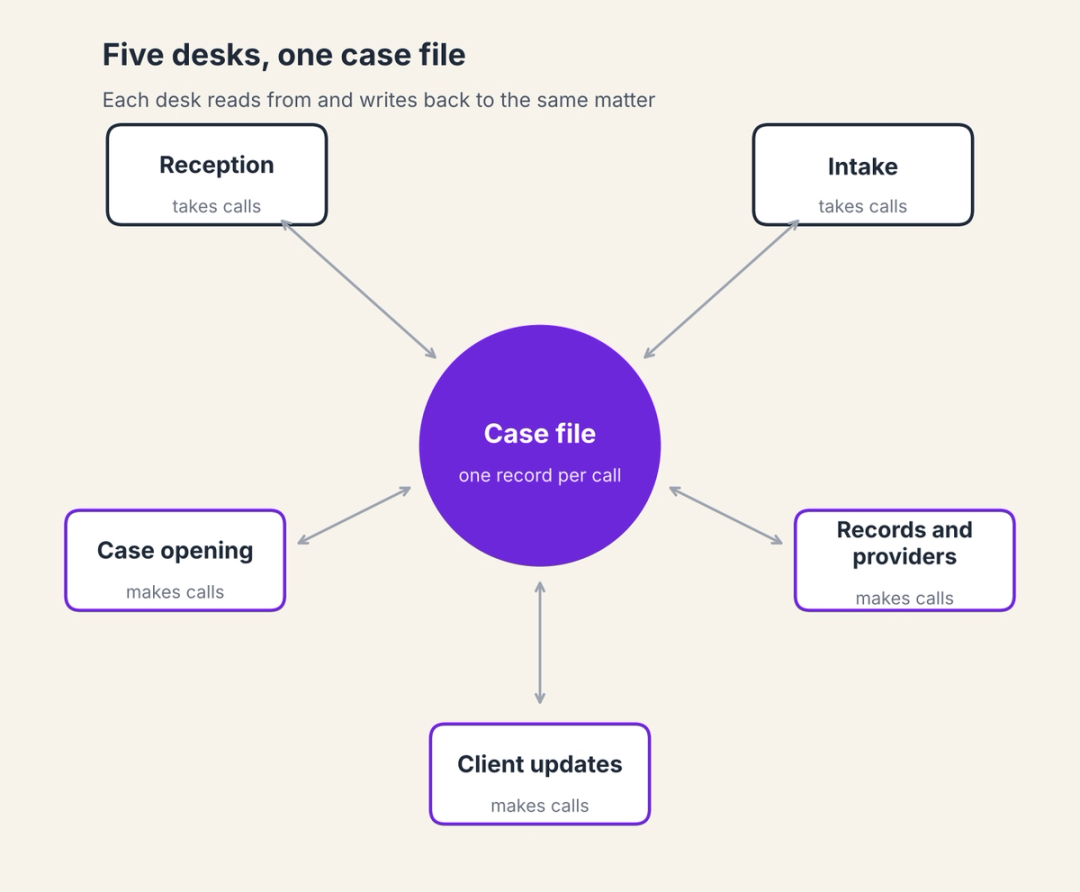
- A plaintiff firm's phone operation splits into five desks: reception, intake, case opening, client updates, and records and provider follow-up, and each automates differently.
- A desk is only automated when the call's outcome reaches the case file, so the phone system, case management system, and intake system need to share one record of every call.
- Covering one phone seat around the clock with people takes about 4.2 full-time employees, which is why staffed desks usually cover business hours and leave most of the week to voicemail.
- Start with the desk where your firm loses the most calls or the most staff hours, run it to clear pass criteria, then add the next desk on the same integrations.
"Call center" brings to mind a room of headsets, a phone menu, and a queue, and that picture fits a plaintiff firm poorly. A plaintiff firm doesn't have one call center so much as a phone operation spread across several jobs: someone answers the main line, someone screens new callers, someone opens claims with insurers, someone keeps clients informed during treatment, and someone chases providers for records. An automated call center for law firms describes that operation once AI voice agents take the routine calls in each of those jobs, inbound and outbound, and staff take the rest.
The difference automation makes shows up in what happens between calls. Follow a single status question through a typical firm today, and the call itself turns out to be the smallest part of the work.
A client calls the main line while the receptionist is on another call, so it goes to voicemail. The receptionist returns the call an hour later, learns the client wants to know whether the hospital records have arrived, and emails the case manager.
The case manager is on hold with that same hospital's records line and sees the email after lunch. She checks the file, calls the client back, reaches voicemail and leaves a message, and the client calls again the next morning to ask the same question.
Count the handoffs in that sequence, and there are at least five, each one a place where the question waits for a person to be free. None of the steps needed legal judgment. The answer was sitting in the case file the whole time, and the hold queue that kept the case manager busy was itself a routine call that a system could have made.
Automating that sequence well means more than answering the first call faster. It means the agent that picks up can read the file, the agent chasing the hospital can log what it learned, and the case manager only hears about the calls that need them. Each job in the phone operation automates a little differently, so the design starts with the desks themselves.
Five desks make up a plaintiff firm's phone operation
Whether one person covers several of them or each has its own team, the same five desks make up the phone operation at a plaintiff firm, and they are the building blocks of any automated call center for law firms. Three mostly take calls and two mostly make them, and that direction shapes what automation has to do at each one.
The reception desk
Reception takes the widest mix of calls: existing clients asking for status, providers and adjusters asking for a case manager, vendors, wrong numbers, and the occasional new caller. As per our estimate, PI firms miss 35 to 50 percent of inbound calls during business hours alone, and reception is where those calls are lost.
The caller who needs a person also changes with the case. A new client's questions belong with case opening, a client in treatment with the case manager, and a client whose demand has gone out with whoever is negotiating, so an automated reception desk routes on the case stage as well as the caller, a pattern that holds across the roughly 150 calls a PI case generates.
Automated, the reception desk answers every call at once, recognizes the caller from the case file, answers status questions from the file, and routes the rest to the person assigned to that matter, with a callback scheduled if they're busy. Staff keep the calls an agent shouldn't finish: a client who is upset, a question about strategy, or anything outside the firm's written procedures. The AI receptionist workflow covers this desk.
The intake desk
Intake decides whether a new caller becomes a client, and the calls arrive whenever accidents happen, which is often outside office hours. An automated intake desk answers at any hour, screens the caller against your firm's intake criteria, writes the lead to your intake or case management system with the full call context, and transfers qualified callers or sends the contract according to your rules.
The lead record matters as much as the answer. A screened caller whose details, accident facts, and qualification results are already in the system can be called back by the right person the next morning without anyone asking the same questions twice.
Language belongs at this desk too. HelloCounsel's agents handle English and Spanish on the same call, including a switch partway through, so a Spanish-speaking caller at midnight is screened in Spanish rather than left a voicemail.
Intake staff keep the conversations that need a person, such as a caller who is unsure or a case where the criteria don't settle. Our comparison of after-hours intake options for PI firms covers how this desk performs once the office closes.
The case opening desk
Once the fee agreement is signed, someone has to open the claims, get claim numbers from adjusters, and collect missing documents such as insurance cards and IDs. These are outbound calls with a defined goal, and an agent on the case opening desk can make them the same day the case is signed instead of whenever a case manager finds an hour. HelloCounsel's goal on this desk is 24 hours to get every new case moving, since a claim opened late pushes every later step back with it.
The client updates desk
Clients in treatment need regular contact, and the firm needs to know whether they're attending appointments, whether the pain has changed and whether a doctor has referred them on. An automated updates desk calls after each scheduled visit and runs a monthly status call on every open file, logging each answer to the case file.
The agent passes anything that could change the claim to the case manager the same day: a new injury, contact from the other driver's insurer, a missed appointment or a client thinking about leaving. The client communication workflow covers this desk, and check-ins happen twice as often once agents run them.
The records and provider desk
Records follow-up is the clearest example of a phone job that is mostly waiting. The agent calls the provider, works through the phone tree, holds, confirms the request is in the queue, sends the follow-up email and logs the result, then calls again on schedule until the records arrive. Most of the call is hold time, which is why automating outbound calls at a PI firm frees staff hours that no inbound change can reach.
The case manager gets involved when a request needs a decision, such as a provider demanding prepayment or a rejected authorization. Automated medical records retrieval has cut 15 days from records turnaround at the firms using HelloCounsel.
Put side by side, the five desks show the same split: the agent completes the predictable part of each call, and staff take the moments that need a decision.
| Desk | Calls it handles | What automation completes | What stays with staff |
|---|---|---|---|
| Reception | Status questions, provider and adjuster calls, vendors | Answers, identifies the caller, answers from the file or routes with context | Upset callers, strategy questions, anything off-procedure |
| Intake | New callers, day and night | Screens against intake criteria, records the lead, transfers or sends the contract | Unclear cases and the signing conversation where needed |
| Case opening | Outbound calls to insurers | Opens claims, gets claim numbers, collects missing documents | Coverage disputes and unusual claims |
| Client updates | Post-visit and monthly calls | Captures attendance, pain, referrals and questions | New injuries, insurer contact, advice |
| Records and providers | Outbound follow-up calls | Works the phone tree and hold, confirms status, logs it | Prepayment requests and rejected authorizations |
That split changes the work of the people at each desk, and that change is the first one your team will notice.
Watch two desks run on the same case file
See HelloCounsel answer an existing client's status call and place a records follow-up call, then open the notes both calls write to the matter. Book a two-desk call demo
What changes for the people who staff the desks
Receptionists stop being the bottleneck for every call and become the people who handle the calls the agent passes on, which are the calls most likely to need tact. Intake specialists spend their time on callers who need a conversation rather than on screening questions a script could ask.
Case managers see the biggest shift. As per our estimate, PI case managers spend 50 or more hours a week on routine calls such as status updates, balance questions and records confirmations, and in an automated call center most of that time goes to the agents while the case manager works the hand-offs and the files.
The new routine needs a little structure. Someone owns each desk's procedures and escalation list, someone reads a sample of call transcripts each week, and the team agrees on how quickly hand-offs get a callback, so the agent's promises to callers hold.
None of this removes the need for staff, since an automated call center for law firms still depends on people for judgment, relationships and every legal decision. What it removes is the hours spent waiting on hold and returning calls whose answers were already in the file, which also changes what full phone coverage costs.
Why staffed phone desks rarely cover nights and weekends
A week has 168 hours. A desk staffed from 8 a.m. to 6 p.m. on weekdays covers 50 of them, and the other 118 go to voicemail, an answering service or a cell phone someone agreed to carry.
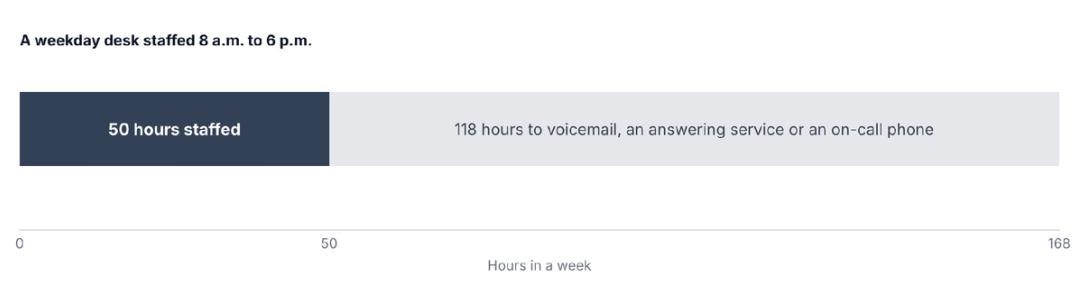
Covering one seat around the clock with people takes 168 hours of staffing a week, which works out to about 4.2 full-time employees at 40 hours each, before vacations and sick days. At the May 2025 median receptionist wage of $38,010 a year, that is roughly $160,000 in wages for a single seat, before benefits, payroll taxes and turnover.
| Coverage model | Hours covered each week | What it takes |
|---|---|---|
| Staffed business hours | 50 of 168 | One person per seat, with voicemail or an answering service after hours |
| Staffed around the clock | 168 of 168 | About 4.2 full-time employees per seat, plus scheduling for absences |
| Answering service after hours | 168 of 168 | Outsourced receptionists who take messages your staff act on the next day |
| AI voice agents on every desk | 168 of 168 | Agents on the phone line around the clock, with staff on hand-offs during office hours |
The comparison isn't only about cost. An answering service fills the hours but sends the work back as messages, and an automated call center for law firms only closes the gap if each desk can finish the call, which depends on what it's connected to.
What has to be connected for the desks to work together
The five desks share one case file, and the automation at every desk depends on its connection to that file. Three connections carry the load.
The phone system comes first. Agents need to sit on your existing numbers, whether through forwarding or a direct integration with providers such as RingCentral or Zoom, so callers reach the same line they always have.
The case management system comes next. Every call, from a status question to a records follow-up, should leave a note, a summary and a transcript in the right matter, and CMS write-back is what turns an answered call into a finished one.
The intake or lead management system closes the loop for new callers, so a lead screened at 11 p.m. is already in the system when the intake team arrives in the morning.
When all three connections hold, a records call logged at 2 p.m. is visible to the agent answering that client's status call at 3 p.m. The desks stop working from different versions of the case, and the remaining question is the rules every desk has to follow.
Rules an automated call center has to follow
An automated call center for law firms carries the same obligations as a staffed one, and four of them shape how the desks are set up:
- Confidentiality: Model Rule 1.6(c), shown here in Minnesota's version, requires reasonable efforts to prevent unauthorized disclosure of or access to client information, which covers call recordings, transcripts and notes held by a vendor.
- Supervision: The ABA's Formal Opinion 512 places responsibility for AI tools with the lawyers who use and supervise them, so a supervising attorney should approve what each desk's agent may say.
- Outbound consent: The FCC treats AI-generated voices as artificial under the Telephone Consumer Protection Act, so outbound AI calls covered by the TCPA need prior express consent, which firms can collect from clients in the engagement letter.
- Recording notices: Federal law allows recording with one party's consent, while states such as California require the consent of all parties to a confidential call, so recording notices should meet the strictest state your callers are in.
With the rules written into each desk's procedures, the build itself is a matter of choosing a vendor whose agents already know what the desks do.
How HelloCounsel's agents cover the five desks
HelloCounsel builds AI voice agents for plaintiff personal injury firms, and its products line up with the desks: Receptionist, Intake, Case Opening, Client Communication and Medical Records. The agents answer inbound calls in under two rings, place outbound calls for case work, and write every call to the case file in case management systems such as Filevine, Litify, SmartAdvocate, CASEpeer and MyCase.
HelloCounsel has handled more than 30,000 calls, and firms using it have seen a 48% improvement in call reception. Calls that need judgment reach staff by warm transfer or a scheduled callback, and the HelloCounsel dashboard shows call volume by caller type and transfer rates across every desk. Each product can start on its own, so a firm can automate one desk without changing how the other four run.
Pricing is custom and based on your firm's call and case volume rather than seats, so adding a desk doesn't mean buying licenses per agent, and most firms go live in under two weeks. HelloCounsel is built for personal injury firms, and once the agents are live, each desk is judged on its own numbers.
How to measure each desk once it's automated
Every desk in an automated call center for law firms needs its own measure, because a single answer rate hides the differences between them. Reception and intake are judged on calls answered and hand-offs that reached the right person, while the outbound desks are judged on what the calls achieved.
For case opening, track the days from signed fee agreement to claims opened. For client updates, track the days since the last contact on each open file, and for records, track days from request to records received.
Read the numbers alongside a weekly sample of transcripts, since a desk can hit its target while passing on too many calls or too few. Measured before launch, the same numbers also show which desk a firm should start with.
Which desk to automate first
The first desk should be the one where your firm loses the most calls or the most staff hours, because that is where the result will be easiest to see. A week of call logs and a few questions to your team usually settle it:
- Calls going to voicemail during the day or after hours: Start with reception and intake.
- Case managers spending afternoons on hold with providers: Start with records and provider follow-up.
- Clients calling repeatedly for updates, or files going weeks without contact: Start with client updates.
- Signed cases waiting days for claims to be opened: Start with case opening.
Run the first desk against written pass criteria, such as calls completed under your procedures, correct hand-offs and notes landing in the right matter, then add the next desk on the same integrations. Building an automated call center for law firms one desk at a time keeps each step measurable, and the ROI of an AI voice agent can be checked desk by desk against your own numbers.
If two desks tie, start with the one whose procedure is already written down. A desk with a clear script and escalation list goes live faster and gives a cleaner result, and that result makes the case for the next desk inside the firm.
Pick the first desk to automate with HelloCounsel's founders Bring a week of call volume and your team's biggest phone bottleneck, and leave with the desk to start on and the criteria to judge it by. Book a call with the founders to choose your first desk
Frequently asked questions about automated call centers for law firms
1. What is an automated call center for law firms?
It is a law firm's phone operation run partly by AI voice agents. The agents answer and place routine calls across reception, intake, case opening, client updates and records follow-up, log each call to the case file and pass judgment calls to staff.
2. Can an automated call center make outbound calls for a plaintiff firm?
Yes. Agents can open insurance claims, run client check-ins after treatment visits and follow up with providers on records. Outbound AI calls covered by the TCPA need prior express consent, which firms usually collect from clients in the engagement letter.
3. What do staff do in an automated call center?
Staff take the calls the agents pass on to them, such as upset clients, strategy questions, unclear intake cases, prepayment requests and anything outside written procedures. Case managers spend less time on hold and more time working files and hand-offs.
4. How much does it cost to staff a law firm phone desk around the clock?
Covering one phone seat for all 168 hours of the week takes about 4.2 full-time employees. At the May 2025 median receptionist wage of $38,010, that is roughly $160,000 in wages per seat, before benefits, payroll taxes and absence coverage.
5. How does an automated call center connect to a case management system?
It connects through direct integrations that write a note, a summary and a transcript to the right matter after every call. The same connection lets agents read the file to recognize callers, answer status questions and route calls to the assigned case manager.
6. Which desks do HelloCounsel's agents cover?
HelloCounsel's agents cover all five: Receptionist for the main line, Intake for new callers, Case Opening for claims, Client Communication for check-ins and status calls, and Medical Records for provider follow-up, with every call written to the matter in your case management system.
Share this article