A Buyer's Guide to AI Call Center Software for Law Firms

- Buying AI call center software for law firms starts with scope: list your call types, pick one workflow to automate first, and decide which calls stay with people before you book a demo.
- Shortlist within one of three paths, legal-specific AI voice agents, general-purpose voice AI platforms your team builds on, or AI features inside a contact center platform, since each asks a different amount of work from your firm.
- A pilot on live calls with written pass criteria, such as notes landing in the right matter and correct escalations, gives a clearer answer than any demo.
- Compare pricing on the unit that drives the bill, whether minutes, calls, seats, or completed tasks, and model it against a busy month, not an average one.
- The contract should cover client data use and model training, retention and deletion, and consent for outbound AI calls, which the FCC treats as artificial-voice calls under the TCPA.
Three-quarters of lawyers holding back on AI give the same reason in the ABA's 2024 Legal Technology Survey: they worry the software will make something up. On a phone line that worry is narrower and easier to test than it is in legal research, because an agent answering a status call either reads the right stage from the case file or it doesn't, and every call leaves a transcript you can check.
The harder questions in buying AI call center software for law firms sit elsewhere, in which calls the firm is willing to hand over, who inside the firm owns that decision, and what the contract says about client data. They also come in an order. Settling scope before booking demos keeps every demo about your calls instead of a vendor's best script, and designing the pilot before signing turns the trial into a pass-or-fail answer rather than an impression.
Which calls should AI call center software take first?
Start with an inventory, not a vendor list. A week of call logs sorted by caller and reason will show which calls repeat, which follow a defined procedure and which need someone's judgment, and the first workflow should come from the first two groups.
| Call type to automate | First workflow? | Why |
|---|---|---|
| Existing client status questions | Strong candidate | High volume, answered from the case file, and easy to check against the transcript |
| After-hours and overflow intake | Strong candidate | Runs on your intake criteria, and every unanswered call is a measurable loss |
| Medical records and provider follow-up | Strong candidate | Outbound, repetitive, and dominated by hold time rather than conversation |
| Post-visit treatment check-ins | Good second step | Scheduled from the case file, with clear hand-off triggers |
| Adjuster messages | Good second step | Needs exact claim details and fast routing, more than conversation |
| Settlement, strategy, and bad news | Stays with staff | Needs a lawyer's judgment from the first word |
Count each candidate's weekly volume and the staff time behind it before choosing. As per our estimate, PI case managers spend 50 or more hours a week on routine calls such as status updates, balance questions, and record confirmations, and the workflow that eats most of those hours usually makes the strongest first case.
Picking one workflow keeps the pilot readable. If an agent takes status calls, after-hours intake, and provider follow-up all at once, a weak result in one hides inside the others, and you lose the clean comparison that justifies the next step.
Inbound and outbound work also behave differently. Answering calls is a coverage problem, while chasing providers and running check-ins is a persistence problem, which is why the line between AI intake and AI operations is worth drawing before scope is final.
Whatever the first workflow, write down what the agent must never do on it, such as quoting a case value, discussing a settlement, or giving an opinion on treatment. That short list becomes the core of the escalation rules every vendor will ask for.
Who inside the firm should own the buying decision?
AI call center software touches intake, case management, ethics, and IT at once, so a purchase owned by one department can stall when it reaches the next. A small buying group with named roles moves faster than a large committee:
- Operations owner: Usually the COO or firm administrator, who owns the scope, the pilot, and the budget.
- Intake and case management leads: The people whose teams take the calls today, who write the escalation rules and judge the pilot transcripts.
- Supervising attorney: Signs off on what the agent may and may not say and on how clients learn they are speaking with AI.
- IT or systems owner: Confirms the phone system and case management system connections and reviews the vendor's security documents.
The supervising attorney's role is more than a formality. In July 2024, the ABA's Formal Opinion 512 set out lawyers' duties when using generative AI tools, covering competence, confidentiality, communication, and supervision, so the firm's managing lawyers carry responsibility for how the agent is set up and monitored.
Case managers belong in the room early for a practical reason. They know which calls repeat and which ones look routine but aren't, and when they write the escalation rules, the agent passes on the calls your firm would actually want a person to take.
What kinds of AI call center software are on the market?
Products sold as AI call center software for law firms fall into three paths, and the main difference between them is how much of the legal workflow your firm has to build.
| Path | What you get | What your team builds | Fits when |
|---|---|---|---|
| General-purpose voice AI platforms | Voice, telephony, and a toolkit for building agents | The legal call flows, integrations, and testing, often with a partner | You have technical staff and unusual workflows |
| AI features inside a contact center platform | AI menus, transcription, summaries, or agent assistance on top of human routing | Routing rules and staff coverage, as before | Your staff will keep answering most calls, and you want help around them |
| Legal-specific AI voice agents | Agents preconfigured for plaintiff call types, case management integrations, and escalation rules | Your SOPs, scripts, and routing preferences | You want working workflows quickly without an internal build team |
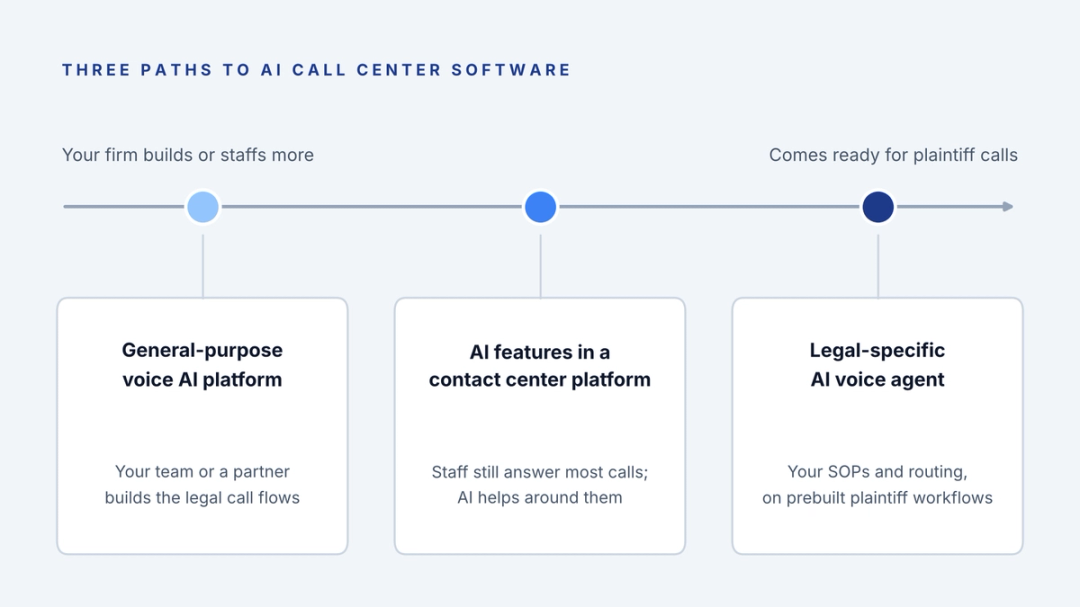
The trade-off runs in one direction. The more flexible the platform, the more of the plaintiff workflow you build and maintain yourself, which is why a generic AI receptionist struggles at a PI firm until someone teaches it case phases, provider calls, and adjuster messages.
Ask every vendor who maintains the workflow after launch. Your SOPs, staff, and intake criteria will change, and the answer to who updates the scripts and how quickly and at what cost matters as much over a year as anything shown in the first demo.
Which integrations should be confirmed before the shortlist is final?
An agent is only as useful as the systems it can read and write. Confirm three connections before a vendor makes your shortlist, since a gap in any one of them turns automated calls back into manual work.
The first is the phone system. Ask whether the agent works with your current provider by forwarding, a direct integration, or a number port, and what happens to your existing numbers, call recording, and reporting if you leave the vendor later.
The second is the case management system, and depth matters more than the logo on a vendor's integration page. Some products write a note, others also update fields, and create tasks for the case manager, and CMS write-back only saves staff time when the record lands in the right matter without anyone copying it over.
The third is your lead management or intake system, if intake runs somewhere other than the case management system. AI call center software for law firms that captures a new caller's details but can't create the lead record leaves your intake team typing up transcripts.
What should a vendor show you in a demo?
Ask for your call types, not theirs. Send the vendor three short scenarios from your own inventory before the demo, such as a client asking where the case stands, a provider calling about a bill and a new caller after hours, and ask them to run each one live.
Watch what happens after each call ends. The demo should finish inside a test matter in your case management system, showing the note, the summary, and any task the call created, because that record is where the time savings either appear or disappear.
If outbound work is in scope, ask the vendor to place a live provider follow-up call during the demo and show how the agent handles the phone tree and the hold, since automating outbound calls at a PI firm is mostly about persistence rather than conversation. A vendor who can only play recorded samples or can't show the note inside a case file hasn't yet shown you the part you're paying for.
Add one Spanish call to the scenarios if your firm serves Spanish-speaking clients, ideally one that switches language partway through. Bilingual handling is easy to claim on a features page and quick to verify in a five-minute live test.
For the detailed criteria, our scorecard for evaluating an AI voice agent covers escalation logic, integration depth, and operational reporting question by question.
How should a law firm design an AI pilot?
A pilot answers one question: does the agent handle your calls well enough to expand? Write the pass criteria before the first call, so the result doesn't depend on whoever happened to listen to the best transcript.
Run the pilot on live calls in the one workflow you scoped, long enough to include a Monday morning and a month-end, and record a baseline for the same workflow in the weeks before it starts. A typical shape is a short setup period, a supervised stretch where staff read every transcript, then a live stretch where they read a sample.
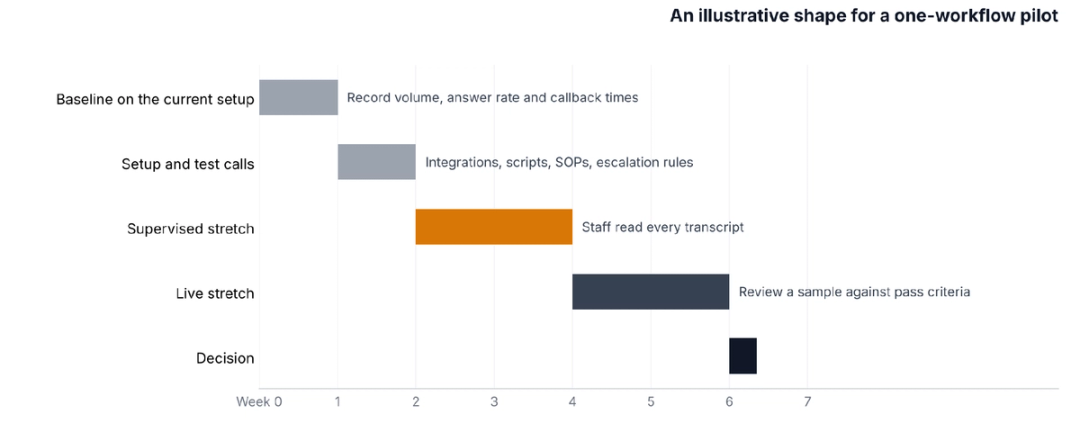
Good pass criteria are specific and countable: the share of calls handled to completion under your SOP, the share of escalations that went to the right person, notes landing in the correct matter, and callback times on anything the agent passed on. A pilot that meets them earns the next workflow; one that misses them tells you exactly where.
A partial miss is common and fixable. If the agent handles calls well but escalates too often, tighten the SOP and rerun a week, and if notes land in the wrong matter, the problem is usually the integration, which is worth solving before any more calls go live.
See your first workflow run on live call types
Watch HelloCounsel handle a status call, an after-hours intake and a provider follow-up, then open the note each one writes to the case file. Book a demo of status, intake and follow-up calls
How is AI call center software priced?
Vendors price on different units, and the unit decides which month is expensive. Compare offers on the same call volume and model the bill against your busiest month, such as the first weeks of a marketing campaign, rather than an average one.
| Pricing unit | What drives the bill | What to check |
|---|---|---|
| Per minute | Total talk time, including hold time on outbound calls | Whether hold time on provider calls is billed |
| Per call or conversation | Number of calls answered or placed | How transfers, short calls, and wrong numbers count |
| Per seat or per agent | Number of agent licenses | Whether one license covers inbound and outbound work |
| Per completed task | Tasks finished, such as a records confirmation or a logged status call | How the vendor defines a completed task |
| Custom volume-based | Your call and case volume | What happens to the price when volume rises |
Minutes look cheapest until outbound work enters the picture, since a provider follow-up can spend most of its length on hold. The ROI calculation for an AI voice agent walks through pricing that is against the case manager time you get back.
The software fee is also only part of the cost. Budget for setup and integration work, the staff hours spent reviewing transcripts during the pilot, and any period where you pay an existing answering service alongside the new system, because the true price of AI call center software for law firms includes the overlap.
What should the contract say about client data and outbound calls?
Client data is the part of the contract that outlasts the pilot. Model Rule 1.6(c), shown here in Minnesota's version, requires lawyers to make reasonable efforts to prevent unauthorized disclosure of or access to client information, and a vendor holding call recordings and transcripts sits inside that duty.
Read for these terms before signature:
- Model training: Whether the vendor may use your call data to train or improve models, and whether an opt-out can be written into the contract.
- Retention and deletion: How long recordings, transcripts, and notes are kept, and how they are returned or deleted when the contract ends.
- Security and subprocessors: Encryption at rest and in transit, who can access your data at the vendor, and which third parties process it.
- Medical information: Whether the vendor will sign a business associate agreement where your calls involve protected health information from providers.
- Termination: Notice periods, price increases at renewal, and how quickly you can leave after a failed pilot.
Outbound calls carry a separate rule. In February 2024, the FCC ruled that AI-generated voices count as artificial under the Telephone Consumer Protection Act, so outbound AI calls that fall under the TCPA need the prior express consent of the person called, and your engagement letter is the natural place to collect it from clients.
How should clients learn they're speaking with an AI agent?
Disclosure is a decision for the supervising attorney, and it's easier to make once than call by call. Formal Opinion 512 ties disclosure of AI use to the circumstances of the representation, and state bar guidance on AI continues to develop, so check the rules where your clients live.
A practical approach covers both ends of the relationship. New engagement letters can explain that the firm uses AI agents for routine calls and how to reach a person, and the agent itself can say what it is at the start of each call, which settles the question before a client has to ask it.
Write the disclosure into the scope document alongside the escalation rules, since any AI call center software for law firms you choose will need to deliver it in the same words every time.
How HelloCounsel handles scope, pilot, and rollout
HelloCounsel builds AI voice agents for plaintiff personal injury firms on the legal-specific path in the table above.
Its agents answer inbound calls on the AI receptionist workflow in under two rings, with the caller already matched to the case file, and place outbound calls for case work such as treatment check-ins.
A first workflow on HelloCounsel can be status and overflow calls, after-hours AI intake against the firm's criteria, or provider follow-up through medical records retrieval.
Every call is written into the case file in case management systems such as Filevine, Litify, SmartAdvocate, CASEpeer, and MyCase, and calls that need judgment go to staff by warm transfer or a scheduled callback.
Most firms go live in under two weeks. HelloCounsel has handled more than 30,000 calls, firms using it have seen a 48% improvement in call reception, and pricing is custom, based on your call and case volume rather than seats, with payment for the tasks the agents complete. The HelloCounsel dashboard reports call volume by caller type and transfer rates, which gives the operations owner the pilot numbers without building a separate report.
Later workflows such as client communication, with check-ins after each treatment visit and monthly status calls, run on the same integrations once the first workflow is stable.
HelloCounsel is built for personal injury firms whose case managers carry heavy caseloads.
What should the first 90 days after go-live look like?
The first month is about trust inside the firm. Tell staff which calls the agent now takes and where its notes appear, keep reading transcripts weekly, and adjust the escalation rules wherever the agent kept a call it should have passed on. Clients should hear it too, through a line in new engagement letters and an agent that identifies itself at the start of each call.
The second month is for the next workflow. Add it only once the first meets its pass criteria, and give it the same baseline, criteria, and review as the first, so each expansion is judged on its own numbers.
By the third month, the reporting should show where calls go: volume by caller type, transfers, callbacks, and unanswered callers. Those numbers decide whether the agent takes more of the line, and they're the same ones a managing partner will ask for when deciding whether AI call center software for law firms earns a larger share of the budget.
A one-page scope document makes every vendor conversation shorter
Before contacting any vendor, write one page: the first workflow, its weekly volume, what the agent may say, what it must pass on, who signs off, and the pilot's pass criteria. Vendors who can work from that page will show you your calls; vendors who can't will show you theirs.
That page also protects the decision after purchase. When the pilot ends, you compare results against criteria you wrote before anyone saw a demo, and the choice to expand, change vendors, or stop rests on your own numbers.
Scope your first AI call workflow with HelloCounsel's founders Bring your call types and weekly volumes, and leave with a first workflow and the pilot criteria to test it against. Book a call with the founders to scope a pilot
Frequently asked questions about AI call center software for law firms
1. What is AI call center software for law firms?
It is software that uses AI to answer or place a law firm's calls. Depending on the product, it can handle intake, existing client status calls and outbound follow-up, write notes to the case management system, and transfer calls needing judgment to staff.
2. How long should a law firm pilot AI call center software?
Long enough to include a Monday morning and a month-end, which usually means several weeks on one workflow. Record a baseline first, read every transcript during a supervised stretch, then review a sample once results meet your written pass criteria.
3. How is AI call center software priced?
Vendors charge per minute, per call, per seat, per completed task, or on custom volume-based plans. Compare offers on the same call volume and model the bill against your busiest month, since hold time and call spikes change which unit costs more.
4. Can AI call center software make outbound calls to clients?
Yes, although in February 2024 the FCC ruled that AI-generated voices are artificial under the TCPA. Outbound AI calls covered by the TCPA need the called person's prior express consent, which firms can collect from clients in the engagement letter.
5. Who should approve AI call center software at a law firm?
A small buying group works best for this decision: an operations owner for scope and budget, intake and case management leads for escalation rules, a supervising attorney for what the agent may say, and an IT owner for integrations and security documents.
6. How long does it take to go live with HelloCounsel?
Most firms go live with HelloCounsel in under two weeks. Setup covers the connection to your phone system and case management system, your scripts and SOPs, escalation rules and live test calls on the first chosen workflow before the agent takes real calls.
Share this article