Which Pre-Litigation Client Communication Should Be Automated and Which Should Staff Handle?

- Pre-litigation client communication splits on two questions: how often a message recurs across the caseload and how much judgment it needs.
- Frequent, factual messages such as appointment reminders, post-visit check-ins, record updates, and routine status answers can belong to an AI agent end to end.
- Messages that could change the claim, such as a new injury, contact from the other insurer, or a bill sent to the client, should start with the agent and finish with a case manager.
- Settlement offers, strategy, and bad news stay with attorneys, because Model Rule 1.4 requires prompt notice of an offer's substance and Rule 1.2(a) makes settlement the client's decision.
- Write the escalation list, the logging standard, and the disclosure approach before the first automated call, and review a sample of calls every week.
Pre-litigation client communication at a personal injury firm covers everything said to a client between the signed retainer and the settlement or the filing of suit. On one file, that can mean months of appointment reminders, treatment check-ins, status questions, and record updates, followed by a settlement offer the client has to decide on.
An AI voice agent can take most of the volume since the bulk of those messages repeat on every file and draw on facts the case file already holds. Case managers keep the messages that could change the claim, and attorneys keep the offer, the strategy and the bad news.
Two ways PI firms get client communication automation wrong
The first is automating too far. A client who calls to say a doctor has recommended surgery and hears a scripted reply about the case stage has learned that nobody at the firm is listening, and the firm has lost a fact that changes the value of the claim.
The second is automating too little. Every status call, reminder, and check-in runs through a case manager, so the routine calls crowd out the conversations that need a person, and some files go weeks without any contact at all, which is usually when clients start calling the front desk to ask whether anyone is working on the case.
HelloCounsel estimates a typical PI case generates around 150 calls over its lifetime. It also estimates that PI case managers spend 50 or more hours a week on routine calls such as status updates, balance questions, and record confirmations.
Neglected communication also carries professional risk. Model Rule 1.4(a)(3) requires a lawyer to keep the client reasonably informed about the status of the matter, and a file that goes weeks without contact is hard to square with that duty.
Sending each message to the right owner takes two questions, one about frequency and one about judgment.
Frequency and judgment decide who owns a message
The first question is how often the message recurs across the caseload. A post-visit check-in happens dozens of times on a single file, while a settlement offer happens once.
The second is how much judgment the message needs. A records update reads a fact from the file, while a question about whether to see a surgeon calls for advice that depends on the claim.
Put the two together, and pre-litigation client communication sorts into four groups. Frequent, factual messages belong to the agent, and frequent messages that need judgment start with the agent and finish with a case manager. Rare, judgment-heavy messages belong to staff, while rare factual ones can be automated whenever it is convenient.
The rare, factual group holds messages like an address change confirmation or the demand-sent notice. They are easy to automate but return for few hours, so they can wait until the frequent messages are running well.
The frequent, factual group is where the hours are. A firm that automates only those messages, and nothing else, still takes the largest single block of routine calls off its case managers.
The ethics rules leave room for this division. Comment 4 to Model Rule 1.4 contemplates that "the lawyer, or a member of the lawyer's staff" may acknowledge a client's request for information and say when a response can be expected.
In July 2024, the ABA issued Formal Opinion 512, its first ethics guidance on lawyers' use of generative AI tools. It treats those tools as usable within the existing duties of competence, confidentiality, communication, and supervision.
An AI agent can own high-volume factual client messages
These messages share one trait: the answer already sits in the case file, so the agent reads it, delivers it, and writes the call back to the file.
| Agent-owned message | When it goes out | What the agent records |
|---|---|---|
| Welcome text with the case manager's name and direct line | Day of signing | Delivery confirmation |
| Receipt for the retainer, HIPAA authorization, and photos | When each document arrives | Which documents are still missing? |
| Appointment reminder | The day before each scheduled visit | Confirmation or a reschedule request |
| Post-visit check-in | The day after each visit | Attendance, pain level, referrals, and anything blocking treatment |
| Monthly status call | Once a month on every open file | New providers, address changes, and client questions |
| Records progress update | When a request goes out or records arrive | Client acknowledgment |
| Demand sent notice | When the demand letter goes out | Client acknowledgment |
Reminders, check-ins, and monthly calls make up the largest share of pre-litigation client communication on a treating client's file. They run from the appointment schedule in the case file, which makes them a natural fit for automated outbound calling.
Each check-in should record the same fields every time, so a case manager can scan a file in seconds instead of reading a paragraph of notes. Consistent fields also make gaps in treatment visible early, while there is still time to address them.
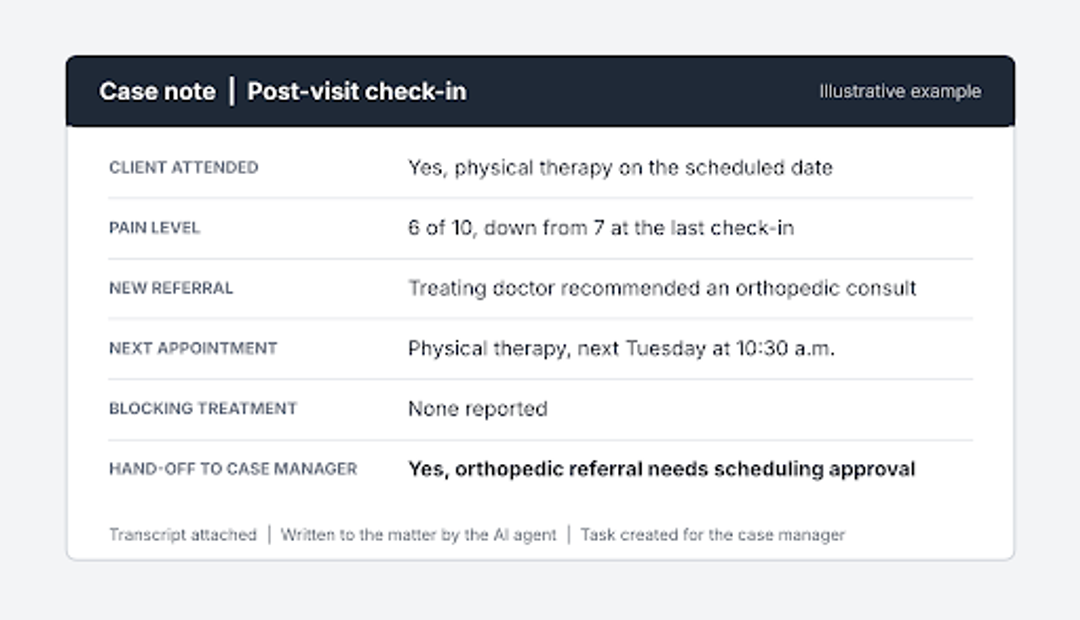
Inbound status questions fit here too. When a client calls the main line asking where the case stands, the agent can read back the current stage, the last action and its date, and the next expected step, all from the file.
Two things stay out of every automated answer: a prediction about what the case is worth and a promise about timing. Both are opinions, and an opinion about the case belongs to a lawyer.
Language belongs in this group too. Routine pre-litigation client communication is what a client hears most often, so a Spanish-speaking client should get reminders, check-ins, and status answers in Spanish, and an agent that handles English and Spanish on the same call, including a switch partway through, covers both without a separate queue.
Which channel each client message should use
Ownership is one decision in pre-litigation client communication, and channel is another. A check-in works best as a call, because the useful answers come out in conversation: the client mentions the referral, the missed visit, or the new pain only when someone asks a follow-up question.
Reminders, document receipts, and the welcome details suit a text, which the client can keep and check later. A text should still carry nothing a stranger shouldn't read on a lock screen, so leave out diagnoses, provider names tied to an injury, and any dollar figures.
Email fits anything with an attachment or a list the client has to act on, such as a request for missing insurance cards. Settlement figures stay out of every automated channel and reach the client through the attorney's call and the settlement statement that follows it.
Whatever the channel, the reply lands in the same place. A client who answers a text with "the other driver's insurance called me" has made a hand-off statement, and it should reach the case manager exactly as a phone call would.
Case managers keep the calls that change the claim
Some messages arrive in the middle of routine calls. A client answering a check-in mentions something that affects treatment, the claim, or the client's trust in the firm, and the agent's job at that point is to recognize it, record it word for word, and pass it on.
Each firm should write its own hand-off list, and a starting version might include statements like these:
- "I was in another accident last week."
- "The adjuster from the other insurance company called me."
- "I stopped going to therapy because I can't take time off work."
- "My doctor wants me to see a surgeon."
- "I got a bill in the mail from the hospital."
- "I'm thinking about finding a different lawyer."
When one of those comes up, the agent tells the client a team member will call back within a set window, then creates a task with the client's words, the relevant file details, and the promised callback time. The case manager starts the call already knowing what was said.
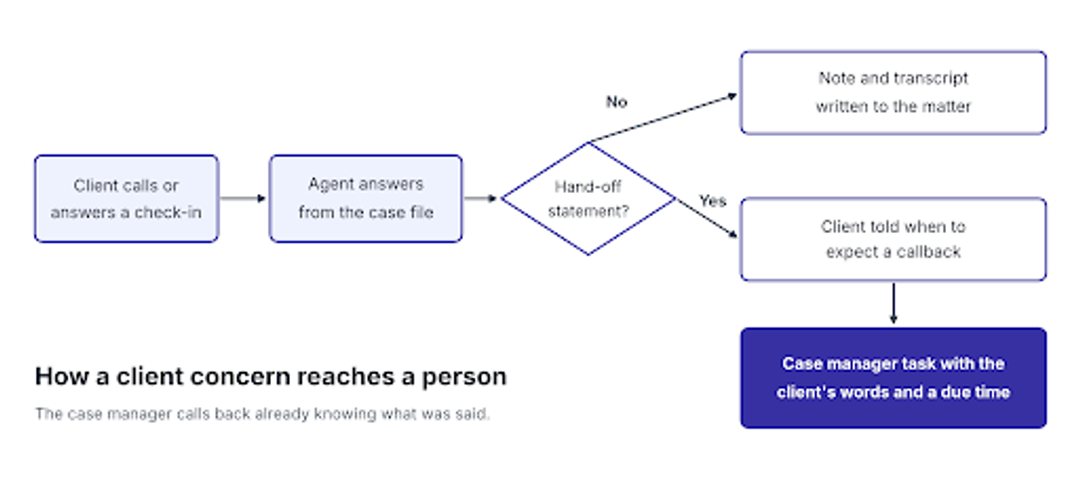
The word-for-word record matters more than it seems. A note reading "client mentioned surgery" loses the surgeon's name, the date of the recommendation and the client's own concern, all of which the case manager needs before calling back.
Several requests follow the same pattern. A client asking about a pre-settlement loan, wanting to change doctors, raising a rental car or repair question, or voicing frustration with the pace of the case gets an immediate acknowledgment from the agent and a real answer from a case manager.
The callback window is the promise that holds this together. If the agent says "by tomorrow afternoon," the task needs a deadline that matches, or the hand-off becomes another unanswered call. Set the window by type: the same business day for a new accident or contact from an adjuster, and within two business days for a billing question.
Silence is a hand-off too. When a treating client misses two check-ins in a row, the agent should try again at a different time of day and by text, and if a week passes without contact, the file goes to the case manager, since a client who stops answering during treatment often has stopped treating as well.
See how an agent hands a client concern to your team
Watch HelloCounsel run a post-visit check-in, flag a client's new symptom, and create a case manager task with the client's words attached. Book a client check-in demo
Attorneys own the offer, the strategy and the bad news
Five kinds of messages need a lawyer from the first word, and for three of them the Model Rules give the reason directly.
| Attorney-owned message | Why it stays with an attorney |
|---|---|
| Notice of a settlement offer | Comment 2 to Rule 1.4 requires a lawyer who receives an offer to promptly inform the client of its substance. |
| The decision to accept or reject | Model Rule 1.2(a), reflected in state rules such as Minnesota's Rule 1.2, requires the lawyer to abide by the client's decision on whether to settle. |
| The net recovery after fees, costs and liens | Rule 1.4(b) requires an explanation sufficient for the client to make an informed decision |
| Whether and when to file suit | A strategy call that depends on the evidence, the insurer's position and the limitation deadline |
| Bad news, such as low policy limits or a weak liability picture | Delivering it well takes judgment about the client and the case |
The agent still has a supporting role. It can schedule the offer call, remind the client of the time and confirm afterward that a signed release reached the firm, but it never states an amount, estimates a net recovery or comments on whether to accept.
Automation still helps the attorney prepare, even on the calls it never joins. Before the offer call, the latest check-in notes show where treatment stands, which providers have sent bills and what the client has been asking about, so the conversation starts from a current file.
The welcome call needs a person even though it looks routine
The first conversation after signing covers predictable ground, which makes it tempting to script. It is also where the client hears from someone at the firm not to give a recorded statement to the other driver's insurer, not to post about the accident, and what the next few months will look like.
Keep that call with a case manager, and make it bilingual when the intake notes show the client prefers Spanish. The receipts, reminders, and welcome text around it can be automated from the same day, and a short written recap sent by the agent afterward gives the client those instructions to keep.
The details gathered that week can move without the case manager. Once the fee agreement is signed, an agent can open the file, get the claim number from the adjuster, and collect missing documents such as insurance cards and IDs, which is the work HelloCounsel's case-opening agent handles.
Write AI supervision rules before the first automated client call
An agent handling pre-litigation client communication is assisting the firm that supervises the way it supervises a paralegal. The rules work best when they are written down and approved by a supervising attorney before launch:
- One knowledge source: The agent answers only from the case file and gives no general legal information.
- An approved hand-off list: It starts with the statements above and grows as the weekly review finds gaps.
- A full record of every call: A transcript and a structured note go into the matter in your case-management system through CMS write-back, so the file shows exactly what the client was told.
- A disclosure approach: The engagement letter explains the firm's use of AI agents, and the agent identifies itself at the start of each call.
- A weekly sample review: A case manager or attorney reads a set of logged calls and adjusts the hand-off list wherever the agent kept a call it should have passed on.
Confidentiality sits alongside these rules. Opinion 512 expects lawyers to understand how an AI tool handles client information before using it, so review the vendor's security documentation, data retention terms and where call recordings are stored.
What clients notice when an agent and staff share the work well
From the client's side, good pre-litigation client communication feels like a firm that always picks up. Routine questions get answered at any hour, a call follows each appointment, and the monthly update arrives without the client having to ask.
When something serious comes up, the client reaches a person who already knows what was said. The client never has to repeat the story, and the hard conversations about the offer, the strategy or a disappointing development happen with an attorney who has the file in front of them.
The other habits behind that experience, such as proactive updates and trauma-aware conversations, are part of improving client communication at PI firms more broadly.
How HelloCounsel's agents run check-ins and status calls
HelloCounsel builds AI voice agents for plaintiff personal injury firms, and the agent-owned side of pre-litigation client communication is one of the workflows they run. Across its workflows, HelloCounsel has handled more than 30,000 calls.
HelloCounsel's client communication agents call clients after each treatment visit to log attendance, pain, referrals, and provider fit; run monthly status calls; and answer routine questions from the case file in English or Spanish. Firms see check-ins happen twice as often once the agents run them.
Every call becomes a structured note with the transcript attached in case-management systems such as Filevine, Litify, SmartAdvocate, CASEpeer, and MyCase. When a client says something on the hand-off list, the agent passes it to the case manager with the context already written down.
The HelloCounsel dashboard shows call volume by caller type, transfer rates, and clients who haven't been reached. Settlement offers, advice, and judgment calls stay with your team, and HelloCounsel is built for personal injury firms whose case managers need their hours back for that work.
Who owns each client message from signing to settlement
Laid along the pre-litigation timeline, the division of work shows a pattern. The agent carries most of the treatment months, the shared messages cluster wherever new information enters the file, and staff ownership concentrates at the two ends of the case.
| Case stage | AI agent | Agent, then case manager | Staff |
|---|---|---|---|
| Signing | Welcome text, document receipts | Insurance and provider details | Welcome call |
| Treatment | Reminders, post-visit check-ins, monthly status calls | New injury, adjuster contact, missed treatment | Advice on care decisions |
| Records and bills | Records progress updates | Bills sent to the client | Lien questions |
| Demand | Demand sent notice | Frustration with the wait | Strategy on the insurer's response |
| Offer | Call scheduling and reminders | None | Offer, net recovery and the decision |
That shape helps with planning. Signing and the arrival of records, bills, and demands add the most new information to a file, so those are the weeks to watch hand-off volume and callback times.
How to measure whether automated client communication is working
Start with a baseline. Pull the last month of client calls and texts from your case management system, sort each piece of pre-litigation client communication with the two questions, and note how many land in each group.
After launch, track four numbers monthly: inbound "where is my case" calls per case manager, days since the last client contact on each open file, the share of hand-offs that turned out to need a person, and hours from hand-off to callback. A falling status-call count with steady callback times means the split is working.
If unneeded hand-offs climb, narrow the list, and if the weekly review finds calls the agent should have passed on, widen it. For the wider workload picture, see our guide to reducing case manager workload.
Decide which client calls an AI agent should handle
Bring a month of client calls and texts to a call with HelloCounsel's founders and sort which messages an agent could own and which should stay with your case managers and attorneys. Book a client call review with the founders
Frequently asked questions about pre-litigation client communication
1. What is pre-litigation client communication?
It is every message between a personal injury firm and its client from the signed retainer to settlement or a lawsuit. That covers welcome calls, appointment reminders, treatment check-ins, status updates, records updates, the demand notice and the settlement offer conversation with the attorney.
2. Can an AI agent give clients case status updates?
Yes, when the answer is in the case file, such as the current stage, the last action, and the next step. When the file doesn't hold the answer, the agent acknowledges the question, gives a callback window and creates a task for the case manager.
3. Should an AI agent tell a client about a settlement offer?
No. Model Rule 1.4 requires the lawyer to promptly inform the client of an offer's substance, and Rule 1.2(a) makes settlement the client's decision. An agent can schedule the offer call, and the attorney explains the amount, fees, liens, and net recovery.
4. Do clients need to know they are speaking with an AI agent?
ABA Formal Opinion 512 ties disclosure of AI use to the circumstances, and state guidance varies. A clear approach is to explain the firm's use of AI agents in the engagement letter and have the agent identify itself at the start of each call.
5. How often should a PI firm contact clients during treatment?
A common cadence is a check-in the day after each scheduled appointment and a status call every month on every open file. The check-in captures attendance, pain, and referrals, while the monthly call covers record progress, new providers, and the next expected step.
6. Does HelloCounsel handle both inbound and outbound client calls?
Yes. HelloCounsel answers inbound client calls with status from the case file and places outbound check-ins after treatment visits and monthly status calls. Each call is logged to the case file, and hand-off statements go to the case manager as tasks.
Share this article