How to Automate Client Intake at a Law Firm

- Work out how to automate client intake in the order your ethical duties allow, since the steps differ in how much lawyer judgment they carry and that difference decides what can be delegated to software.
- ABA Formal Opinion 506 permits a non-lawyer, and by extension a system, to gather intake information, run an initial conflict check, explain how fees are charged and obtain a signature on the fee agreement.
- The same opinion puts the conflict decision itself with the lawyer, so a system that clears its own conflict hits has automated the one step the ABA specifically reserved.
- Electronically signed fee agreements are enforceable under the ESIGN Act, but only where the consumer consent conditions in 15 USC 7001(c) are met first.
- Automated follow-up to accident victims runs into state solicitation rules that the Supreme Court upheld in 1995, so speed to lead is a compliance question before it is a conversion tactic.
Automating intake means handing parts of the path from first contact to signed case over to software: the form that captures the lead, the message that goes back, the questions that qualify, the agreement that gets signed, the file that opens.
Advice on this is not hard to find. What almost none of it does is ask which of those steps a firm is permitted to hand over. Search the published advice on this and you will find recommendations to automate conflict checks, to collect electronic signatures on retainers, and to fire outbound follow-up the moment a lead arrives, without a single reference to the rules that govern each of those three things.
Two of them have clear limits. One of them has a Supreme Court case behind it.
That matters because sequence is not a question of convenience here. Some steps carry almost no judgment and should go first. Others carry a decision a lawyer cannot delegate, and automating those is how a firm ends up with an efficient process and a disciplinary problem.
The six steps between a first call and a signed case
Anyone working out how to automate client intake is usually handed it as a single process. It is six, and they behave differently.
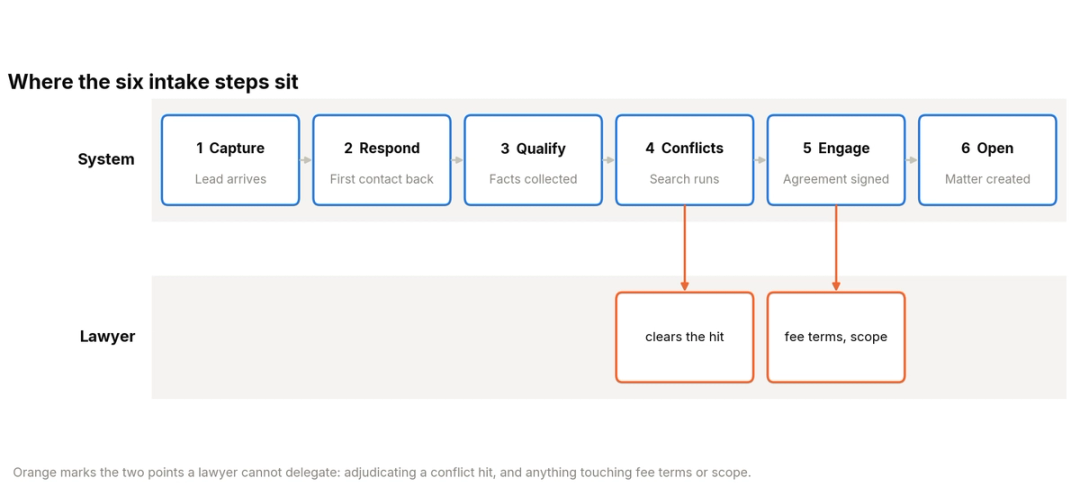
Capture is the arrival of a lead through a phone call, a form, a chat or a referral. Response is the first contact back, and qualification is the set of questions that decide whether the matter fits.
Conflict checking runs the parties against the firm's existing files. Engagement is the fee agreement and its signature, and opening is the creation of the matter and the first tasks against it.
Each step carries a different amount of judgment. Capture carries none, while conflict adjudication carries a decision the ABA has put in writing as the lawyer's own.
Sorting the six by that measure is the whole of the sequencing problem, and it is where knowing how to automate client intake safely starts.
Why the order you automate in is a legal question
ABA Formal Opinion 506, issued on 7 June 2023, is the clearest statement of where the lines sit, and it contemplates software directly. The opinion treats delegating intake to a person and using technology for it as the same question, describing how firms already offer "website intake questions, a menu of available limited scope legal document completion services, a conflict checking algorithm, and then click-to-accept-terms engagement agreements."
What it permits is broad. A trained non-lawyer may obtain initial information about the matter, perform an initial conflict check, determine whether the matter is in an area germane to the practice, answer general questions about the fee agreement or the process of representation, and obtain the prospective client's signature on the fee agreement, provided the prospect is always offered the chance to speak with the lawyer.
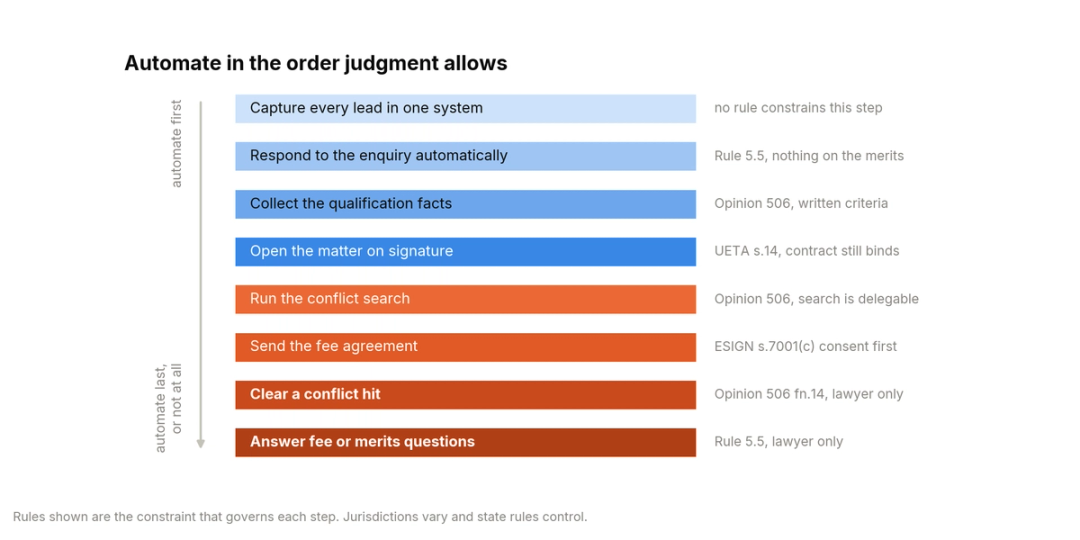
What it withholds is specific. Questions about what legal services the client should obtain, any negotiation of fees or expenses, and any interpretation of the engagement agreement have to reach the lawyer. Model Rule 5.5 sits behind that, because a lawyer may not assist the unauthorized practice of law, and an automated system answering those questions is doing exactly that on the firm's behalf.
Rule 5.3 supplies the supervision duty. A lawyer with managerial authority has to make reasonable efforts to ensure that non-lawyer conduct is compatible with the lawyer's own professional obligations, and Opinion 512, issued in July 2024, extends that reasoning to generative AI tools specifically. Managerial lawyers have to set policies on permissible use, and supervisory lawyers carry a duty to check that those policies are being followed when the tools are in play.
Read together, the two opinions produce a working rule. Automate the steps where the system executes a decision the firm has already made. Stop at the steps where the system would be making the decision.
Capture every inbound lead in one system
Capture is where how to automate client intake should always begin, because it carries no judgment at all and everything downstream depends on it.
The practical problem is rarely the form. It is that a plaintiff firm receives leads through four or five channels that do not share a record.
The phone line, the website form, the chat widget, the referral email and the intake number on a billboard each terminate somewhere different, and the firm has no single count of what arrived. Ask three people at the same firm how many new enquiries came in last week and you will usually get three numbers, none of which is wrong from where that person sits.
The source tag is what makes the count useful later. Record where the lead came from, what time it landed, and which campaign or referrer sent it, because those three fields are what let you tell a marketing problem from an intake problem six months from now.
Fix the count before fixing anything else. Route every channel to one system, give each lead a source tag, and check the total against your phone bill for the same period.
Firms doing this for the first time commonly find a channel nobody was working, and our note on the hidden cost of missed calls covers what that gap is worth.
An unworked channel is one of the ways firms lose cases before they sign them, and it is invisible until the counts are in one place.
Nothing in the rules constrains this step. It is pure plumbing, which is why it goes first.
Answer every lead within minutes of it arriving
The first response is the highest-return automation available to a plaintiff firm, because a claimant who cannot reach anyone calls the next firm on the list.
Set the target in minutes rather than hours and measure the median rather than the average. One lead answered in nine seconds and one answered the following afternoon average out to something that looks acceptable and describes nothing that happened.
The distinction that keeps this step clean is between responding and deciding. An automated response that acknowledges the enquiry, collects the basic facts and books a time is executing a decision the firm already made. An automated response that tells the caller their claim looks strong has made a decision the firm did not make and was not permitted to delegate.
Build the response so it can say three things without a lawyer: what the firm does, what happens next, and when someone will be in touch. Build it so it cannot say anything about the merits of the matter.
Whether that response comes from staff or software is a separate decision, and our comparison of an AI receptionist against an answering service covers what each costs at a plaintiff firm's volume.
One constraint applies here and it is easy to miss. If the response is an outbound call or message to an accident victim rather than a reply to their own enquiry, the solicitation rules covered further down apply to it.
Collect conflict data automatically and let a lawyer clear it
Conflict checking is where most published guidance on how to automate client intake goes wrong, and the error is specific enough to quote.
Opinion 506 permits the collection. Trained non-lawyers, and systems, may run names through the firm's conflict system and filter for parties, witnesses, opposing counsel and vendors. That part is delegable and should be automated, because it is fast, mechanical and better done consistently than by memory.
The adjudication is not delegable. Footnote 14 of the opinion is explicit that when a relevant or closely related name comes up, the lawyer must be the one to review the similarities and make the final determination of whether a conflict exists and whether it is waivable.
So the automation has a defined stopping point. The system runs the search, surfaces the hits with the reason each one matched, and holds the matter until a lawyer clears it.
A workflow that auto-advances a matter because the search returned nothing close enough has quietly made the determination the opinion reserved.
Build the hold into the workflow rather than the training. A rule that blocks engagement until a named lawyer has marked the conflict review complete survives staff turnover in a way that an instruction does not.
Send the fee agreement electronically with the consent ESIGN requires
Engagement is where firms automate confidently and document carelessly.
Knowing how to automate client intake at this step means separating what is settled from what is conditional. The enforceability is settled. Under 15 USC 7001, a signature, contract or record relating to a transaction in interstate commerce may not be denied legal effect, validity or enforceability solely because it is in electronic form.
Section 7003 lists what the rule does not reach. That list covers wills, codicils and testamentary trusts, state family law, most of the Uniform Commercial Code, and court filings including briefs and pleadings.
Legal services agreements are not on that list. A contingency fee agreement signed electronically is as enforceable as one signed on paper, and the same statute excepts the pleading it eventually leads to, which is the clean line to hold in your head.
The conditions are where the work sits. Section 7001(c) applies where a rule of law requires information to be given to a consumer in writing, and a personal injury client is a consumer under the statute. In that case the electronic record satisfies the requirement only if the consumer has affirmatively consented and has not withdrawn consent, and only if, before consenting, they were given a clear and conspicuous statement of their right to receive the record on paper, their right to withdraw consent, any consequences of withdrawing, and how to obtain a paper copy.
Section 7001(b)(2) adds the point that undoes a one-path signing flow: nothing in the statute requires any person to agree to use or accept electronic records. A client may decline, and the process needs somewhere for them to go when they do.
Opinion 506 layers its own condition on top. The prospective client must always be offered the opportunity to discuss the fee agreement and the scope of representation with the lawyer, which means the signing page needs to say so on its face rather than in a footer nobody reads.
Open the matter the moment the signature lands
Matter opening is mechanical and should be fully automated, which makes it the easiest win on the list and the one most often left manual.
When the signature comes back, the matter should open itself, the client record should populate from what intake already collected, the first tasks should generate against the case type, and the engagement letter should file to the matter.
Nobody should be retyping a date of loss that the firm captured twice already. Re-keying is where the quiet errors enter a file, and a date of loss that shifts by a digit between the intake form and the matter is the kind of error that surfaces at the statute rather than at the point it was made.
The measure worth watching is how long a signed case waits before it exists as a matter. Most firms have never looked at it and are surprised by what they find, because it is a queue nobody owns rather than a task anyone is late on. CMS write-back is the capability that closes it.
There is a wrinkle worth knowing here. Under the Uniform Electronic Transactions Act, adopted in nearly every state, a contract may be formed by the interaction of electronic agents even where no individual reviewed the resulting terms.
State contract law will therefore hold a firm to an agreement its intake system formed on its own. The professional conduct rules will separately ask whether a lawyer supervised the system that formed it, and those two answers are independent.
Keep automated follow-up inside your state's solicitation rules
Follow-up is the step where the standard advice on how to automate client intake is most confidently wrong for a plaintiff practice.
Following up on an enquiry somebody made to your firm is ordinary business. Reaching out to an accident victim who never contacted you is solicitation, and many states restrict it.
Florida prohibits targeted direct contact concerning an accident for 30 days afterward, and the Supreme Court upheld that restriction in Florida Bar v. Went For It in 1995, by five votes to four.
The practical consequence for automation is that the trigger matters more than the message. A sequence that fires on an inbound enquiry is safe in a way that a sequence firing on a purchased accident-report list is not, and the two can look identical inside the same software.
Rules vary by state and several have their own blackout periods and disclosure requirements, so this is the step to take to your own state's rules rather than to a vendor's template. What automation should do here is enforce the distinction, by keeping outbound sequences tied to a record of inbound contact.
What stays on a lawyer's desk at every level of automation
Five things survive any amount of automation, and knowing them before you start is what stops a rollout from overreaching.
The conflict determination, once a hit surfaces, belongs to a lawyer under Opinion 506 footnote 14.
The decision to accept or decline the matter belongs to a lawyer. The Illinois Supreme Court Commission on Professionalism, writing on Opinion 506, put it as structuring intake so that the decision applies the lawyer's judgment rather than the non-lawyer's, which is achieved through templates and written criteria the lawyer prepares.
Any question about the merits, the fee terms, or what the engagement agreement means belongs to a lawyer, because answering it is practising law.
The supervision itself belongs to a lawyer. Opinion 512 makes clear that this covers both the firm's written policy on permissible use and the training of everyone who operates the system.
There is a fifth item that is easy to miss because it concerns people who never become clients. An automated intake form or agent collects confidential information from every enquirer, most of whom the firm will decline. Opinion 512 confirms that Model Rule 1.18(b) extends confidentiality protection to prospective clients, which means the declines carry duties too.
That has a design consequence. Whatever your system does with the data of a person you turned away needs deciding in advance: how long it is kept, who can search it, and whether it is fed to any tool outside the firm. Opinion 512 asks lawyers to evaluate the risk of disclosure before information relating to a representation goes into a generative AI tool, and a declined enquirer's account of their accident is exactly that kind of information.
Everything else is available. That is a longer list than most firms assume and a shorter one than most software suggests.
How Counsel runs these six steps
HelloCounsel is our own product, so this section maps it against the sequence above rather than arguing it is the right answer for every firm.
Counsel answers the main line in under two rings at any hour, which covers capture and response in one step for the channel that carries most plaintiff enquiries. It identifies the caller and the matter before the conversation starts, and runs the qualification criteria your firm wrote.
On conflicts and merits it stops where the opinion stops. Questions about whether a caller has a case, what fees would be, or what the agreement means escalate to a named destination rather than being answered. Anything outside the written criteria does the same.
Once a prospect qualifies and a fee agreement lands, the agent opens the matter, pulls the crash report and sends the Letter of Representation, which is step five running without a queue. Every call writes back to the case management system as a structured record with the transcript attached, so the supervision Rule 5.3 asks for has something to review.
Post-signing calls run on the same agents, so medical records retrieval works provider phone trees and re-requests, and treatment check-ins run on schedule.
Our guide to choosing a legal intake service covers the wider procurement question.
For the staffing side of the same decision, the outsourced against in-house comparison runs the numbers.
Pricing is fixed monthly from $500, scoped to expected volume with 20% tolerance either way, with no per-minute billing and no setup fee. Direct integrations cover SmartAdvocate, Filevine, Litify, Lead Docket and Clio, with custom builds for other systems. Across 25,000 calls and 500 hours of call time, firms working with HelloCounsel have seen a 48% improvement in call reception rates.
The limits are worth stating. It covers English and Spanish and stops there, it runs inside your case management system rather than replacing it, and firms tracking cases in spreadsheets are not a fit.
Map your own six steps before you automate any of them
Write down who does each of the six steps today and how long each takes. The exercise takes an afternoon and usually finds one step running on a queue nobody owns. Book a demo
A 90-day rollout for a firm starting from paper
Knowing how to automate client intake is not the same as doing all six at once, which is how these projects stall. The sequence below front-loads the steps with no judgment in them, so the firm sees a result before it has to make any hard decisions.
In the first month, consolidate capture and instrument it. One system, every channel, a source tag on each lead, and a weekly count. Automate nothing else yet, because the baseline is what will tell you whether the rest worked.
In the second month, automate the first response and the intake questionnaire. Write the qualification criteria down properly, since this is the step that exposes criteria living in one person's head, and route anything the criteria do not cover to a person.
In the third month, take on conflicts, engagement and matter opening together, because they form one chain. Build the conflict hold, write the ESIGN consent language into the signing flow with a paper alternative behind it, and connect matter creation to the returned signature.
Leave outbound follow-up until after your own state's solicitation rules have been checked, whatever month that lands in. It is the one step where moving fast creates a problem that automation then repeats at scale.
Measure three things throughout: leads captured, median time to first response, and the gap between signature and matter opening. How many calls a PI case generates gives the volume those numbers sit inside.
Get a scoped figure against your own call mix
Send last week's call log split and the case management system you run. We will come back with a fixed monthly price, what it covers beyond intake, and a walkthrough on three of your own recordings. Talk to the HelloCounsel founders
Frequently asked questions
1. What part of client intake should a law firm automate first?
Lead capture, because it carries no judgment and everything downstream depends on having one count of what arrived. First response comes second for the same reason.
2. Can intake software run our conflict checks?
It can run the search and surface the hits. ABA Opinion 506 puts the determination of whether a hit is an actual conflict, and whether it is waivable, with a lawyer.
3. Are electronically signed fee agreements enforceable?
Yes, under the ESIGN Act, provided the consumer consent conditions in section 7001(c) are met and the client was told they may have the record on paper instead.
4. Does automating intake create an ethics problem?
Automating intake does not create one by itself. Rule 5.3 and Opinion 512 require a lawyer to govern permissible use and supervise it in practice, which is a documentation obligation rather than a bar to automating.
5. Can we automate follow-up to people who have not contacted us?
That is solicitation rather than follow-up, and many states restrict it after an accident. Check your own jurisdiction before building any sequence that fires on anything other than an inbound enquiry.
6. How long does it take to automate client intake end to end?
About 90 days to cover all six steps, working in the order above. Capture and response can be live inside a month, and the engagement chain takes longest because it needs written criteria first.
Share this article